EducationSoftwareStrategy.com
StrategyCommunity

Knowledge Base

Product

Community

Knowledge Base

TopicsBrowse ArticlesDeveloper Zone

Product

Download SoftwareProduct DocumentationSecurity Hub

Education

Tutorial VideosSolution GalleryEducation courses

Community

GuidelinesGrandmastersEvents
x_social-icon_white.svglinkedin_social-icon_white.svg
Strategy logoCommunity

© Strategy Inc. All Rights Reserved.

LegalTerms of UsePrivacy Policy
  1. Home
  2. Topics

KB485764: ‘The Intelligent Cube “xxx” for locale <German (Germany)>has not been published’ error occurs for cube-based report


Danfeng Zhan

Principal Product Specialist • Strategy


This article narrates ‘The Intelligent Cube “xxx” for locale <German (Germany)>has not been published’ error occurs for cube-based report is due to database connection mapping setup. A solution for this issue is available in current releases.

Symptom


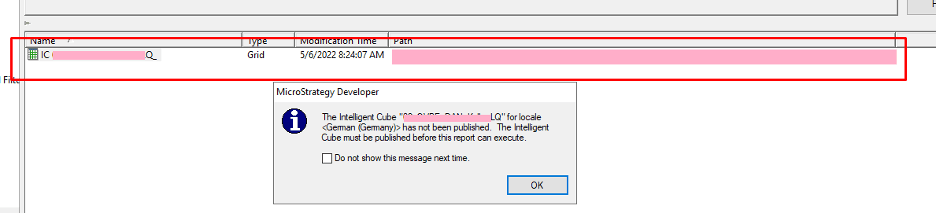
In Strategy 2021 Update 7, ‘The Intelligent Cube “xxx” for locale <German (Germany)>has not been published’ error occurs when execute a cube-based report as shown below:  
ka04W000000OaODQA0_0EM4W000006GcOj.jpeg

The Intelligent Cube “xxx” for locale <German (Germany)>has not been published. The Intelligent Cube must be published before this report can execute. 
Refer to Knowledge Base article on how to support connection mapping with the use of cubes:
KB33830: Can Intelligent cubes be used along with connection mapping in MicroStrategy Developer 9.x?
 

Reproduction

Prerequisites:

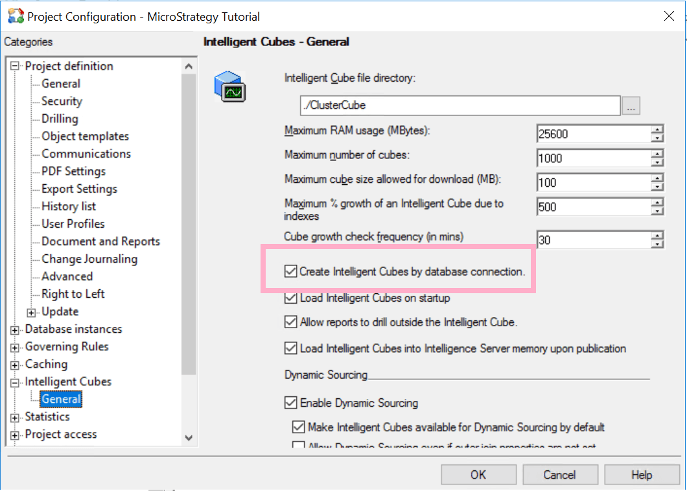
  1. Check Intelligent Cubes>General> “Create Intelligent Cubes by database connection” as shown below:
ka04W000000OaODQA0_0EM4W000006GcPc.jpeg
  1. Create new user called ‘MSTR’ and provide Tutorial Project access.
  2. Edit connection mapping for Tutorial database instance, add new Database connection for User ‘MSTR’ as shown below: 
ka04W000000OaODQA0_0EM4W000006GcPh.jpeg


Steps to reproduce:

  1. Login as MSTR, create an intelligent cube with attribute ‘Year’ and metric ‘Average Revenue’, and publish it as ‘Cube_Tutorial’. 
  2. Right Mouse Click on ‘Cube_Tutorial’ to create report called ‘Report_Tutorial’. 
  3. Execute ‘Report_Tutorial’ returns data as shown below:
ka04W000000OaODQA0_0EM4W000006GcPr.jpeg
  1. Unload ‘Cube_Tutorial’ from cube monitor. 
  2. Disconnect Developer, and login as Administrator
  3. Execute ‘Report_Tutorial’ throws error of “Intelligent Cube (Cube_Tutorial) for locale English (United States) is not published.” As shown below: 
ka04W000000OaODQA0_0EM4W000006GcQ1.jpeg

Error: Intelligent Cube (Cube_Tutorial) for locale English (United States) is not published. 
Error in Process method of Component: CubeServer, Project Strategy Tutorial, Job 802, Error Code= -2147072488.

  1. Republish cube ‘Cube_Tutorial’ and notice there is new cube published as shown below: 
ka04W000000OaODQA0_0EM4W000006GcQ6.jpeg


Cause


Cube caches are generated by a user group mapped to a particular database connection other than the default one, thus default users don’t have access to them. 
 

Action


Add proper users/groups in the particular database connection mapping to access the existing cube caches. 
Review the project default database and connection mapping setup as nuances difference in DB instance level can produce project level impact.
 

Workaround


Disable “Create Intelligent Cubes by database connection” from Project Configuration>Intelligent Cubes>General. 


Comment

0 comments

Details

Knowledge Article

Published:

November 2, 2022

Last Updated:

November 2, 2022