EducationSoftwareStrategy.com
StrategyCommunity

Knowledge Base

Product

Community

Knowledge Base

TopicsBrowse ArticlesDeveloper Zone

Product

Download SoftwareProduct DocumentationSecurity Hub

Education

Tutorial VideosSolution GalleryEducation courses

Community

GuidelinesGrandmastersEvents
x_social-icon_white.svglinkedin_social-icon_white.svg
Strategy logoCommunity

© Strategy Inc. All Rights Reserved.

LegalTerms of UsePrivacy Policy
  1. Home
  2. Topics

KB483900: The error, “invalid argument” appears in a Compound Grid and Grid when multiple attribute display forms are enabled in one column set and an attribute displays subtotals in another column set


Cheng Guo

Product Owner, Principal • Strategy


This article provides two workarounds to the error, "You have included an invalid argument" that appears when multiple attribute display forms are enabled in one column set and an attribute displays subtotals in another column set in a Compound Grid and Grid.

Starting with the release of Strategy ONE (March 2024), dossiers are also known as dashboards.

Description


In both a Grid and a Compound Grid, checking multiple attribute display forms and displaying attribute form names will cause the enabling or disabling of other attribute's subtotals.
Steps to Reproduce on a Compound Grid

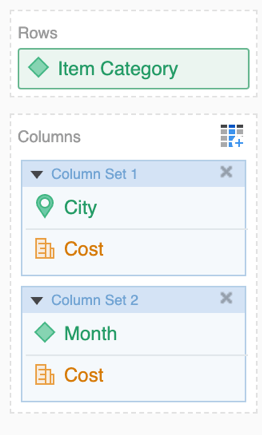
  • In Strategy Web 2020, create a dossier with a Compound Grid visualization. 
  • On each column set, add at least one attribute.
ka0PW0000001JarYAE_0EM2R000000nDL1.jpeg
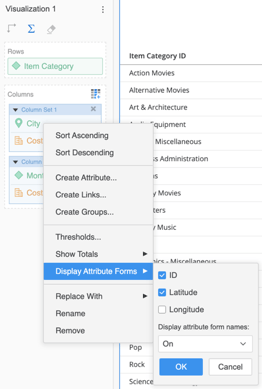
  • Right-click an attribute in the first column set and select Display Attribute Forms. Choose multiple attribute forms to display and select On from the drop-down to Display attribute form names. Click OK.
ka0PW0000001JarYAE_0EM2R000000nDLG.jpeg
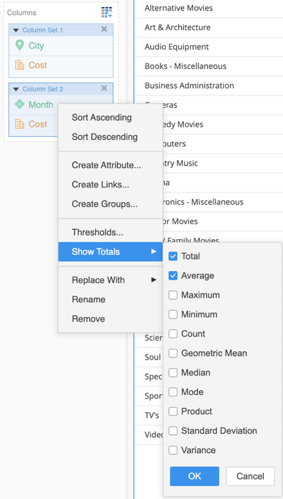
  • Right-click an attribute in the second column set and select Show Totals. Choose multiple subtotals and click OK. 
ka0PW0000001JarYAE_0EM2R000000nDLp.jpeg
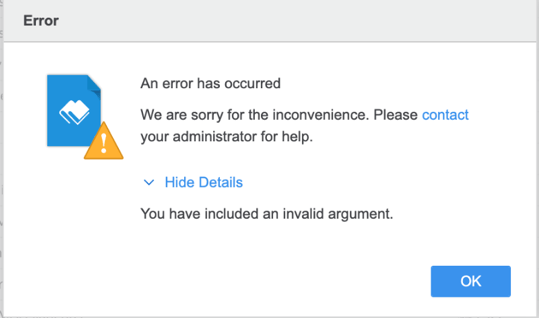
  • After click OK, the error, "You have included an invalid argument" may appear.
ka0PW0000001JarYAE_0EM2R000000nDLu.jpeg
  • If an error does not appear, view your Compound Grid and notice the subtotals on the grid are not appearing for the attributes from the second column set.

Steps to Reproduce on a Grid

  • In Strategy Web 2020, create a dossier with a Grid visualization. 
  • On each column set, add at least one attribute.
  • Right-click an attribute in the first column set and select Display Attribute Forms. Choose multiple attribute forms to display and select On from the drop-down to Display attribute form names. Click OK.
  • Right-click an attribute in the second column set and select Show Totals. Choose multiple subtotals and click OK. 
    After click OK, the error, "You have included an invalid argument" may appear.
ka0PW0000001JarYAE_0EM2R000000nDLu.jpeg

Solution


This issue is currently under investigation by Strategy's Technology team. For an immediate solution, try the following workarounds.

Workaround 1


The following workaround allows you to display multiple attribute forms and their names, in addition to see the correct subtotals for the other column set.

  1. In your first column set, right-click your attribute and select multiple attribute forms to display.
  2. Choose Off from the drop-down to Display attribute form names.
  3. Enable your subtotals in the other column set.
  4. Return to your first column set and right-click your attribute and choose On from the drop-down to Display attribute form names.

Workaround 2


Use this workaround if you do not mind changing the position of the column sets or the attribute sequences. 
As long as the column set containing the attribute with the enabled subtotals is above the column set containing the attribute with multiple attribute forms, setting the display form to On should not impact the subtotals.

Related Articles

KB483901: In a Compound Grid, an error appears when sorting a metric ascending or descending when an attribute in the same column set displays multiple attribute form names and has subtotals enabled


Comment

0 comments

Details

Knowledge Article

Published:

December 18, 2019

Last Updated:

March 21, 2024