EducationSoftwareStrategy.com
StrategyCommunity

Knowledge Base

Product

Community

Knowledge Base

TopicsBrowse ArticlesDeveloper Zone

Product

Download SoftwareProduct DocumentationSecurity Hub

Education

Tutorial VideosSolution GalleryEducation courses

Community

GuidelinesGrandmastersEvents
x_social-icon_white.svglinkedin_social-icon_white.svg
Strategy logoCommunity

© Strategy Inc. All Rights Reserved.

LegalTerms of UsePrivacy Policy
  1. Home
  2. Topics

KB486081: The transaction time displays as “Invalid Date” when viewing from MicroStrategy Workstation Change Journal.


Yating (Tiffanie) Zhai

Senior Cloud Support Engineer III • MicroStrategy


The transaction time displays as “Invalid Date” when viewing from MicroStrategy Workstation Change Journal.

Symptom
Some of the transaction time displays as “Invalid Date” when viewing from Strategy Workstation change journal, while some displays well if the day of the month is 12 or less, for example “06/10/2023”, please see below screenshot:
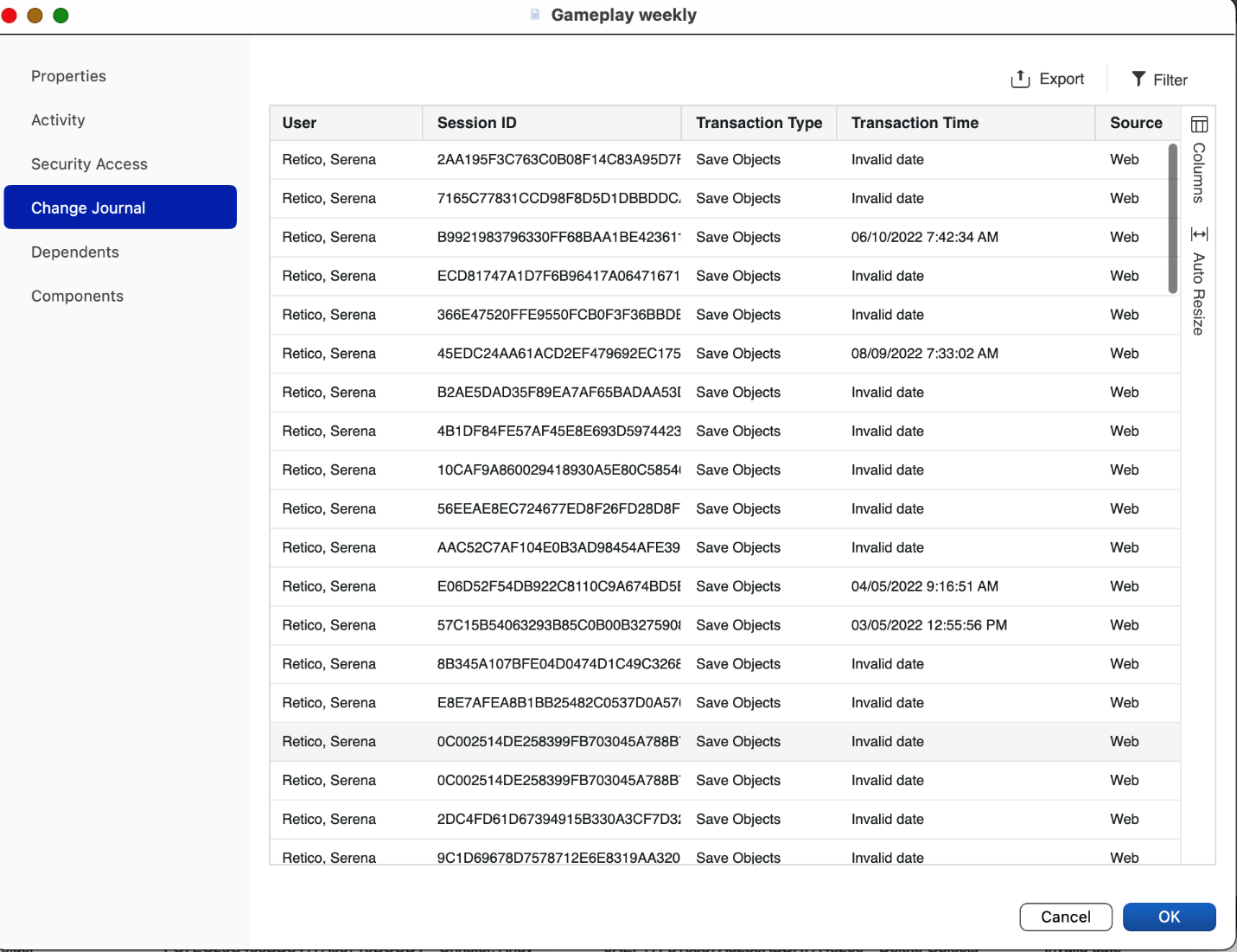
ka04W000001MKmOQAW_0EM4W000008KCJH.png

Reproduce steps

  1. Select English (United Kingdom) as the system locale from Windows Region Settings, date with be in dd/mm/yyyy format.
  2. Go to Workstation > History > Change Journal, or view change journal for individual object, for the date in dd/mm/yyyy format, when the day of the month is 12 or less, it can be displayed well in English (United States) format like mm/dd/yyyy, when the day of month is greater than 12, invalid date displays.

Cause
This has been identified as a defect in Strategy 2021 Update 6, Update 7, Update 8.
Action
This issue has been fixed in Strategy 2021 Update 9. Upgrade to this version to take advantage of the fix.


Comment

0 comments

Details

Knowledge Article

Published:

June 23, 2023

Last Updated:

June 23, 2023