EducationSoftwareStrategy.com
StrategyCommunity

Knowledge Base

Product

Community

Knowledge Base

TopicsBrowse ArticlesDeveloper Zone

Product

Download SoftwareProduct DocumentationSecurity Hub

Education

Tutorial VideosSolution GalleryEducation courses

Community

GuidelinesGrandmastersEvents
x_social-icon_white.svglinkedin_social-icon_white.svg
Strategy logoCommunity

© Strategy Inc. All Rights Reserved.

LegalTerms of UsePrivacy Policy
  1. Home
  2. Topics

KB426624: "This 'Configuration' object cannot be locked" error occurs after connecting to a project source in MicroStrategy 2021 Object Manager


Amanda Gordon

Quality Engineer, Senior • MicroStrategy


The issue described in this document has been classified as a defect by MicroStrategy.  The issue can occur in MicroStrategy Object Manager when connecting to a project source or in MicroStrategy Developer when trying to edit a user.  A solution/code fix is not available in current release, but is being reviewed for a future MicroStrategy release.

SUMMARY
The issue described in this document has been classified as a defect by Strategy.  The issue can occur in Strategy Object Manager 2021 when connecting to a project source or in Strategy Developer 2021 when trying to edit a user.  A solution/code fix is not available in current release, but is being reviewed for a future Strategy release.
SYMPTOM
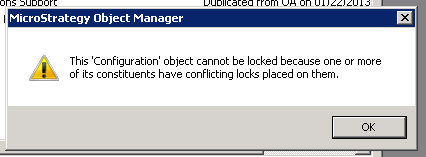
When connecting to a project source in Object Manager, the following error may occur:
ka0PW0000000wqPYAQ_0EM440000002UhQ.png


This 'Configuration' object cannot be locked because one or more of its constituents have conflicting locks placed on them.
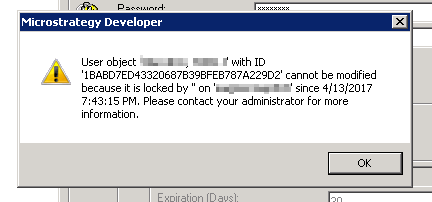
When editing a user in Developer, the following error may occur: 

ka0PW0000000wqPYAQ_0EM440000002UhV.png


User object '...' with ID '...' cannot be modified because it is locked by '' on '...' since ... Please contact your administrator for more information.

Users may try locking and unlocking the Configuration, the Project, and the Schema, but the errors will continue to occur.  For more information about these types of locks, see KB12274: Differences between Lock Schema, Lock Project and Lock Configuration in MicroStrategy Developer 2021
CAUSE
These errors occur because there are locks on one or more user objects in the metadata.
ACTION
Users who are encountering this error message should contact Strategy Technical Support for assistance with removing these locks.
  KB426624


Comment

0 comments

Details

Knowledge Article

Published:

July 10, 2017

Last Updated:

February 26, 2024