In Strategy 10.x, Use connection pooling option is located in Intelligence Server configuration>LDAP Server Settings as shown below:
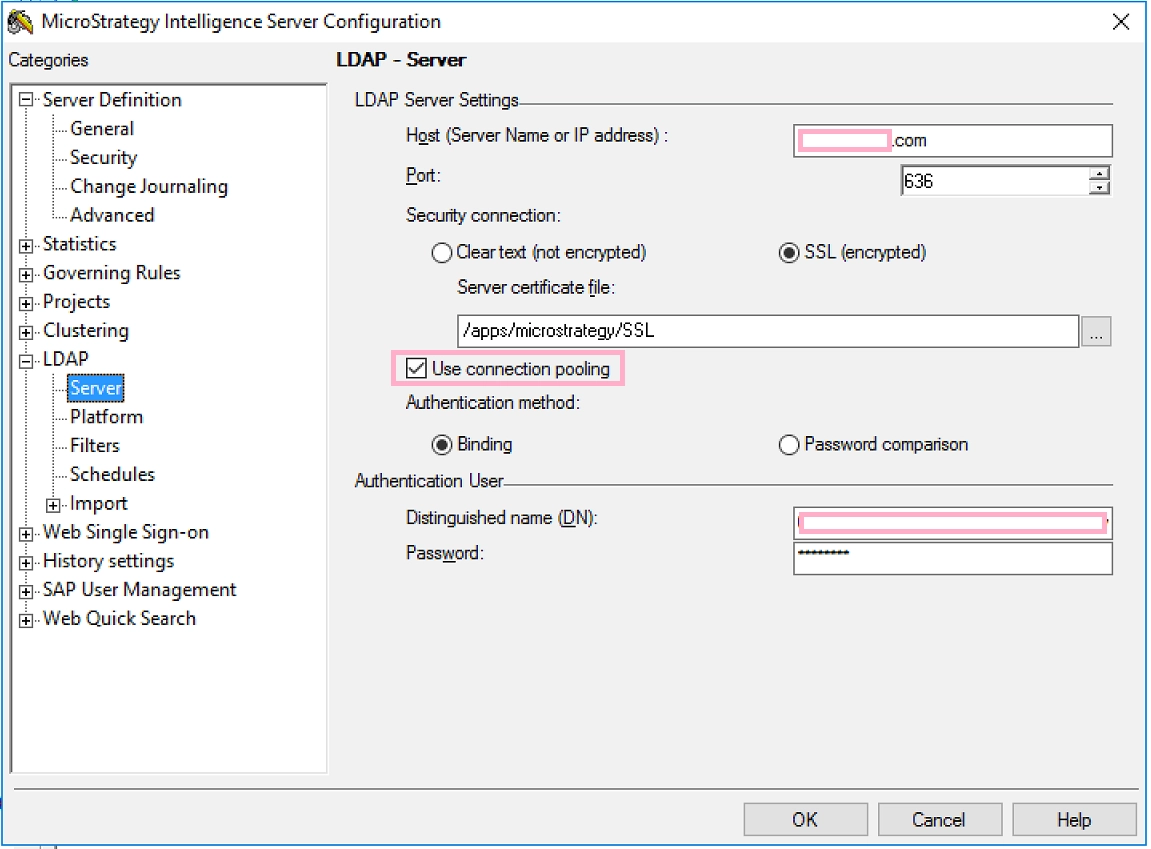
Determining whether to use connection pooling
With connection pooling, an open connection to the LDAP server can be reused for subsequent operations. The connection to the LDAP server remains open even when the connection is not processing any operations (also known as pooling). This setting can improve performance by removing the processing time required to open and close a connection to the LDAP server for each operation.
Without connection pooling, the connection to an LDAP server is closed after each request. If requests are sent to the LDAP server infrequently, this can help reduce the use of network resources.
Connection pooling with clustered LDAP servers
If there are multiple LDAP servers which work together as a cluster of LDAP servers.
If connection pooling is disabled, when a request to open an LDAP connection is made, the LDAP server with the lightest load at the time of the request is accessed. The operation against the LDAP directory can then be completed, and in an environment without connection pooling, the connection to the LDAP server is closed. When the next request to open an LDAP connection is made, the LDAP server with the least amount of load is determined again and chosen.
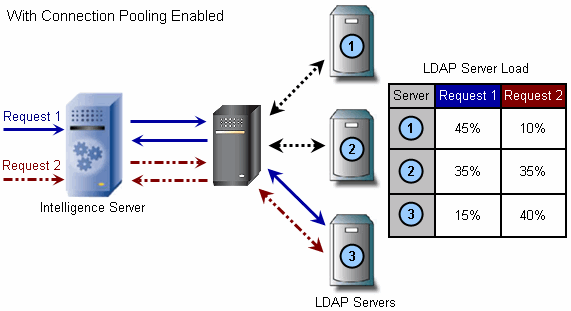
If connection pooling is enabled for a clustered LDAP environment, the behavior is different than described above. On the first request to open an LDAP connection, the LDAP server with the least amount of load at the time of the request is accessed. However, the connection to the LDAP server is not closed because connection pooling is enabled. Therefore, instead of determining the LDAP server with the least amount of load during the next request to open an LDAP connection, the currently open connection is reused.
The diagrams shown below illustrate how subsequent connections to a clustered LDAP server environment are handled, depending on whether connection pooling is enabled or disabled.

NOTE:
The setting to use LDAP connection pool is ignored and the LDAP connection is not re-used among LDAP authorizations since 2020 Update 1 for Intelligence Server running on Linux due to libldap_r.so issue. Refer to Knowledge Base article below for more details:
KB484041 : Force no-reuse-LDAP-connection due to crashes in libldap_r.so
Further Readings:
Refer to Technical Document below on how to configure LDAP on Windows and Linux:
KB13041: How to configure LDAP connectivity using SSL authentication with MicroStrategy Intelligence Server 9.x and newer on Windows Operating Systems
KB12067: How to configure LDAP connectivity using Clear text (using OpenLDAP) or SSL (using OpenSSL) for MicroStrategy Intelligence Server 9.x-10.x on Linux.
Article Reference Number: KB441617
