“pg_ctl: could not start server” error occurs when try to start PostgreSQL repository using “./mstr_pg_ctl start” post upgrade to Strategy 2021 Update 7 from Strategy 2020 as shown below:

The Strategy Repository is a PostgreSQL database server that contains the Platform Analytics Warehouse. While in this scenario, metadata is also residing on PostgreSQL database, the Intelligence Server is also down as the PostgreSQL repository goes down.
Refer to Knowledge Base article below on how to start the Strategy Repository
KB483931: How to Stop and Start the MicroStrategy Repository in Windows and Linux in MicroStrategy 2020
In the Postgresql-XXX.log located in /opt/MicroStrategy/Repository/pgdata/log shows below entry:
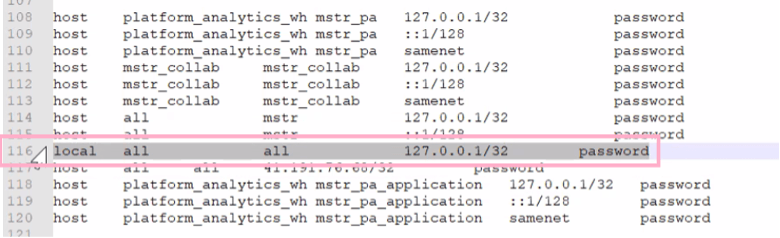
Log: invalid authentication method “127.0.0.1/32”
CONTEXT: Line 116 of configuration file “/opt/MicroStrategy/Repository/pgdata/pg_hba.conf”
FATAL: could not load pg_hba.conf
Log: database system is shut down
In pg_hba.conf, it shows address after ‘All’ for Line 116.
While the default setting is doesn’t have address associated. It is unclear how additional entries is appended.
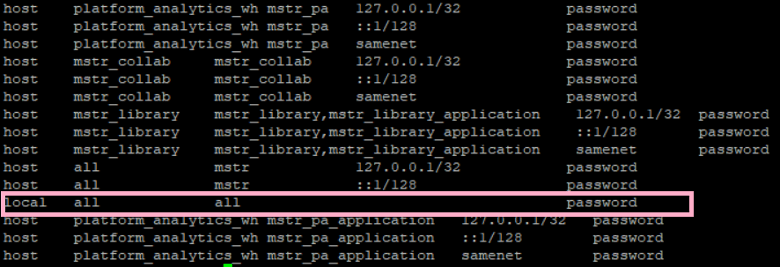
Remove the address in Line 116 or comment out the whole line by adding ‘#’ in front of the row.
