EducationSoftwareStrategy.com
StrategyCommunity

Knowledge Base

Product

Community

Knowledge Base

TopicsBrowse ArticlesDeveloper Zone

Product

Download SoftwareProduct DocumentationSecurity Hub

Education

Tutorial VideosSolution GalleryEducation courses

Community

GuidelinesGrandmastersEvents
x_social-icon_white.svglinkedin_social-icon_white.svg
Strategy logoCommunity

© Strategy Inc. All Rights Reserved.

LegalTerms of UsePrivacy Policy
  1. Home
  2. Topics

KB259076: New in MicroStrategy 10.1 - "Enable Flash Mode" Web Preference


Community Admin

• Strategy


With MicroStrategy Web 10.1, Flash mode for document execution and MHT export has been deprecated. Existing documents that have Flash mode enabled will still be executable in Flash mode and can be exported to MHT. Users can disable or enable Flash mode on the project and user level.

With Strategy Web 10.1, Flash mode for document execution and MHT export has been deprecated as outlined in KB257502: New in MicroStrategy 10.1 - Interactive and Flash document view modes deprecated. 
Existing documents that have Flash mode enabled will still be executable in Flash mode and can be exported to MHT.
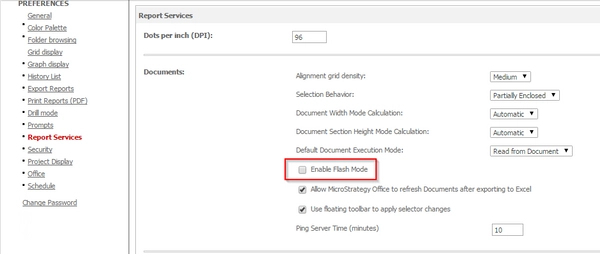
Users can disable or enable Flash mode on the project and user level using the Web preference > Report Services > "Enable Flash Mode".
ka04W00000147wSQAQ_0EM4400000025ba.jpeg

When disabling the preference "Enable Flash Mode", documents set to run in Flash mode will execute in Presentation mode. Additionally, users will not be able to export documents to Flash.
Note: This setting has only an effect on existing documents that have Flash mode / export enabled. New documents will only run in Presentation mode.


Comment

0 comments

Details

Knowledge Article

Published:

April 7, 2017

Last Updated:

April 7, 2017