EducationSoftwareStrategy.com
StrategyCommunity

Knowledge Base

Product

Community

Knowledge Base

TopicsBrowse ArticlesDeveloper Zone

Product

Download SoftwareProduct DocumentationSecurity Hub

Education

Tutorial VideosSolution GalleryEducation courses

Community

GuidelinesGrandmastersEvents
x_social-icon_white.svglinkedin_social-icon_white.svg
Strategy logoCommunity

© Strategy Inc. All Rights Reserved.

LegalTerms of UsePrivacy Policy
  1. Home
  2. Topics

KB414015: Duplicated records are seen for same data after running an Incremental Refresh Report to update an intelligent cube in MicroStrategy Intelligence Server 9.x


Stefan Zepeda

Salesforce Solutions Architect • Strategy


SYMPTOM:
 
Duplicated records are seen for same data after running an Incremental Refresh Report to update an intelligent cube in Strategy Intelligence Server 9.x.
 
STEPS TO REPRODUCE:
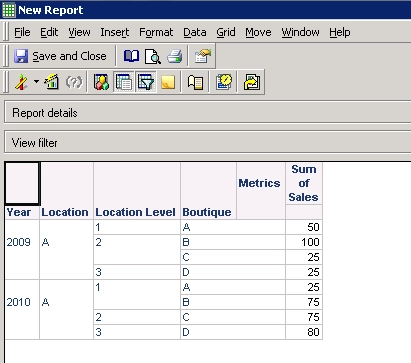
  1. Create an intelligent cube and then create a report based on the intelligent cube.
ka02R000000kazfQAA_0EM440000002CLK.png


  • Create an Incremental Refresh Report to update the intelligent cube.
ka02R000000kazfQAA_0EM440000002CLJ.png

 
Sql
UPDATE test SET Location_Level = 1 WHERE Year = 2009 AND Boutique ='B';
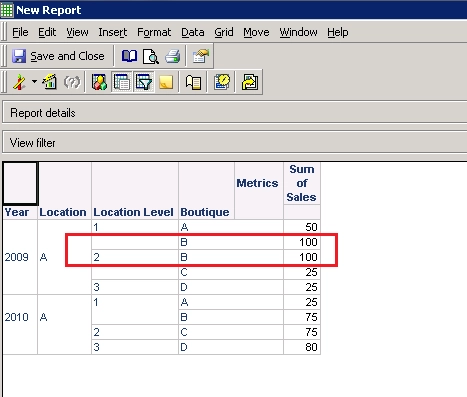
  • Update the value of an attribute in warehouse tables.
  • Run the incremental refresh report to update data.
  • Run the report based on the cube, duplicate records is seen for same data.
ka02R000000kazfQAA_0EM440000002CLI.png

 
CAUSE:
 
This is an expected behavior. For any change for any other attribute, a new line is added and the previous line also persists.
For examples of how each refresh type option of an Incremental Refresh report works, refer to the following Strategy Knowledge Base article:
KB45837 - How the Incremental Refresh option works in Strategy 9.4.x?
 
ACTION:
 
Contact Strategy Technical Support for an updates of this issue.
 
WORKAROUND:
 
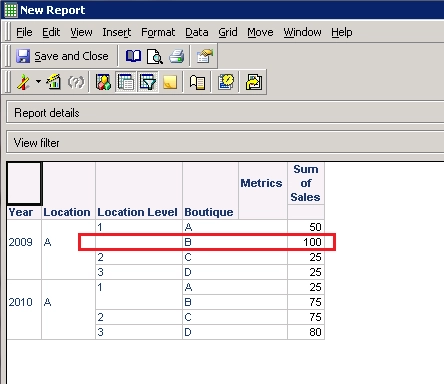
If user wants to see the updated record only, republish the intelligent cube directly. After the intelligent cube is republished, now the report shows only the updated record, as following:
 

ka02R000000kazfQAA_0EM440000002CLH.png

 
KB414015


Comment

0 comments

Details

Knowledge Article

Published:

June 7, 2017

Last Updated:

January 9, 2019