EducationSoftwareStrategy.com
StrategyCommunity

Knowledge Base

Product

Community

Knowledge Base

TopicsBrowse ArticlesDeveloper Zone

Product

Download SoftwareProduct DocumentationSecurity Hub

Education

Tutorial VideosSolution GalleryEducation courses

Community

GuidelinesGrandmastersEvents
x_social-icon_white.svglinkedin_social-icon_white.svg
Strategy logoCommunity

© Strategy Inc. All Rights Reserved.

LegalTerms of UsePrivacy Policy
  1. Home
  2. Topics

KB440051: Count Metric displays double dashes (--) for calculated group instead of expected data in MicroStrategy 10.9


Community Admin

• Strategy


This article describes a behavior where count metric do not get evaluated for calculated group in MicroStrategy 10.9

SYMPTOM


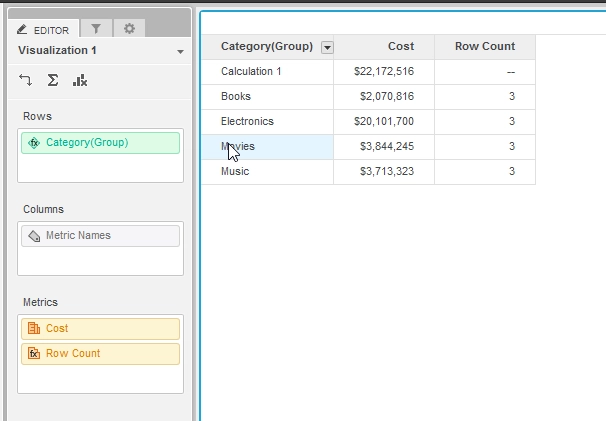
When executing a VI Dashboard with count metric and calculated group in the grid, the count metric row(s) corresponding to the calculated group displays as double dashes in Strategy 10.9 or earlier release. This is due to an aggregation issue when calculating the metric based off the calculated group.
ka04W000001IxAGQA0_0EM44000000WNwz.png


STEPS TO REPRODUCE


1. Create a VI Dashboard in Strategy 10.9 or earlier release
2. Add any attribute
3. Add a count metric define as: Count<UseLookupForAttributes=False>("*"){~}
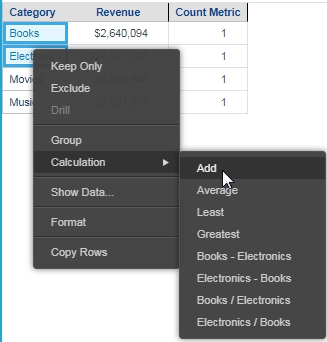
4. Create a calculation from two elements of the Attribute from step 1
ka04W000001IxAGQA0_0EM44000000A4oE.png

5. Observe that the count metric display as double dashes for the calculation (Shows "--")
 

CAUSE


This is a known issue in Strategy 10.9 and earlier release.

ACTION


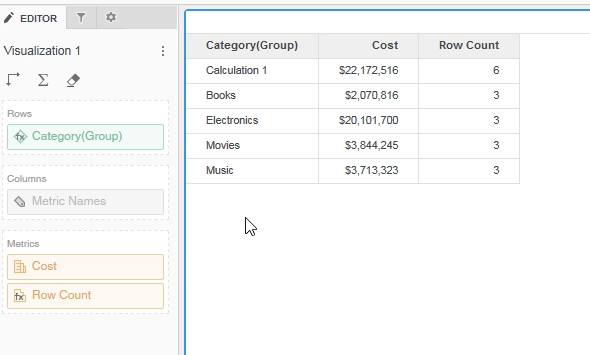
This issue has been fixed in Strategy 10.10. To pick up the fix,
  • If you are upgrading to Strategy 11.0 or above, enable project level setting "Data Engine Version" to 11. This property can only be enabled through Workstation. For more details on enabling the setting, refer to Change Data Engine Version.
  • If you are upgrading to Strategy 10.9 / 10.10 / 10.11: enable the Feature Flag "Defect fixes that may impact Data, SQL, MDX, CSI" within the Web Preferences -> Project Defaults. For more details on enabling Feature Flags refer to What are the Feature Flag options and what do they accomplish in MicroStrategy Web 10.8 and up . Starting Strategy 11.0, this Feature Flag is removed and replaced with project level setting called "Data Engine Version".
ka04W000001IxAGQA0_0EM44000000WNx4.png

The correct value will now be shown as demonstrated above.
Note: If you're not connecting to I-Server, the feature flag is enabled by default.
This issue is tracked by KB440051. KB440051


Comment

0 comments

Details

Knowledge Article

Published:

March 17, 2018

Last Updated:

June 29, 2022