Starting with the release of Strategy ONE (March 2024), dossiers are also known as dashboards.
This case is built upon the Strategy Tutorial project.
1. Create a New Dossier. Add External Data. Choose Databases. Import “LU_MONTH” and “MNTH_CATEGORY_SLS” Table from the Tutorial warehouse. Define a Many-to-Many relationship between Category Id and Month Id.
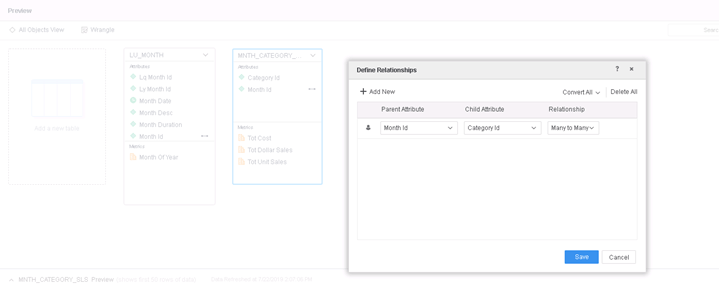
2. Add another Dataset by adding Existing Objects and Add Category, Month, Profit from Project Schema to the DataSet.
3. Create 2 Derived Attributes:
1) Month(Group) = {Group1 =(Feb 2005, Jan 2005), All Others }
This is an Element Group Derived Attribute. To create it, add Month Attribute to the grid, multi-select elements "Feb 2005" and "Jan 2005" from Month Attribute column, right click and select Group.
2) New attribute = Concat([Category Id]@ID, [Category@DESC])
This is a regular Derived Attribute.
4. Create 2 Attributes Links between the 2 Datasets:
1) Month Desc@ID Form to Month@Desc Form
2) Category Id@ID form to Category@ID Form.
5. Add Month(Group), New attribute to the grid.
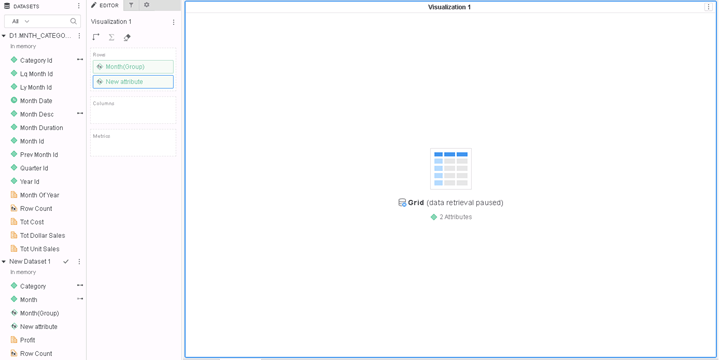
6. Link Month Id in the first with Month@Id in the second Data set. The dossier will run into infinite loops.
7. If the user enables MCE Trace, the log will display a record about 'Get Relation Sleep610ms'
This is a known defect before Strategy 10.6.
The cause is that attribute linking can lead to invalid Many-to-Many relationships being generated between the linked attributes. The wrong order of generating those relationships can sometimes lead to the infinite loops, prevent the dossier from finishing execution.
In 10.6 and later, the Engine has been optimized and the problem of such infinite loops has been resolved.
To resolve this defect, upgrade to Strategy 10.6 or above. We recommend the latest version.
In the new fix, the relationship will be generated in the right order and such infinite loops will not happen again.
Strategy Internal Reference number for this technical note is KB483234 and DE40058.
