Starting with the release of Strategy ONE (March 2024), dossiers are also known as dashboards.
This defect happens in Strategy 2019 with Data Engine Version set to 11. When using a dataset with multiple tables in a dossier, if more than one tables are available for attributes or metrics that are added into the grid, a table with 0 rows can be picked and causes missing data on the grid.
What is CSI?
Query Detail – A way to check the CSI statements.
The following example uses Strategy Tutorial attributes and metrics.
1. Add External Data -> Databases -> Select Tables and add the following tables.
a. CITY_MNTH_SLS
b. ITEM_CCTR_MNTH_SLS
c. SUBCATEG_MNTH_CTR_SLS
2. Prepare Data, and click on "Add a new table", Databases -> Build a Query, choose ITEM_CCTR_MNTH_SLS again, but ensure this table contains 0 rows.
a. Add column Call Ctr Id and Month Id
b. Edit SQL, the query should be similar to:
select ITEM_CCTR_MNTH_SLS.CALL_CTR_ID CALL_CTR_ID,
ITEM_CCTR_MNTH_SLS.MONTH_ID MONTH_ID
from dbo.ITEM_CCTR_MNTH_SLS ITEM_CCTR_MNTH_SLS
c. Add a WHERE Clause to ensure this logical table has 0 rows:
select ITEM_CCTR_MNTH_SLS.CALL_CTR_ID CALL_CTR_ID,
ITEM_CCTR_MNTH_SLS.MONTH_ID MONTH_ID
from dbo.ITEM_CCTR_MNTH_SLS ITEM_CCTR_MNTH_SLS where 1 = 0
d. Click "Add" and rename this table as Build Query_ZRC
3. Remove some unused columns and tables should look like:
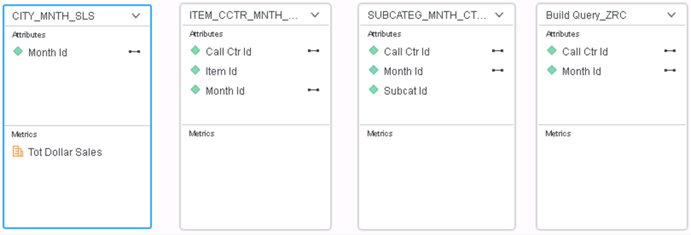
4. Save it in In-Memory mode and create a dossier with it.
5. Add Call Ctr Id and Tot Dollar Sales into the dossier. Since they come from different tables, Engine will generate a table join tree. However, on the grid, there is no data presented.
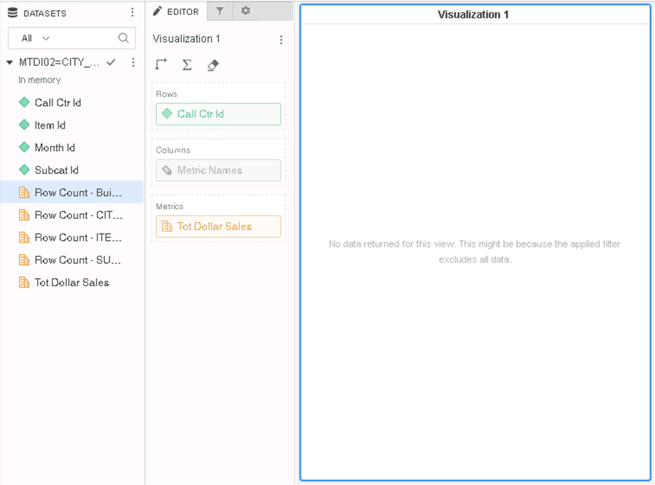
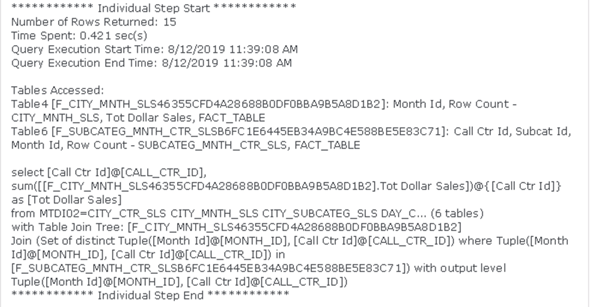
6. Looking into the Query Detail, to get the attribute “Call Ctr Id”, Engine picks the table “Build Query_ZRC” rather than “SUBCATEG_MNTH_CTR_SLS”. Since “Build Query_ZRC” has 0 rows, no data is returned as a result for the view.
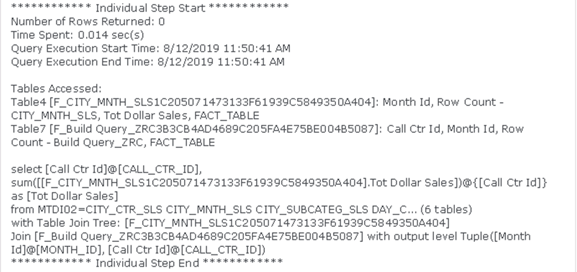
This is a known defect in Strategy 2019 with Data Engine Version set to 11.
When an attribute can come from multiple tables, the Engine used to pick the first table in the list. However it is not a good strategy when this table contains 0 rows, as there will be no data after table join.
In most cases, this issue has been fixed, for more details please read KB442273. For performance reasons, the Engine still prefers the table with the least attributes when multiple choices available, and in this case, it is the table with 0 rows.
To resolve this defect, please upgrade to Strategy 2019 Critical Update 1 or above.
In the new fix, tables with 0 rows will be skipped when a table is picked, therefore the missing data problem would be resolved.
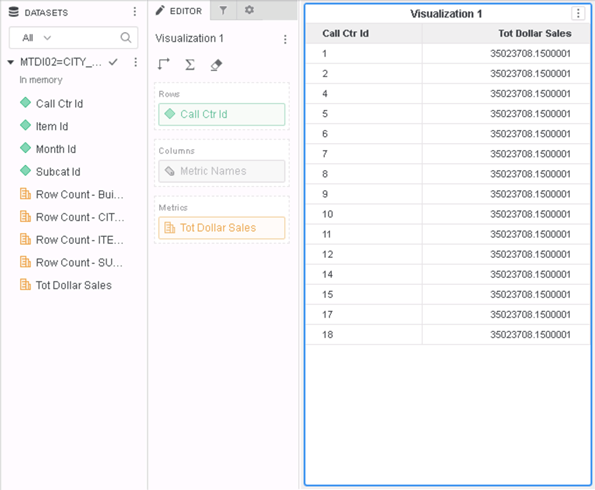
Compare the Query Detail, “SUBCATEG_MNTH_CTR_SLS” is now picked for the attribute “Call Ctr Id”.
The Strategy Internal Reference Number for the issue discussed is KB483562 and DE121750.
