Starting with the release of Strategy ONE (March 2024), dossiers are also known as dashboards.
The following example uses the Strategy Tutorial project.
1. Open Strategy Web.
2. Create a new dossier, create 2 datasets:
a. Create dataset DS1:
i. Add data and choose “Existing Objects”.
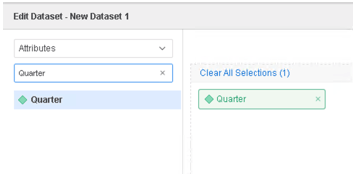
ii. Search for attribute “Quarter” in search bar and choose it. The attribute “Quarter” contains 16 rows from “2014 Q1” to “2017 Q4”.
iii. Click add.
b. Create dataset DS2:
i. Add data and choose “New Data”.
ii. Click Clipboard and fill in the following data.
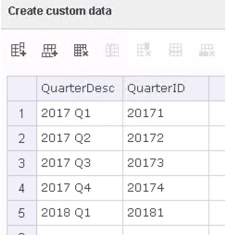
iii. Click “Prepare Data” to enter the wrangle window.
iv. Select both attributes and click “Create Multiform attribute”, Use QuarterID as ID form and QuarterDesc as DESC form.
v. Rename the name of the attribute to “Quarter MTDI”.
vi. Click finish to save the dataset.
3. Right click on attribute “Quarter MTDI” in DS2, click “Link to Other Dataset” and link it to attribute “Quarter” in DS1.
4. Add attribute “Quarter MTDI” to the visualization. Though the attribute has description “2018 Q1” for the ID “20181”, it is not displayed in the visualization.
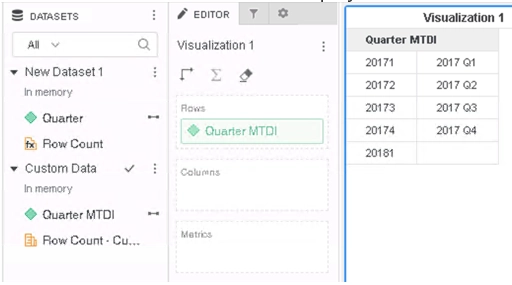
This is a known defect before Strategy 2020.
MTDI cube and project have different configurations. MTDI cube attributes and project schema attributes have different locale setting in the description form, so when they are linked, the link only works for ID form.
To resolve this defect, please upgrade to Strategy 2020 or above, and set Data Engine Version setting to 12.
The project level setting Data Engine Version can only be enabled through Workstation. For more details on enabling the setting, see Change Data Engine Version .
In Strategy 2020, MTDI cube locale for Description form now could match all other locales, attributes can be linked properly, and corresponding data could be displayed correctly.
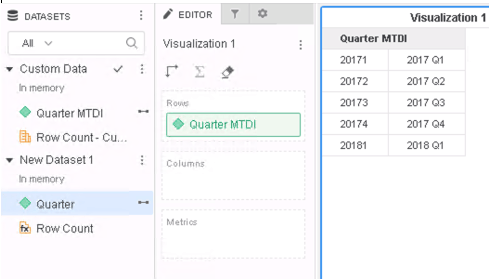
Strategy Internal Reference number for this technical note is KB483753 and DE123585.
