Starting with the release of Strategy ONE (March 2024), dossiers are also known as dashboards.
The following example uses Strategy Tutorial warehouse.
1. Open Strategy Web.
2. Create a new dossier.
a. Add Data: “Existing Objects”.
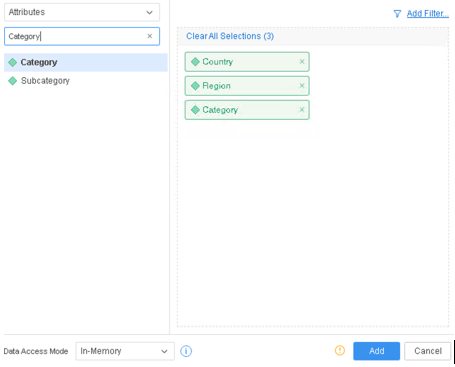
b. Add attributes “Country”, “Region”, “Category”.
* Attributes “Country” and “Region” are in 1-to-M relationship.
c. Click “Add” to add the data in In-Memory mode.
3. Create a derived attribute “DA1” with expression:
Country@ID+Category@ID. Validate the expression and save the attribute.
Category@ID+Region@ID. Validate the expression and save the attribute.
...
select	[DA2]@[ID],
	[Category]@[CATEGORY_ID],
	[Country]@[COUNTRY_ID],
	[Region]@[REGION_ID],
	[DA1]@[ID]
from	Full Outer Join(
	                Ex4_tempcube2,
	                Full Outer Join(
	                                Ex4_tempcube0,
	                                Ex4_tempcube1
	                               ) on Category
	               ) on Region, Country
to	RELATION5-<DA2, Category, Country, Region, DA1>
...
This is a known defect before Strategy 2020.
Due to a previous change, the relationship between derived attributes related by a joint child and their children are regarded as Many-to-Many instead of 1-to-Many. This change makes the logic of relation table ordering failed to work, therefore causes CSI changes.
While this change of CSI is still correct and returns the same data, the memory request may increase due to larger internal results of temp cubes, and will potentially lead to execution failures.
To resolve this defect, please upgrade to Strategy 2020 or above, and set Data Engine Version setting to 12.
The project level setting Data Engine Version can only be enabled through Workstation. For more details on enabling the setting, see Change Data Engine Version .
In Strategy 2020 the logic of Relation table ordering is fixed so the attributes could be ordered properly and the memory request is optimized.
Query Detail after the fix
select	[DA2]@[ID],
	[DA1]@[ID],
	[Category]@[CATEGORY_ID],
	[Country]@[COUNTRY_ID],
	[Region]@[REGION_ID]
from	Full Outer Join(
	                Ex4_tempcube2,
	                Full Outer Join(
	                                Ex4_tempcube0,
	                                Ex4_tempcube1
	                               ) on Category
	               ) on Region, Country
to	RELATION5-<DA2, DA1, Category, Country, Region>
