Starting with the release of Strategy ONE (March 2024), dossiers are also known as dashboards.
In Strategy 2021 Update 6, dossier users with the proper privileges can modify data and submit data changes to the database. The dossier transaction configuration automatically generates the basic INSERT, UPDATE, and DELETE SQL statements with tokens according to the mapping view configuration. Customized SQL statements with the correct syntax can be used to complete the transaction configuration.
Certified Gateways:
Consider the following recommendations when designing your transaction configuration.
Strategy supports connectivity to multiple Hadoop components and SaaS applications through an ODBC or JDBC driver, such as Hive, Salesforce, or MongoDB. These drivers support data retrieval (queries) but do not support data manipulation.
To troubleshoot SQL statements submitted to the source, use the diagnostic trace Engine > SQL Trace. See Configuring What is Logged for more information.
Most databases accept double quotes as table and column identifiers. The SQL statement generated by the dossier transaction configuration may not include them. To escape special characters, use the specifications that correspond to your gateway. Use the grid further below as reference.
Avoid selecting columns that may lead multiple rows being updated. You may rely on a table primary key or unique identifier. Do not use decimal, double, or float data types in the WHERE clause, as data precision may cause issues with matching the rows correctly.
In Strategy 2021 Update 6, by default, the controls in the Input Configuration handle inputs as "VarChar" (text) for attributes and "Integer" for metrics.
In Strategy 2021 Update 7, in the configuration mapping view, the data type for each control is populated according to the target database source. In the configuration SQL view, the data type for each control is populated according to the mapped template object.
Review and update the control with the right data type and use the right data format to allow Strategy to update values in the format expected by the source. This can be problematic with date and date-time columns where a date must follow a specific format or even explicit data type cast to be accepted by the source.
Example 1
Your input has a data type of "Date", "Date Time", and "Time" to a MySQL database. You want to add a record with the values "12/31/2022", "23:59:59.001", and "12/31/2022 23:59:59.001". These are values accepted by Strategy as date, time, and date time format.
INSERT INTO database_namespace.database_table (DATE_type_column, DATETIME_type_column, TIME_type_column) VALUES ('12/31/2022','12/31/2022 23:59:59.001','23:59:59.001')
INSERT INTO database_namespace.database_table (DATE_type_column, DATETIME_type_column, TIME_type_column) VALUES ('2022-12-31','2022-12-31 23:59:59','23:59:59')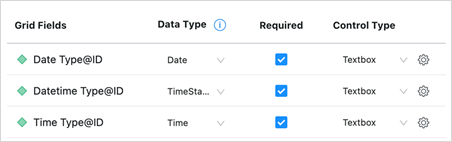
Note: Default formats for Strategy are set at VLDB Data Type settings and can be adjusted at the DBMS, database instance, and report level.
Example 2
Your input has a data type of "Date", "Date Time", and "Time" to a MySQL database. Your type values of "31-12-2022", "11:59:59.001 PM", "31-12-2022 11:59:59.001 PM" are not accepted by the Strategy engine. You set the correct data type on the Input Configuration. Your transaction fails with an error.
[Dimensional Storage][Error][CDSSTransactionData.cpp:2649] You have input an invalid value '31-12-2022 11:59:59.001 PM', acceptable data type is 'TimeStamp'.

[Dimensional Storage][Error][CDSSTransactionData.cpp:2649] You have input an invalid value '11:59:59.001 PM', acceptable data type is 'Time'.
INSERT INTO database_namespace.database_table ( {DATE_type_column}, {DATETIME_type_column}, {TIME_type_column} ) VALUES (STR_TO_DATE ([Date Type@ID], '%d-%m-%Y'), STR_TO_DATE ( [Datetime Type@ID], '%d-%m-%Y %h:%i:%s.%f %p'), STR_TO_DATE ([Time Type@ID], '%h:%i:%s.%f %p'))
INSERT INTO database_namespace.database_table (DATE_type_column, DATETIME_type_column, TIME_type_column) VALUES ( STR_TO_DATE ('31-12-2022', '%d-%m-%Y'), STR_TO_DATE ( '31-12-2022 11:59:59.001 PM', '%d-%m-%Y %h:%i:%s.%f %p' ), STR_TO_DATE ('11:59:59.001 PM', '%h:%i:%s.%f %p') )Refer to your database documentation for the supported functions to cast text into a specific data type. The list below is intended as guideline and may differ from your database documentation.
If the problem persists, log a support ticket regarding this logical defect to Strategy Support team and attach the DSSErrors.log file. "yyyy-mm-dd"Oracle Database" (quote)Date "dd-mm-yyyy" Time "yyyy-mm-dd hh:nn:ss"Microsoft SQL Server[ ] (square bracket) Note: if the identifier uses character ], you can escape by using ]]in your SQL statement.Date "yyyy-mm-dd" Time "hh:nn:ss.0000000" TimeStamp "yyyy-mm-dd hh:nn:ss.0000000"Amazon Redshift" (quote)Date “yyyy-mm-dd"IBM DB2" (quote) PosgreSQL" (quote)Date "yyyy-mm-dd"Azure Synapse Analytics[ ] (square bracket)Date "yyyy-mm-dd"Exasol" (quote)Date "yyyy-mm-dd"Oracle MySQL` (backtick)Date "yyyy-mm-dd"SAP HANA" (quote)Date "yyyy-mm-dd" Time "yyyy-mm-dd hh:nn:ss"Google BigQuery` (backtick)Date "yyyy-mm-dd"Snowflake" (quote) | If the problem persists, log a support ticket regarding this logical defect to Strategy Support team and attach the DSSErrors.log file. "yyyy-mm-dd"Oracle Database" (quote)Date "dd-mm-yyyy" Time "yyyy-mm-dd hh:nn:ss"Microsoft SQL Server[ ] (square bracket) Note: if the identifier uses character ], you can escape by using ]]in your SQL statement.Date "yyyy-mm-dd" Time "hh:nn:ss.0000000" TimeStamp "yyyy-mm-dd hh:nn:ss.0000000"Amazon Redshift" (quote)Date “yyyy-mm-dd"IBM DB2" (quote) PosgreSQL" (quote)Date "yyyy-mm-dd"Azure Synapse Analytics[ ] (square bracket)Date "yyyy-mm-dd"Exasol" (quote)Date "yyyy-mm-dd"Oracle MySQL` (backtick)Date "yyyy-mm-dd"SAP HANA" (quote)Date "yyyy-mm-dd" Time "yyyy-mm-dd hh:nn:ss"Google BigQuery` (backtick)Date "yyyy-mm-dd"Snowflake" (quote) | If the problem persists, log a support ticket regarding this logical defect to Strategy Support team and attach the DSSErrors.log file. "yyyy-mm-dd"Oracle Database" (quote)Date "dd-mm-yyyy" Time "yyyy-mm-dd hh:nn:ss"Microsoft SQL Server[ ] (square bracket) Note: if the identifier uses character ], you can escape by using ]]in your SQL statement.Date "yyyy-mm-dd" Time "hh:nn:ss.0000000" TimeStamp "yyyy-mm-dd hh:nn:ss.0000000"Amazon Redshift" (quote)Date “yyyy-mm-dd"IBM DB2" (quote) PosgreSQL" (quote)Date "yyyy-mm-dd"Azure Synapse Analytics[ ] (square bracket)Date "yyyy-mm-dd"Exasol" (quote)Date "yyyy-mm-dd"Oracle MySQL` (backtick)Date "yyyy-mm-dd"SAP HANA" (quote)Date "yyyy-mm-dd" Time "yyyy-mm-dd hh:nn:ss"Google BigQuery` (backtick)Date "yyyy-mm-dd"Snowflake" (quote) |
If the problem persists, log a support ticket regarding this logical defect to Strategy Support team and attach the DSSErrors.log file. "yyyy-mm-dd"Oracle Database" (quote)Date "dd-mm-yyyy" Time "yyyy-mm-dd hh:nn:ss"Microsoft SQL Server[ ] (square bracket) Note: if the identifier uses character ], you can escape by using ]]in your SQL statement.Date "yyyy-mm-dd" Time "hh:nn:ss.0000000" TimeStamp "yyyy-mm-dd hh:nn:ss.0000000"Amazon Redshift" (quote)Date “yyyy-mm-dd"IBM DB2" (quote) PosgreSQL" (quote)Date "yyyy-mm-dd"Azure Synapse Analytics[ ] (square bracket)Date "yyyy-mm-dd"Exasol" (quote)Date "yyyy-mm-dd"Oracle MySQL` (backtick)Date "yyyy-mm-dd"SAP HANA" (quote)Date "yyyy-mm-dd" Time "yyyy-mm-dd hh:nn:ss"Google BigQuery` (backtick)Date "yyyy-mm-dd"Snowflake" (quote) | If the problem persists, log a support ticket regarding this logical defect to Strategy Support team and attach the DSSErrors.log file. "yyyy-mm-dd"Oracle Database" (quote)Date "dd-mm-yyyy" Time "yyyy-mm-dd hh:nn:ss"Microsoft SQL Server[ ] (square bracket) Note: if the identifier uses character ], you can escape by using ]]in your SQL statement.Date "yyyy-mm-dd" Time "hh:nn:ss.0000000" TimeStamp "yyyy-mm-dd hh:nn:ss.0000000"Amazon Redshift" (quote)Date “yyyy-mm-dd"IBM DB2" (quote) PosgreSQL" (quote)Date "yyyy-mm-dd"Azure Synapse Analytics[ ] (square bracket)Date "yyyy-mm-dd"Exasol" (quote)Date "yyyy-mm-dd"Oracle MySQL` (backtick)Date "yyyy-mm-dd"SAP HANA" (quote)Date "yyyy-mm-dd" Time "yyyy-mm-dd hh:nn:ss"Google BigQuery` (backtick)Date "yyyy-mm-dd"Snowflake" (quote) | If the problem persists, log a support ticket regarding this logical defect to Strategy Support team and attach the DSSErrors.log file. "yyyy-mm-dd"Oracle Database" (quote)Date "dd-mm-yyyy" Time "yyyy-mm-dd hh:nn:ss"Microsoft SQL Server[ ] (square bracket) Note: if the identifier uses character ], you can escape by using ]]in your SQL statement.Date "yyyy-mm-dd" Time "hh:nn:ss.0000000" TimeStamp "yyyy-mm-dd hh:nn:ss.0000000"Amazon Redshift" (quote)Date “yyyy-mm-dd"IBM DB2" (quote) PosgreSQL" (quote)Date "yyyy-mm-dd"Azure Synapse Analytics[ ] (square bracket)Date "yyyy-mm-dd"Exasol" (quote)Date "yyyy-mm-dd"Oracle MySQL` (backtick)Date "yyyy-mm-dd"SAP HANA" (quote)Date "yyyy-mm-dd" Time "yyyy-mm-dd hh:nn:ss"Google BigQuery` (backtick)Date "yyyy-mm-dd"Snowflake" (quote) |
If the problem persists, log a support ticket regarding this logical defect to Strategy Support team and attach the DSSErrors.log file. "yyyy-mm-dd"Oracle Database" (quote)Date "dd-mm-yyyy" Time "yyyy-mm-dd hh:nn:ss"Microsoft SQL Server[ ] (square bracket) Note: if the identifier uses character ], you can escape by using ]]in your SQL statement.Date "yyyy-mm-dd" Time "hh:nn:ss.0000000" TimeStamp "yyyy-mm-dd hh:nn:ss.0000000"Amazon Redshift" (quote)Date “yyyy-mm-dd"IBM DB2" (quote) PosgreSQL" (quote)Date "yyyy-mm-dd"Azure Synapse Analytics[ ] (square bracket)Date "yyyy-mm-dd"Exasol" (quote)Date "yyyy-mm-dd"Oracle MySQL` (backtick)Date "yyyy-mm-dd"SAP HANA" (quote)Date "yyyy-mm-dd" Time "yyyy-mm-dd hh:nn:ss"Google BigQuery` (backtick)Date "yyyy-mm-dd"Snowflake" (quote) | If the problem persists, log a support ticket regarding this logical defect to Strategy Support team and attach the DSSErrors.log file. "yyyy-mm-dd"Oracle Database" (quote)Date "dd-mm-yyyy" Time "yyyy-mm-dd hh:nn:ss"Microsoft SQL Server[ ] (square bracket) Note: if the identifier uses character ], you can escape by using ]]in your SQL statement.Date "yyyy-mm-dd" Time "hh:nn:ss.0000000" TimeStamp "yyyy-mm-dd hh:nn:ss.0000000"Amazon Redshift" (quote)Date “yyyy-mm-dd"IBM DB2" (quote) PosgreSQL" (quote)Date "yyyy-mm-dd"Azure Synapse Analytics[ ] (square bracket)Date "yyyy-mm-dd"Exasol" (quote)Date "yyyy-mm-dd"Oracle MySQL` (backtick)Date "yyyy-mm-dd"SAP HANA" (quote)Date "yyyy-mm-dd" Time "yyyy-mm-dd hh:nn:ss"Google BigQuery` (backtick)Date "yyyy-mm-dd"Snowflake" (quote) | If the problem persists, log a support ticket regarding this logical defect to Strategy Support team and attach the DSSErrors.log file. "yyyy-mm-dd"Oracle Database" (quote)Date "dd-mm-yyyy" Time "yyyy-mm-dd hh:nn:ss"Microsoft SQL Server[ ] (square bracket) Note: if the identifier uses character ], you can escape by using ]]in your SQL statement.Date "yyyy-mm-dd" Time "hh:nn:ss.0000000" TimeStamp "yyyy-mm-dd hh:nn:ss.0000000"Amazon Redshift" (quote)Date “yyyy-mm-dd"IBM DB2" (quote) PosgreSQL" (quote)Date "yyyy-mm-dd"Azure Synapse Analytics[ ] (square bracket)Date "yyyy-mm-dd"Exasol" (quote)Date "yyyy-mm-dd"Oracle MySQL` (backtick)Date "yyyy-mm-dd"SAP HANA" (quote)Date "yyyy-mm-dd" Time "yyyy-mm-dd hh:nn:ss"Google BigQuery` (backtick)Date "yyyy-mm-dd"Snowflake" (quote) |
If the problem persists, log a support ticket regarding this logical defect to Strategy Support team and attach the DSSErrors.log file. "yyyy-mm-dd"Oracle Database" (quote)Date "dd-mm-yyyy" Time "yyyy-mm-dd hh:nn:ss"Microsoft SQL Server[ ] (square bracket) Note: if the identifier uses character ], you can escape by using ]]in your SQL statement.Date "yyyy-mm-dd" Time "hh:nn:ss.0000000" TimeStamp "yyyy-mm-dd hh:nn:ss.0000000"Amazon Redshift" (quote)Date “yyyy-mm-dd"IBM DB2" (quote) PosgreSQL" (quote)Date "yyyy-mm-dd"Azure Synapse Analytics[ ] (square bracket)Date "yyyy-mm-dd"Exasol" (quote)Date "yyyy-mm-dd"Oracle MySQL` (backtick)Date "yyyy-mm-dd"SAP HANA" (quote)Date "yyyy-mm-dd" Time "yyyy-mm-dd hh:nn:ss"Google BigQuery` (backtick)Date "yyyy-mm-dd"Snowflake" (quote) | If the problem persists, log a support ticket regarding this logical defect to Strategy Support team and attach the DSSErrors.log file. "yyyy-mm-dd"Oracle Database" (quote)Date "dd-mm-yyyy" Time "yyyy-mm-dd hh:nn:ss"Microsoft SQL Server[ ] (square bracket) Note: if the identifier uses character ], you can escape by using ]]in your SQL statement.Date "yyyy-mm-dd" Time "hh:nn:ss.0000000" TimeStamp "yyyy-mm-dd hh:nn:ss.0000000"Amazon Redshift" (quote)Date “yyyy-mm-dd"IBM DB2" (quote) PosgreSQL" (quote)Date "yyyy-mm-dd"Azure Synapse Analytics[ ] (square bracket)Date "yyyy-mm-dd"Exasol" (quote)Date "yyyy-mm-dd"Oracle MySQL` (backtick)Date "yyyy-mm-dd"SAP HANA" (quote)Date "yyyy-mm-dd" Time "yyyy-mm-dd hh:nn:ss"Google BigQuery` (backtick)Date "yyyy-mm-dd"Snowflake" (quote) | If the problem persists, log a support ticket regarding this logical defect to Strategy Support team and attach the DSSErrors.log file. "yyyy-mm-dd"Oracle Database" (quote)Date "dd-mm-yyyy" Time "yyyy-mm-dd hh:nn:ss"Microsoft SQL Server[ ] (square bracket) Note: if the identifier uses character ], you can escape by using ]]in your SQL statement.Date "yyyy-mm-dd" Time "hh:nn:ss.0000000" TimeStamp "yyyy-mm-dd hh:nn:ss.0000000"Amazon Redshift" (quote)Date “yyyy-mm-dd"IBM DB2" (quote) PosgreSQL" (quote)Date "yyyy-mm-dd"Azure Synapse Analytics[ ] (square bracket)Date "yyyy-mm-dd"Exasol" (quote)Date "yyyy-mm-dd"Oracle MySQL` (backtick)Date "yyyy-mm-dd"SAP HANA" (quote)Date "yyyy-mm-dd" Time "yyyy-mm-dd hh:nn:ss"Google BigQuery` (backtick)Date "yyyy-mm-dd"Snowflake" (quote) |
If the problem persists, log a support ticket regarding this logical defect to Strategy Support team and attach the DSSErrors.log file. "yyyy-mm-dd"Oracle Database" (quote)Date "dd-mm-yyyy" Time "yyyy-mm-dd hh:nn:ss"Microsoft SQL Server[ ] (square bracket) Note: if the identifier uses character ], you can escape by using ]]in your SQL statement.Date "yyyy-mm-dd" Time "hh:nn:ss.0000000" TimeStamp "yyyy-mm-dd hh:nn:ss.0000000"Amazon Redshift" (quote)Date “yyyy-mm-dd"IBM DB2" (quote) PosgreSQL" (quote)Date "yyyy-mm-dd"Azure Synapse Analytics[ ] (square bracket)Date "yyyy-mm-dd"Exasol" (quote)Date "yyyy-mm-dd"Oracle MySQL` (backtick)Date "yyyy-mm-dd"SAP HANA" (quote)Date "yyyy-mm-dd" Time "yyyy-mm-dd hh:nn:ss"Google BigQuery` (backtick)Date "yyyy-mm-dd"Snowflake" (quote) | If the problem persists, log a support ticket regarding this logical defect to Strategy Support team and attach the DSSErrors.log file. "yyyy-mm-dd"Oracle Database" (quote)Date "dd-mm-yyyy" Time "yyyy-mm-dd hh:nn:ss"Microsoft SQL Server[ ] (square bracket) Note: if the identifier uses character ], you can escape by using ]]in your SQL statement.Date "yyyy-mm-dd" Time "hh:nn:ss.0000000" TimeStamp "yyyy-mm-dd hh:nn:ss.0000000"Amazon Redshift" (quote)Date “yyyy-mm-dd"IBM DB2" (quote) PosgreSQL" (quote)Date "yyyy-mm-dd"Azure Synapse Analytics[ ] (square bracket)Date "yyyy-mm-dd"Exasol" (quote)Date "yyyy-mm-dd"Oracle MySQL` (backtick)Date "yyyy-mm-dd"SAP HANA" (quote)Date "yyyy-mm-dd" Time "yyyy-mm-dd hh:nn:ss"Google BigQuery` (backtick)Date "yyyy-mm-dd"Snowflake" (quote) | If the problem persists, log a support ticket regarding this logical defect to Strategy Support team and attach the DSSErrors.log file. "yyyy-mm-dd"Oracle Database" (quote)Date "dd-mm-yyyy" Time "yyyy-mm-dd hh:nn:ss"Microsoft SQL Server[ ] (square bracket) Note: if the identifier uses character ], you can escape by using ]]in your SQL statement.Date "yyyy-mm-dd" Time "hh:nn:ss.0000000" TimeStamp "yyyy-mm-dd hh:nn:ss.0000000"Amazon Redshift" (quote)Date “yyyy-mm-dd"IBM DB2" (quote) PosgreSQL" (quote)Date "yyyy-mm-dd"Azure Synapse Analytics[ ] (square bracket)Date "yyyy-mm-dd"Exasol" (quote)Date "yyyy-mm-dd"Oracle MySQL` (backtick)Date "yyyy-mm-dd"SAP HANA" (quote)Date "yyyy-mm-dd" Time "yyyy-mm-dd hh:nn:ss"Google BigQuery` (backtick)Date "yyyy-mm-dd"Snowflake" (quote) |
If the problem persists, log a support ticket regarding this logical defect to Strategy Support team and attach the DSSErrors.log file. "yyyy-mm-dd"Oracle Database" (quote)Date "dd-mm-yyyy" Time "yyyy-mm-dd hh:nn:ss"Microsoft SQL Server[ ] (square bracket) Note: if the identifier uses character ], you can escape by using ]]in your SQL statement.Date "yyyy-mm-dd" Time "hh:nn:ss.0000000" TimeStamp "yyyy-mm-dd hh:nn:ss.0000000"Amazon Redshift" (quote)Date “yyyy-mm-dd"IBM DB2" (quote) PosgreSQL" (quote)Date "yyyy-mm-dd"Azure Synapse Analytics[ ] (square bracket)Date "yyyy-mm-dd"Exasol" (quote)Date "yyyy-mm-dd"Oracle MySQL` (backtick)Date "yyyy-mm-dd"SAP HANA" (quote)Date "yyyy-mm-dd" Time "yyyy-mm-dd hh:nn:ss"Google BigQuery` (backtick)Date "yyyy-mm-dd"Snowflake" (quote) | If the problem persists, log a support ticket regarding this logical defect to Strategy Support team and attach the DSSErrors.log file. "yyyy-mm-dd"Oracle Database" (quote)Date "dd-mm-yyyy" Time "yyyy-mm-dd hh:nn:ss"Microsoft SQL Server[ ] (square bracket) Note: if the identifier uses character ], you can escape by using ]]in your SQL statement.Date "yyyy-mm-dd" Time "hh:nn:ss.0000000" TimeStamp "yyyy-mm-dd hh:nn:ss.0000000"Amazon Redshift" (quote)Date “yyyy-mm-dd"IBM DB2" (quote) PosgreSQL" (quote)Date "yyyy-mm-dd"Azure Synapse Analytics[ ] (square bracket)Date "yyyy-mm-dd"Exasol" (quote)Date "yyyy-mm-dd"Oracle MySQL` (backtick)Date "yyyy-mm-dd"SAP HANA" (quote)Date "yyyy-mm-dd" Time "yyyy-mm-dd hh:nn:ss"Google BigQuery` (backtick)Date "yyyy-mm-dd"Snowflake" (quote) | If the problem persists, log a support ticket regarding this logical defect to Strategy Support team and attach the DSSErrors.log file. "yyyy-mm-dd"Oracle Database" (quote)Date "dd-mm-yyyy" Time "yyyy-mm-dd hh:nn:ss"Microsoft SQL Server[ ] (square bracket) Note: if the identifier uses character ], you can escape by using ]]in your SQL statement.Date "yyyy-mm-dd" Time "hh:nn:ss.0000000" TimeStamp "yyyy-mm-dd hh:nn:ss.0000000"Amazon Redshift" (quote)Date “yyyy-mm-dd"IBM DB2" (quote) PosgreSQL" (quote)Date "yyyy-mm-dd"Azure Synapse Analytics[ ] (square bracket)Date "yyyy-mm-dd"Exasol" (quote)Date "yyyy-mm-dd"Oracle MySQL` (backtick)Date "yyyy-mm-dd"SAP HANA" (quote)Date "yyyy-mm-dd" Time "yyyy-mm-dd hh:nn:ss"Google BigQuery` (backtick)Date "yyyy-mm-dd"Snowflake" (quote) |
If the problem persists, log a support ticket regarding this logical defect to Strategy Support team and attach the DSSErrors.log file. "yyyy-mm-dd"Oracle Database" (quote)Date "dd-mm-yyyy" Time "yyyy-mm-dd hh:nn:ss"Microsoft SQL Server[ ] (square bracket) Note: if the identifier uses character ], you can escape by using ]]in your SQL statement.Date "yyyy-mm-dd" Time "hh:nn:ss.0000000" TimeStamp "yyyy-mm-dd hh:nn:ss.0000000"Amazon Redshift" (quote)Date “yyyy-mm-dd"IBM DB2" (quote) PosgreSQL" (quote)Date "yyyy-mm-dd"Azure Synapse Analytics[ ] (square bracket)Date "yyyy-mm-dd"Exasol" (quote)Date "yyyy-mm-dd"Oracle MySQL` (backtick)Date "yyyy-mm-dd"SAP HANA" (quote)Date "yyyy-mm-dd" Time "yyyy-mm-dd hh:nn:ss"Google BigQuery` (backtick)Date "yyyy-mm-dd"Snowflake" (quote) | If the problem persists, log a support ticket regarding this logical defect to Strategy Support team and attach the DSSErrors.log file. "yyyy-mm-dd"Oracle Database" (quote)Date "dd-mm-yyyy" Time "yyyy-mm-dd hh:nn:ss"Microsoft SQL Server[ ] (square bracket) Note: if the identifier uses character ], you can escape by using ]]in your SQL statement.Date "yyyy-mm-dd" Time "hh:nn:ss.0000000" TimeStamp "yyyy-mm-dd hh:nn:ss.0000000"Amazon Redshift" (quote)Date “yyyy-mm-dd"IBM DB2" (quote) PosgreSQL" (quote)Date "yyyy-mm-dd"Azure Synapse Analytics[ ] (square bracket)Date "yyyy-mm-dd"Exasol" (quote)Date "yyyy-mm-dd"Oracle MySQL` (backtick)Date "yyyy-mm-dd"SAP HANA" (quote)Date "yyyy-mm-dd" Time "yyyy-mm-dd hh:nn:ss"Google BigQuery` (backtick)Date "yyyy-mm-dd"Snowflake" (quote) | If the problem persists, log a support ticket regarding this logical defect to Strategy Support team and attach the DSSErrors.log file. "yyyy-mm-dd"Oracle Database" (quote)Date "dd-mm-yyyy" Time "yyyy-mm-dd hh:nn:ss"Microsoft SQL Server[ ] (square bracket) Note: if the identifier uses character ], you can escape by using ]]in your SQL statement.Date "yyyy-mm-dd" Time "hh:nn:ss.0000000" TimeStamp "yyyy-mm-dd hh:nn:ss.0000000"Amazon Redshift" (quote)Date “yyyy-mm-dd"IBM DB2" (quote) PosgreSQL" (quote)Date "yyyy-mm-dd"Azure Synapse Analytics[ ] (square bracket)Date "yyyy-mm-dd"Exasol" (quote)Date "yyyy-mm-dd"Oracle MySQL` (backtick)Date "yyyy-mm-dd"SAP HANA" (quote)Date "yyyy-mm-dd" Time "yyyy-mm-dd hh:nn:ss"Google BigQuery` (backtick)Date "yyyy-mm-dd"Snowflake" (quote) |
If the problem persists, log a support ticket regarding this logical defect to Strategy Support team and attach the DSSErrors.log file. "yyyy-mm-dd"Oracle Database" (quote)Date "dd-mm-yyyy" Time "yyyy-mm-dd hh:nn:ss"Microsoft SQL Server[ ] (square bracket) Note: if the identifier uses character ], you can escape by using ]]in your SQL statement.Date "yyyy-mm-dd" Time "hh:nn:ss.0000000" TimeStamp "yyyy-mm-dd hh:nn:ss.0000000"Amazon Redshift" (quote)Date “yyyy-mm-dd"IBM DB2" (quote) PosgreSQL" (quote)Date "yyyy-mm-dd"Azure Synapse Analytics[ ] (square bracket)Date "yyyy-mm-dd"Exasol" (quote)Date "yyyy-mm-dd"Oracle MySQL` (backtick)Date "yyyy-mm-dd"SAP HANA" (quote)Date "yyyy-mm-dd" Time "yyyy-mm-dd hh:nn:ss"Google BigQuery` (backtick)Date "yyyy-mm-dd"Snowflake" (quote) | If the problem persists, log a support ticket regarding this logical defect to Strategy Support team and attach the DSSErrors.log file. "yyyy-mm-dd"Oracle Database" (quote)Date "dd-mm-yyyy" Time "yyyy-mm-dd hh:nn:ss"Microsoft SQL Server[ ] (square bracket) Note: if the identifier uses character ], you can escape by using ]]in your SQL statement.Date "yyyy-mm-dd" Time "hh:nn:ss.0000000" TimeStamp "yyyy-mm-dd hh:nn:ss.0000000"Amazon Redshift" (quote)Date “yyyy-mm-dd"IBM DB2" (quote) PosgreSQL" (quote)Date "yyyy-mm-dd"Azure Synapse Analytics[ ] (square bracket)Date "yyyy-mm-dd"Exasol" (quote)Date "yyyy-mm-dd"Oracle MySQL` (backtick)Date "yyyy-mm-dd"SAP HANA" (quote)Date "yyyy-mm-dd" Time "yyyy-mm-dd hh:nn:ss"Google BigQuery` (backtick)Date "yyyy-mm-dd"Snowflake" (quote) | If the problem persists, log a support ticket regarding this logical defect to Strategy Support team and attach the DSSErrors.log file. "yyyy-mm-dd"Oracle Database" (quote)Date "dd-mm-yyyy" Time "yyyy-mm-dd hh:nn:ss"Microsoft SQL Server[ ] (square bracket) Note: if the identifier uses character ], you can escape by using ]]in your SQL statement.Date "yyyy-mm-dd" Time "hh:nn:ss.0000000" TimeStamp "yyyy-mm-dd hh:nn:ss.0000000"Amazon Redshift" (quote)Date “yyyy-mm-dd"IBM DB2" (quote) PosgreSQL" (quote)Date "yyyy-mm-dd"Azure Synapse Analytics[ ] (square bracket)Date "yyyy-mm-dd"Exasol" (quote)Date "yyyy-mm-dd"Oracle MySQL` (backtick)Date "yyyy-mm-dd"SAP HANA" (quote)Date "yyyy-mm-dd" Time "yyyy-mm-dd hh:nn:ss"Google BigQuery` (backtick)Date "yyyy-mm-dd"Snowflake" (quote) |
If the problem persists, log a support ticket regarding this logical defect to Strategy Support team and attach the DSSErrors.log file. "yyyy-mm-dd"Oracle Database" (quote)Date "dd-mm-yyyy" Time "yyyy-mm-dd hh:nn:ss"Microsoft SQL Server[ ] (square bracket) Note: if the identifier uses character ], you can escape by using ]]in your SQL statement.Date "yyyy-mm-dd" Time "hh:nn:ss.0000000" TimeStamp "yyyy-mm-dd hh:nn:ss.0000000"Amazon Redshift" (quote)Date “yyyy-mm-dd"IBM DB2" (quote) PosgreSQL" (quote)Date "yyyy-mm-dd"Azure Synapse Analytics[ ] (square bracket)Date "yyyy-mm-dd"Exasol" (quote)Date "yyyy-mm-dd"Oracle MySQL` (backtick)Date "yyyy-mm-dd"SAP HANA" (quote)Date "yyyy-mm-dd" Time "yyyy-mm-dd hh:nn:ss"Google BigQuery` (backtick)Date "yyyy-mm-dd"Snowflake" (quote) | If the problem persists, log a support ticket regarding this logical defect to Strategy Support team and attach the DSSErrors.log file. "yyyy-mm-dd"Oracle Database" (quote)Date "dd-mm-yyyy" Time "yyyy-mm-dd hh:nn:ss"Microsoft SQL Server[ ] (square bracket) Note: if the identifier uses character ], you can escape by using ]]in your SQL statement.Date "yyyy-mm-dd" Time "hh:nn:ss.0000000" TimeStamp "yyyy-mm-dd hh:nn:ss.0000000"Amazon Redshift" (quote)Date “yyyy-mm-dd"IBM DB2" (quote) PosgreSQL" (quote)Date "yyyy-mm-dd"Azure Synapse Analytics[ ] (square bracket)Date "yyyy-mm-dd"Exasol" (quote)Date "yyyy-mm-dd"Oracle MySQL` (backtick)Date "yyyy-mm-dd"SAP HANA" (quote)Date "yyyy-mm-dd" Time "yyyy-mm-dd hh:nn:ss"Google BigQuery` (backtick)Date "yyyy-mm-dd"Snowflake" (quote) | If the problem persists, log a support ticket regarding this logical defect to Strategy Support team and attach the DSSErrors.log file. "yyyy-mm-dd"Oracle Database" (quote)Date "dd-mm-yyyy" Time "yyyy-mm-dd hh:nn:ss"Microsoft SQL Server[ ] (square bracket) Note: if the identifier uses character ], you can escape by using ]]in your SQL statement.Date "yyyy-mm-dd" Time "hh:nn:ss.0000000" TimeStamp "yyyy-mm-dd hh:nn:ss.0000000"Amazon Redshift" (quote)Date “yyyy-mm-dd"IBM DB2" (quote) PosgreSQL" (quote)Date "yyyy-mm-dd"Azure Synapse Analytics[ ] (square bracket)Date "yyyy-mm-dd"Exasol" (quote)Date "yyyy-mm-dd"Oracle MySQL` (backtick)Date "yyyy-mm-dd"SAP HANA" (quote)Date "yyyy-mm-dd" Time "yyyy-mm-dd hh:nn:ss"Google BigQuery` (backtick)Date "yyyy-mm-dd"Snowflake" (quote) |
If the problem persists, log a support ticket regarding this logical defect to Strategy Support team and attach the DSSErrors.log file. "yyyy-mm-dd"Oracle Database" (quote)Date "dd-mm-yyyy" Time "yyyy-mm-dd hh:nn:ss"Microsoft SQL Server[ ] (square bracket) Note: if the identifier uses character ], you can escape by using ]]in your SQL statement.Date "yyyy-mm-dd" Time "hh:nn:ss.0000000" TimeStamp "yyyy-mm-dd hh:nn:ss.0000000"Amazon Redshift" (quote)Date “yyyy-mm-dd"IBM DB2" (quote) PosgreSQL" (quote)Date "yyyy-mm-dd"Azure Synapse Analytics[ ] (square bracket)Date "yyyy-mm-dd"Exasol" (quote)Date "yyyy-mm-dd"Oracle MySQL` (backtick)Date "yyyy-mm-dd"SAP HANA" (quote)Date "yyyy-mm-dd" Time "yyyy-mm-dd hh:nn:ss"Google BigQuery` (backtick)Date "yyyy-mm-dd"Snowflake" (quote) | If the problem persists, log a support ticket regarding this logical defect to Strategy Support team and attach the DSSErrors.log file. "yyyy-mm-dd"Oracle Database" (quote)Date "dd-mm-yyyy" Time "yyyy-mm-dd hh:nn:ss"Microsoft SQL Server[ ] (square bracket) Note: if the identifier uses character ], you can escape by using ]]in your SQL statement.Date "yyyy-mm-dd" Time "hh:nn:ss.0000000" TimeStamp "yyyy-mm-dd hh:nn:ss.0000000"Amazon Redshift" (quote)Date “yyyy-mm-dd"IBM DB2" (quote) PosgreSQL" (quote)Date "yyyy-mm-dd"Azure Synapse Analytics[ ] (square bracket)Date "yyyy-mm-dd"Exasol" (quote)Date "yyyy-mm-dd"Oracle MySQL` (backtick)Date "yyyy-mm-dd"SAP HANA" (quote)Date "yyyy-mm-dd" Time "yyyy-mm-dd hh:nn:ss"Google BigQuery` (backtick)Date "yyyy-mm-dd"Snowflake" (quote) | If the problem persists, log a support ticket regarding this logical defect to Strategy Support team and attach the DSSErrors.log file. "yyyy-mm-dd"Oracle Database" (quote)Date "dd-mm-yyyy" Time "yyyy-mm-dd hh:nn:ss"Microsoft SQL Server[ ] (square bracket) Note: if the identifier uses character ], you can escape by using ]]in your SQL statement.Date "yyyy-mm-dd" Time "hh:nn:ss.0000000" TimeStamp "yyyy-mm-dd hh:nn:ss.0000000"Amazon Redshift" (quote)Date “yyyy-mm-dd"IBM DB2" (quote) PosgreSQL" (quote)Date "yyyy-mm-dd"Azure Synapse Analytics[ ] (square bracket)Date "yyyy-mm-dd"Exasol" (quote)Date "yyyy-mm-dd"Oracle MySQL` (backtick)Date "yyyy-mm-dd"SAP HANA" (quote)Date "yyyy-mm-dd" Time "yyyy-mm-dd hh:nn:ss"Google BigQuery` (backtick)Date "yyyy-mm-dd"Snowflake" (quote) |
If the problem persists, log a support ticket regarding this logical defect to Strategy Support team and attach the DSSErrors.log file. "yyyy-mm-dd"Oracle Database" (quote)Date "dd-mm-yyyy" Time "yyyy-mm-dd hh:nn:ss"Microsoft SQL Server[ ] (square bracket) Note: if the identifier uses character ], you can escape by using ]]in your SQL statement.Date "yyyy-mm-dd" Time "hh:nn:ss.0000000" TimeStamp "yyyy-mm-dd hh:nn:ss.0000000"Amazon Redshift" (quote)Date “yyyy-mm-dd"IBM DB2" (quote) PosgreSQL" (quote)Date "yyyy-mm-dd"Azure Synapse Analytics[ ] (square bracket)Date "yyyy-mm-dd"Exasol" (quote)Date "yyyy-mm-dd"Oracle MySQL` (backtick)Date "yyyy-mm-dd"SAP HANA" (quote)Date "yyyy-mm-dd" Time "yyyy-mm-dd hh:nn:ss"Google BigQuery` (backtick)Date "yyyy-mm-dd"Snowflake" (quote) | If the problem persists, log a support ticket regarding this logical defect to Strategy Support team and attach the DSSErrors.log file. "yyyy-mm-dd"Oracle Database" (quote)Date "dd-mm-yyyy" Time "yyyy-mm-dd hh:nn:ss"Microsoft SQL Server[ ] (square bracket) Note: if the identifier uses character ], you can escape by using ]]in your SQL statement.Date "yyyy-mm-dd" Time "hh:nn:ss.0000000" TimeStamp "yyyy-mm-dd hh:nn:ss.0000000"Amazon Redshift" (quote)Date “yyyy-mm-dd"IBM DB2" (quote) PosgreSQL" (quote)Date "yyyy-mm-dd"Azure Synapse Analytics[ ] (square bracket)Date "yyyy-mm-dd"Exasol" (quote)Date "yyyy-mm-dd"Oracle MySQL` (backtick)Date "yyyy-mm-dd"SAP HANA" (quote)Date "yyyy-mm-dd" Time "yyyy-mm-dd hh:nn:ss"Google BigQuery` (backtick)Date "yyyy-mm-dd"Snowflake" (quote) | If the problem persists, log a support ticket regarding this logical defect to Strategy Support team and attach the DSSErrors.log file. "yyyy-mm-dd"Oracle Database" (quote)Date "dd-mm-yyyy" Time "yyyy-mm-dd hh:nn:ss"Microsoft SQL Server[ ] (square bracket) Note: if the identifier uses character ], you can escape by using ]]in your SQL statement.Date "yyyy-mm-dd" Time "hh:nn:ss.0000000" TimeStamp "yyyy-mm-dd hh:nn:ss.0000000"Amazon Redshift" (quote)Date “yyyy-mm-dd"IBM DB2" (quote) PosgreSQL" (quote)Date "yyyy-mm-dd"Azure Synapse Analytics[ ] (square bracket)Date "yyyy-mm-dd"Exasol" (quote)Date "yyyy-mm-dd"Oracle MySQL` (backtick)Date "yyyy-mm-dd"SAP HANA" (quote)Date "yyyy-mm-dd" Time "yyyy-mm-dd hh:nn:ss"Google BigQuery` (backtick)Date "yyyy-mm-dd"Snowflake" (quote) |
If the problem persists, log a support ticket regarding this logical defect to Strategy Support team and attach the DSSErrors.log file. "yyyy-mm-dd"Oracle Database" (quote)Date "dd-mm-yyyy" Time "yyyy-mm-dd hh:nn:ss"Microsoft SQL Server[ ] (square bracket) Note: if the identifier uses character ], you can escape by using ]]in your SQL statement.Date "yyyy-mm-dd" Time "hh:nn:ss.0000000" TimeStamp "yyyy-mm-dd hh:nn:ss.0000000"Amazon Redshift" (quote)Date “yyyy-mm-dd"IBM DB2" (quote) PosgreSQL" (quote)Date "yyyy-mm-dd"Azure Synapse Analytics[ ] (square bracket)Date "yyyy-mm-dd"Exasol" (quote)Date "yyyy-mm-dd"Oracle MySQL` (backtick)Date "yyyy-mm-dd"SAP HANA" (quote)Date "yyyy-mm-dd" Time "yyyy-mm-dd hh:nn:ss"Google BigQuery` (backtick)Date "yyyy-mm-dd"Snowflake" (quote) | If the problem persists, log a support ticket regarding this logical defect to Strategy Support team and attach the DSSErrors.log file. "yyyy-mm-dd"Oracle Database" (quote)Date "dd-mm-yyyy" Time "yyyy-mm-dd hh:nn:ss"Microsoft SQL Server[ ] (square bracket) Note: if the identifier uses character ], you can escape by using ]]in your SQL statement.Date "yyyy-mm-dd" Time "hh:nn:ss.0000000" TimeStamp "yyyy-mm-dd hh:nn:ss.0000000"Amazon Redshift" (quote)Date “yyyy-mm-dd"IBM DB2" (quote) PosgreSQL" (quote)Date "yyyy-mm-dd"Azure Synapse Analytics[ ] (square bracket)Date "yyyy-mm-dd"Exasol" (quote)Date "yyyy-mm-dd"Oracle MySQL` (backtick)Date "yyyy-mm-dd"SAP HANA" (quote)Date "yyyy-mm-dd" Time "yyyy-mm-dd hh:nn:ss"Google BigQuery` (backtick)Date "yyyy-mm-dd"Snowflake" (quote) | If the problem persists, log a support ticket regarding this logical defect to Strategy Support team and attach the DSSErrors.log file. "yyyy-mm-dd"Oracle Database" (quote)Date "dd-mm-yyyy" Time "yyyy-mm-dd hh:nn:ss"Microsoft SQL Server[ ] (square bracket) Note: if the identifier uses character ], you can escape by using ]]in your SQL statement.Date "yyyy-mm-dd" Time "hh:nn:ss.0000000" TimeStamp "yyyy-mm-dd hh:nn:ss.0000000"Amazon Redshift" (quote)Date “yyyy-mm-dd"IBM DB2" (quote) PosgreSQL" (quote)Date "yyyy-mm-dd"Azure Synapse Analytics[ ] (square bracket)Date "yyyy-mm-dd"Exasol" (quote)Date "yyyy-mm-dd"Oracle MySQL` (backtick)Date "yyyy-mm-dd"SAP HANA" (quote)Date "yyyy-mm-dd" Time "yyyy-mm-dd hh:nn:ss"Google BigQuery` (backtick)Date "yyyy-mm-dd"Snowflake" (quote) |
If the problem persists, log a support ticket regarding this logical defect to Strategy Support team and attach the DSSErrors.log file. "yyyy-mm-dd"Oracle Database" (quote)Date "dd-mm-yyyy" Time "yyyy-mm-dd hh:nn:ss"Microsoft SQL Server[ ] (square bracket) Note: if the identifier uses character ], you can escape by using ]]in your SQL statement.Date "yyyy-mm-dd" Time "hh:nn:ss.0000000" TimeStamp "yyyy-mm-dd hh:nn:ss.0000000"Amazon Redshift" (quote)Date “yyyy-mm-dd"IBM DB2" (quote) PosgreSQL" (quote)Date "yyyy-mm-dd"Azure Synapse Analytics[ ] (square bracket)Date "yyyy-mm-dd"Exasol" (quote)Date "yyyy-mm-dd"Oracle MySQL` (backtick)Date "yyyy-mm-dd"SAP HANA" (quote)Date "yyyy-mm-dd" Time "yyyy-mm-dd hh:nn:ss"Google BigQuery` (backtick)Date "yyyy-mm-dd"Snowflake" (quote) | If the problem persists, log a support ticket regarding this logical defect to Strategy Support team and attach the DSSErrors.log file. "yyyy-mm-dd"Oracle Database" (quote)Date "dd-mm-yyyy" Time "yyyy-mm-dd hh:nn:ss"Microsoft SQL Server[ ] (square bracket) Note: if the identifier uses character ], you can escape by using ]]in your SQL statement.Date "yyyy-mm-dd" Time "hh:nn:ss.0000000" TimeStamp "yyyy-mm-dd hh:nn:ss.0000000"Amazon Redshift" (quote)Date “yyyy-mm-dd"IBM DB2" (quote) PosgreSQL" (quote)Date "yyyy-mm-dd"Azure Synapse Analytics[ ] (square bracket)Date "yyyy-mm-dd"Exasol" (quote)Date "yyyy-mm-dd"Oracle MySQL` (backtick)Date "yyyy-mm-dd"SAP HANA" (quote)Date "yyyy-mm-dd" Time "yyyy-mm-dd hh:nn:ss"Google BigQuery` (backtick)Date "yyyy-mm-dd"Snowflake" (quote) | If the problem persists, log a support ticket regarding this logical defect to Strategy Support team and attach the DSSErrors.log file. "yyyy-mm-dd"Oracle Database" (quote)Date "dd-mm-yyyy" Time "yyyy-mm-dd hh:nn:ss"Microsoft SQL Server[ ] (square bracket) Note: if the identifier uses character ], you can escape by using ]]in your SQL statement.Date "yyyy-mm-dd" Time "hh:nn:ss.0000000" TimeStamp "yyyy-mm-dd hh:nn:ss.0000000"Amazon Redshift" (quote)Date “yyyy-mm-dd"IBM DB2" (quote) PosgreSQL" (quote)Date "yyyy-mm-dd"Azure Synapse Analytics[ ] (square bracket)Date "yyyy-mm-dd"Exasol" (quote)Date "yyyy-mm-dd"Oracle MySQL` (backtick)Date "yyyy-mm-dd"SAP HANA" (quote)Date "yyyy-mm-dd" Time "yyyy-mm-dd hh:nn:ss"Google BigQuery` (backtick)Date "yyyy-mm-dd"Snowflake" (quote) |
For certified gateways, the submitted SQL statement through transactions is secured with parameterized queries. See KB485174: Secure text inputs for transaction services reports and transaction enabled documents for more information.
KB483540: Unified Quoting Behavior for Warehouse Identifiers
KB485174: Secure text inputs for transaction services reports and transaction enabled documents
