This document outlines the licensing implementation additions and changes in Processor Affinity Implementation in Strategy 9.x - 10.x. This information is in addition to the existing license governing in Strategy 8.x and earlier releases. Consult the following Strategy Knowledge Base document for information on the license governing in Strategy 9.x - 10.x:
KB9737: License Compliance Auditing modifications introduced in MicroStrategy 7i Release 11 (7.5.1 products) applicable to version 10.x
Processor Affinity for Intelligence Server Universal Edition
As part of the installation process and the software compliance program, when Strategy Intelligence Server Universal Edition is licensed based on CPUs, the user is required to input the number of processors that will be used by Strategy Intelligence Server on that machine. The ability to deploy Intelligence Server on a subset of the total number of physical CPUs on a given machine is called Processor Affinity.
With the exception of some operating system specific variations outlined in this document, the Processor Affinity behavior for Strategy Intelligence Server on UNIX Operating Systems is similar to the current behavior on Windows operating system. For details on the Processor Affinity behavior on Windows, consult the following Strategy Knowledge Base document:
KB7496: How does the CPU/Clock Speed licensing scheme work in MicroStrategy Intelligence Server 9.x - 10.x?
The following are some general points regarding Processor Affinity on UNIX operating system. Implementation considerations specific to AIX and Solaris are discussed in separate sections later in this document.
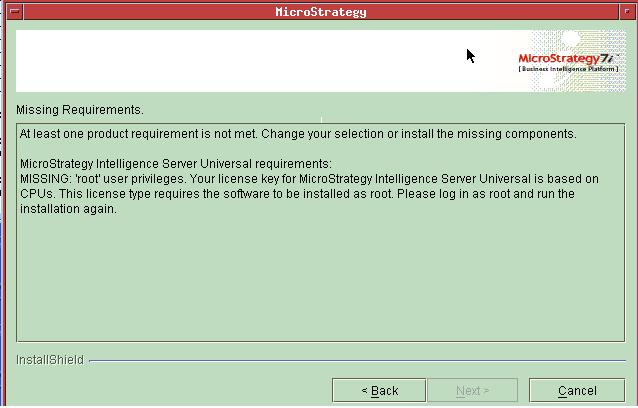
At least one product requirement is not met. Change your selection or install the missing components.
Strategy Intelligence Server Universal requirements:
MISSING: 'root' user privileges. Your license key for Strategy Intelligence Server Universal is based on CPUs. This license type requires the software to be installed as root. Please log in as root and run the installation again.
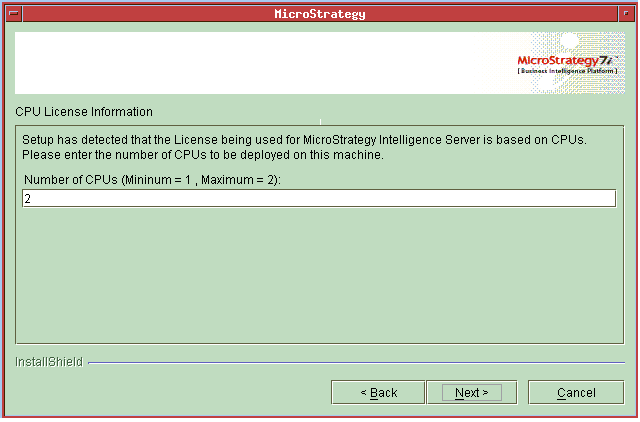
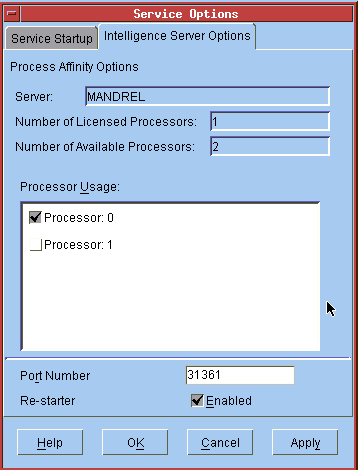
mstrctl -s IntelligenceServer rs
Implementation considerations on AIX
On AIX, Processor Affinity is implemented using resource sets. A resource set is a logical structure that contains a list of CPUs. Processes are bound to a resource set which defines specific CPUs that will be used. Resource sets do not define an exclusive use of resource, meaning that the same CPU can be a part of several different resource sets. When Strategy Intelligence Server starts up, it creates a resource set, assigns CPUs to that resource set and binds the server process to that resource set. Resource sets exist only for the lifetime of the process. If the process shuts down either normally or unexpectedly, the resource set is cleaned from the system.
While the 'root' account is mandatory for installation based on CPU licensing, it may be possible to run Strategy Intelligence Server as a non-root account by granting appropriate permissions. However, creating/modifying resource sets and binding processes requires 'root' privileges. If Strategy Intelligence Server is run as a non-root account, CPU based licensing may result in an out-of-compliance. For example, suppose Strategy Intelligence Server only has license for 3 CPUs while the machine on which it is running has 8 CPUs. In this scenario, if Strategy Intelligence Server is run as a non-root account, it will still start but it will use all 8 CPUs. This will result in an out-of-compliance situation.
AIX provides a series of *rset commands to easily manipulate resource sets and resource set binding. For instance, the rmrset command can be used manually to remove resource sets. If the user manually alters processor assignments and an out-of-compliance situation occurs, then the Processor Affinity will automatically be brought back to compliance as described earlier.
Implementation considerations on Solaris
On Solaris, Processor Affinity is implemented using Processor Set Binding. A processor set is a collection of processors. Thus, a process assigned to a processor set can only use the specified CPUs. Additionally, there are two constraints with regard to Processor sets:
For creation of a processor set with more than 1 CPU, the psrset command is used. For 1 CPU, the pbind command may be used to bind processes to that CPU. Unlike the psrset command, binding processes to CPUs using the pbind command does not cause the CPU lock to linger beyond the lifetime of the process.
The following points apply regarding implementation of Processor Affinity on Solaris:
psrset -e <processorsetID> mstrsvr
Processor Affinity tool for Strategy Web
In Strategy 9.x - 10.x, it is possible to install Strategy Web on a machine that has more CPUs than has been licensed. During installation, if the license is based on CPUs, the number of CPUs that Strategy Web will use on the machine must be entered. Similar to installing Strategy Intelligence Server, this sets the initial processor affinity mask. A window similar to the one shown in the following screen shot appears during installation:
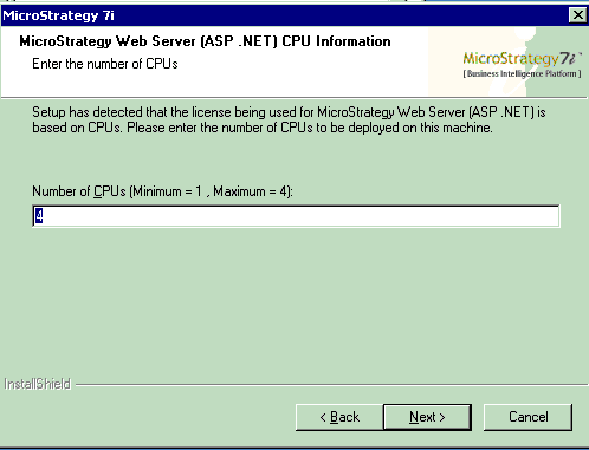
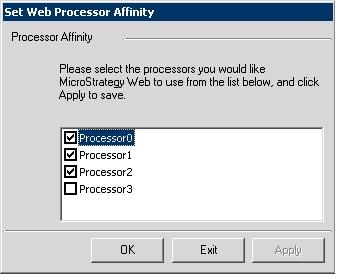
A Processor Affinity tool (MAWebAff.exe) will also be shipped, to allow the manual setting of Processor Affinity for web servers. This tool is installed in the Strategy Web directory and may be launched by double-clicking on MAWebAff.exe. The following window will appear:
NOTES:
Product Packaging Disclaimer
Strategy reserves the right to modify the behavior, capabilities, packaging and licensing for our software products at any time. Contact your Strategy Account Executive to obtain additional information regarding any particular software products.
Third Party Software Installation:
WARNING:
The third-party product(s) discussed in this technical note is manufactured by vendors independent of Strategy. Strategy makes no warranty, express, implied or otherwise, regarding this product, including its performance or reliability.
