EducationSoftwareStrategy.com
StrategyCommunity

Knowledge Base

Product

Community

Knowledge Base

TopicsBrowse ArticlesDeveloper Zone

Product

Download SoftwareProduct DocumentationSecurity Hub

Education

Tutorial VideosSolution GalleryEducation courses

Community

GuidelinesGrandmastersEvents
x_social-icon_white.svglinkedin_social-icon_white.svg
Strategy logoCommunity

© Strategy Inc. All Rights Reserved.

LegalTerms of UsePrivacy Policy
  1. Home
  2. Topics

KB10135: "Object (of type: Fact) not allowed in this place." error message appears when using an ApplySimple to build a metric.


Community Admin

• Strategy


This article helps users attempting to use an ApplySimple to build a metric but receives an error message stating that the fact is not allowed in the expression.

SYMPTOM:
A user is attempting to use an ApplySimple to build a metric but receives an error message stating that the fact is not allowed in the expression.
 
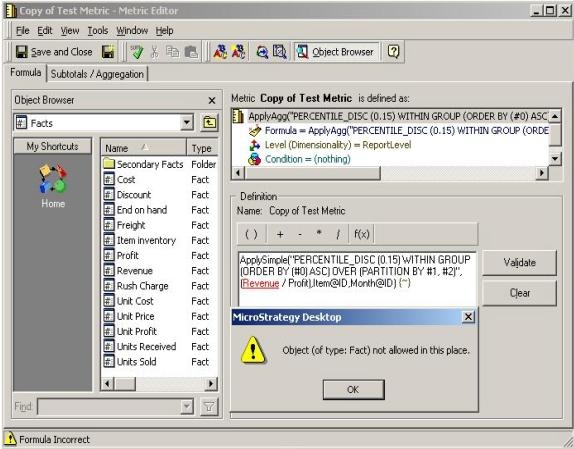
For example, a user is attempting to integrate Oracle Analytical Function with the Strategy Developer metric editor. They then use an ApplySimple to build the expression but the report renders the following error stating that facts are not allowed in the expression:
ka04W00000148pOQAQ_0EM440000002FvW.jpeg

Object (of type: Fact) not allowed in this place.
 
CAUSE:
ApplySimple functions are used for simple expressions that use arithmetic operators. Complex functions that use combinations of metrics, attribute forms and facts as arguments must use an ApplyAgg.
 
ACTION:
Perform the following steps to resolve this issue:
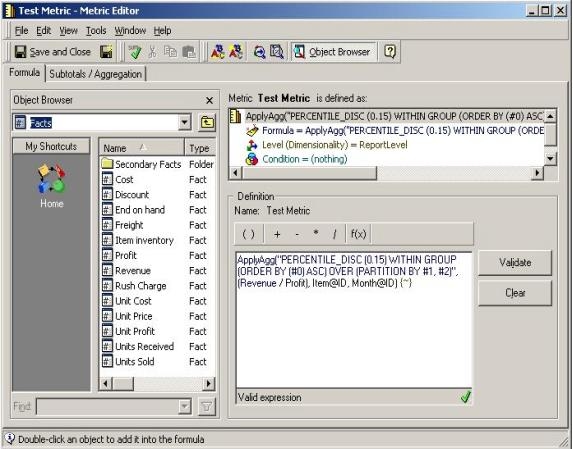
  1. Create a fact that maps to the fact column and create an attribute form that maps to the attribute column.
  2. Use the ApplyAgg () function, in the expression below, and validate it:
    ApplyAgg("PERCENTILE_DISC (X.XX) WITHIN GROUP (ORDER BY (#0) ASC) OVER (PARTITION BY #1, #2)", (Fact_1 / Fact_2), <Attribute_1>@ID, <Attribute_2>@ID) {~}
ka04W00000148pOQAQ_0EM440000002FvJ.jpeg

 
For more information on using the ApplyAgg() function, refer to the following Strategy Knowledge Base documents:

  • KB4202: How to implement attribute form expression using Apply Functions in MicroStrategy Desktop 8.x
  • KB5814: How to use an ApplyAggregate function to allow greater functionality in metrics created in MicroStrategy Developer 9.x

Comment

0 comments

Details

Knowledge Article

Published:

April 28, 2017

Last Updated:

April 28, 2017