When memory or performance issues occur in Strategy Intelligence Server 2021, the initial procedure to identify bottlenecks and root causes is to collect performance logs for the Intelligence Server process. Some performance counters must be obtained through the Microsoft Windows Performance Monitor. Other counters - specifically related to Intelligence Server objects must be collected through the Strategy Diagnostics and Performance logging tool. The following counters are recommended to be logged for an initial picture of the process and system behavior:
Enable ALL counters from the following 4 Categories
1 - Strategy Server Jobs (all counters within this Category, through Strategy Diagnostics Tool)
2 - Strategy Server Users (all counters within this Category, through Strategy Diagnostics Tool)
3 - Process (through Windows Performance Monitor)
The Process performance object lists all running processes on the machine as Instances in the right-hand list box. Only "MSTRSvr" (or MSTRSvr2_64 on 64 bit Windows) should be chosen to track values for the Intelligence Server process.
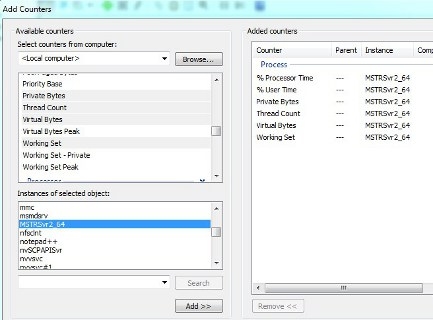
4 - Processor (through Windows Performance Monitor)
Additional Content
Consult the following Strategy Knowledgebase articles for details on capturing these counters into logs to be provided to Strategy Technical Support.
