EducationSoftwareStrategy.com
StrategyCommunity

Knowledge Base

Product

Community

Knowledge Base

TopicsBrowse ArticlesDeveloper Zone

Product

Download SoftwareProduct DocumentationSecurity Hub

Education

Tutorial VideosSolution GalleryEducation courses

Community

GuidelinesGrandmastersEvents
x_social-icon_white.svglinkedin_social-icon_white.svg
Strategy logoCommunity

© Strategy Inc. All Rights Reserved.

LegalTerms of UsePrivacy Policy
  1. Home
  2. Topics

KB20405: Overview of the process flow for LDAP integration with the MicroStrategy Intelligence Server


Community Admin

• Strategy


The following knowledge base article provides a process overview for LDAP integration with the MicroStrategy Intelligence Server.

Users attempting to understand how the Strategy Intelligence Server integrates with the LDAP Server should refer to the following technical note for details:

  • KB18562: Understanding LDAP integration with the MicroStrategy Intelligence Server

This document attempts to provide a detailed look at the process flow involved in achieving this integration. This information may be used as a guide to understand and investigate issues that may arise when attempting to setup LDAP integration for the Intelligence Server. The typical issues that may be encountered related to LDAP integration with the Strategy Intelligence Server usually fall into the following two categories:
  1. Authentication or connectivity issues.
  2. Functionality problems/questions with Importing and synchronization of Users and Groups within the Strategy Intelligence Server.
  • Authentication or connectivity issues:
    The first step in the LDAP integration process for the Intelligence Server is for the Intelligence Server to connect to the LDAP server. The Intelligence Server binds to the LDAP Server using the credentials of the 'Authentication User' specified in the LDAP configuration. The following technical note details the troubleshooting steps that may be taken to investigate issues related to the initial authentication and connectivity of the Intelligence Server to the LDAP Server:
    • KB18579: Steps to take to troubleshoot LDAP integration - connectivity and initial authentication from the MicroStrategy Intelligence Server
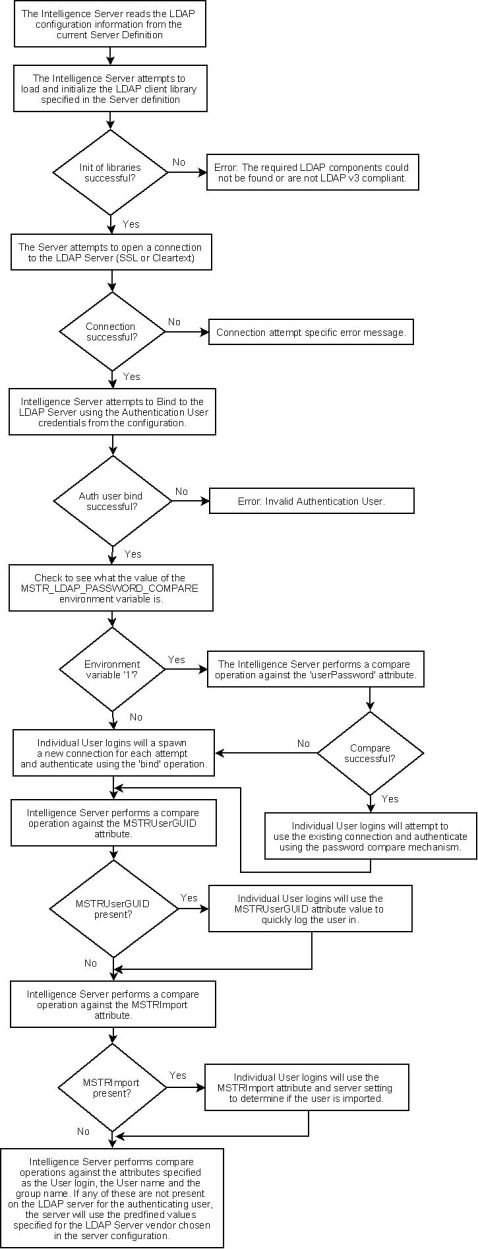
  • The flowchart below shows the series of actions carried out by the Intelligence Server initially when it is started up, or in the event that the LDAP configuration is changed:
     
ka0PW0000000s21YAA_0EM440000002BAs.jpeg
  •  
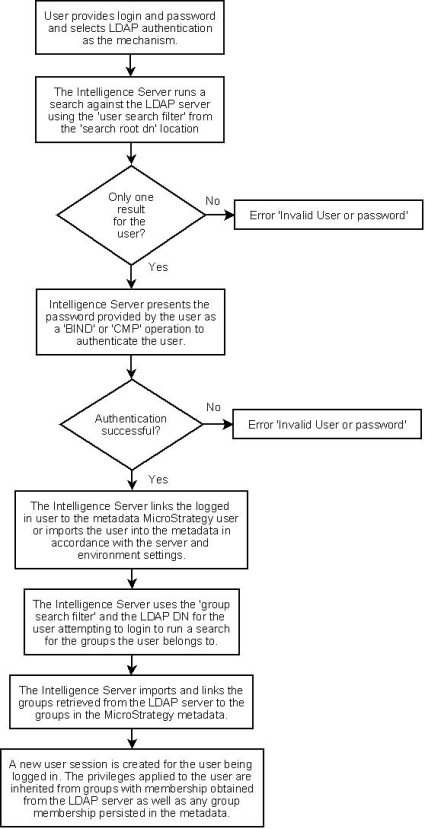
    Once the Intelligence Server is able to successfully connect to the LDAP server it is ready to allow users to login to the server wile providing their LDAP credentials. The authentication process for a user attempting to login to the Strategy Intelligence Server while specifying LDAP as the authentication method is as follows:
     
    • The Intelligence Server users the 'Authentication User' credentials to search the LDAP server for the user based on the login provided and the configured 'user search filter'.
    • If the user is found in the LDAP server, the Intelligence Server will try to authenticate the user using the password provided by the user interactively.
    • Once the user is authenticated against the LDAP Server, the Intelligence Server will attempt to find and link the corresponding Strategy User object to create a Strategy session and privileges.
    • If no user exists in the in the Strategy metadata, the Intelligence Server will attempt to Import the user from the LDAP Server in accordance with the Import configuration settings.
    • Along with the user, the Intelligence Server will also check the LDAP Server for any groups that the user belongs to by searching for any LDAP groups matching the configured 'group search filter'
    • Groups may also be imported into the Strategy metadata in accordance with the group import configuration settings.
    • In addition to importing users, previously imported users and groups may have their information updated on the LDAP server. The Strategy Intelligence Server also provides some options for user and group information persisted in the metadata to be synchronized from the LDAP server.
  •  
    When troubleshooting issues related to user authentication, it is important to determine exactly which specific section in the process flow is affected. In addition to the Strategy side troubleshooting, LDAP server side logging can also be used for troubleshooting authentication issues. Users should contact their LDAP Server administrators to obtain the relevant information.
     
    The following technical note discusses various troubleshooting steps related to user authentication in detail:
    • KB18646: Troubleshooting the 'Incorrect login/password' error when logging into the MicroStrategy Intelligence Server using LDAP authentication
  • The flowchart below also details the steps taken by the Intelligence Server when authenticating a user against the LDAP Server:
     
ka0PW0000000s21YAA_0EM440000002BAr.jpeg
  • Functionality problems / questions with Importing and synchronization of Users and Groups within the Strategy Intelligence Server:
    Once the authentication is successful, i.e., the Strategy Intelligence Server has verified the existence of the LDAP user within the LDAP server; it needs to treat the LDAP user as a Strategy user so that the user can function as a Strategy user under the assigned privileges within Strategy.
     
    The Strategy Intelligence Server achieves this transformation by importing the LDAP user as a new Strategy user into the Strategy metadata. The relationship between the LDAP user and the Strategy user is maintained by a link in the Strategy metadata, which is in the form of a Distinguished Name (DN) for the user. A Distinguished Name is the unique identifier of an entry in the LDAP directory.
     
    Administrators can choose to assign LDAP Distinguished Names to Strategy users explicitly (linking the Strategy and LDAP users). If none is supplied, the LDAP user's DN is assigned to the Strategy user after the LDAP user is imported.
     
    Strategy Intelligence Server also allows LDAP groups to be imported. With this option enabled, all the groups to which the user belongs (found by searching the LDAP Server) are also imported under the 'LDAP Users' group (similar to the imported user) when a LDAP user logs in. For a detailed discussion of the various options, users should refer to the following technical note for details:
    • KB18506: Importing and linking users using LDAP integration with the MicroStrategy Intelligence Server 9.x and newer
  • NOTE: The hierarchical visual relationship between users and their user group is not maintained within the 'LDAP Users' folder as it is maintained within the LDAP server directory. However, the link between the user and his/her group is maintained. Users should refer to the following technical note for additional details:
    • KB17701: Visual representation and conflict resolution of LDAP user group membership in MicroStrategy Intelligence Server
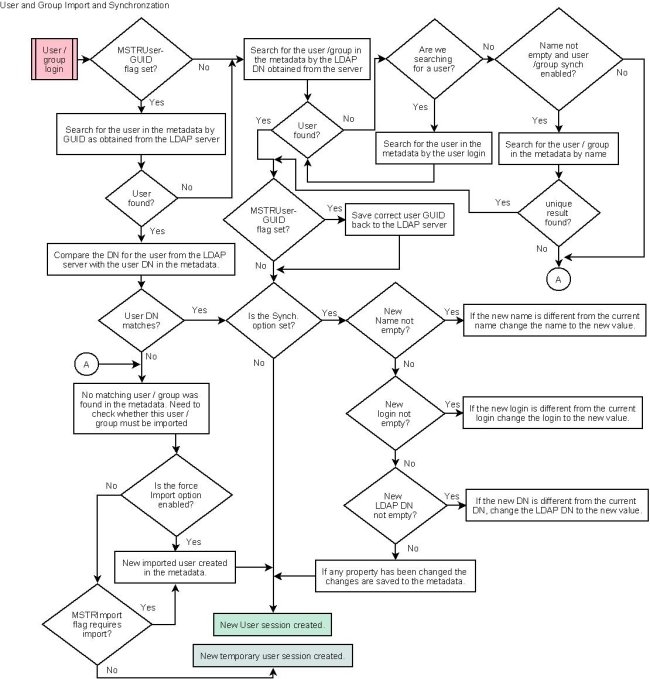
  • The Strategy Intelligence Server also includes the 'Synchronize at login' options for users and user groups. These options force the Strategy Intelligence Server to check the following (at the time of login) to ensure that the Strategy Intelligence Server users and groups and the LDAP server are synchronous for the following information:
    • The User login, user name, and Strategy user-LDAP user link information and
    • The Group name, Strategy group-LDAP group information
  • When a matching Strategy user cannot be created, a temporary user session may be created. If a user is logged in as a temporary LDAP user/group, there is no link persisted in the metadata and the user has the privileges of a 'Guest' user (inheriting the 'LDAP Public' group privileges as long as the user is logged in). The non-imported user has an inbox valid for as long as the user's session and the inbox is not persisted on disk. The non-imported users also cannot create objects and cannot schedule reports.
     
    The following chart describes the detailed process flow involved in importing, linking and synchronizing both users and groups. Users should be aware that because of the differences between users and groups, the process flow depicted below may vary slightly depending on whether users or groups are being imported.
     
ka0PW0000000s21YAA_0EM440000002BAu.jpeg

 
Strategy Intelligence Server LDAP integration FAQ
 
Q. Do LDAP users have their own Inbox and Personal folders?
A. If users are imported into the metadata, as Strategy users, they will have their own inbox and personal folders. If users are not imported, regardless of whether they are part of the LDAP Users or LDAP Public group, their inbox will only be persisted for the current session. Users that are not imported into the metadata will not have personal folders and will only be able to save to public folders if they have the correct privileges and permissions.
 
Q. What is the 'scope' value used for searching the LDAP Server?
A. The scope for all searches is for all nodes in the 'sub-tree'. The Strategy Intelligence Server 8.x does not support configuration of the scope parameter. Users may be able to limit search results using conditions in the search filter or by changing the 'search root' location.
 
Q. How can I assign security filters, security roles (privileges), or access control (permissions) to individual LDAP users?
A. Security roles and ACLs may be assigned to users after they have been imported into the Strategy metadata, this information is not assigned dynamically from information in the LDAP repository.
 
To allow users to dynamically inherit this information, administrators should assign these permissions at the group level in the Strategy metadata. User group membership information is dynamically determined each time an LDAP user logs into the system, regardless if they are imported.
For Security filters, the Strategy Intelligence Server 9.2.x and newer includes the ability to populate a 'System Prompt' object with the value of an LDAP attribute assigned to the user. This system prompt can then be used in a Strategy filter object, and used as a security filter as documented in the following Technical Note: KB35069 "How to link LDAP attributes to system prompt LDAP attributes in the Strategy Intelligence Server 9.2.x and newer releases"
 
Q. May two different users have different LDAP links, but the same user name?
A. No. The Strategy metadata may not contain two users with the same login name or user name. If an attempt is made to create a user with the same user login or user name the import will fail. Each user object in the Strategy metadata must have a unique User login or User Name.
 
Q. What happens if there are two users with similar descriptions in the LDAP directory?
A. If the DN (distinguished name) descriptor that specifies a particular user is not sufficient for the Strategy Intelligence Server to identify the user in the Directory Server, then the user will fail to log in. The administrator should enhance the 'user search filter' and 'Group search filter' in the LDAP configuration window to aid the identification of the user.
 
Q. What happens if I import a User Group along with all its members in the LDAP directory into a Strategy metadata and then assign a connection map to the imported group?
A. The connection map of the imported user group to which the user belongs will not readily apply to the user. The user needs to be persisted explicitly as a member of the group after she/he has been imported.


Comment

0 comments

Details

Knowledge Article

Published:

May 31, 2017

Last Updated:

February 26, 2024