Starting with the release of Strategy ONE (March 2024), dossiers are also known as dashboards.
SYMPTOM
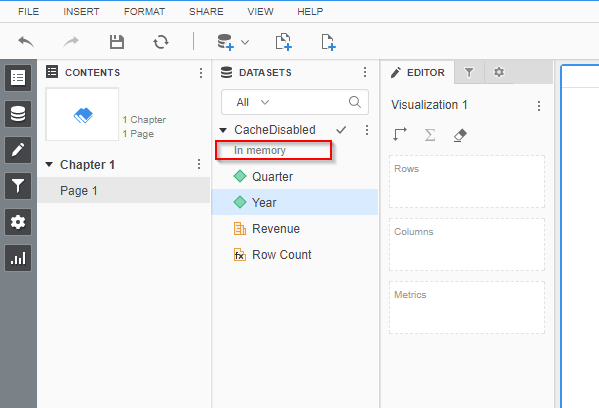
While the report cache is disabled at the report level and there is no cache or Intelligent Cube exist for the dataset to hit, "In Memory" appears under the dataset name listed in Visual Insight editor with Strategy Web 10.x.
STEPS TO REPRODUCE
1. Create a report with Quarter and Year attribute plus "Revenue" metric.
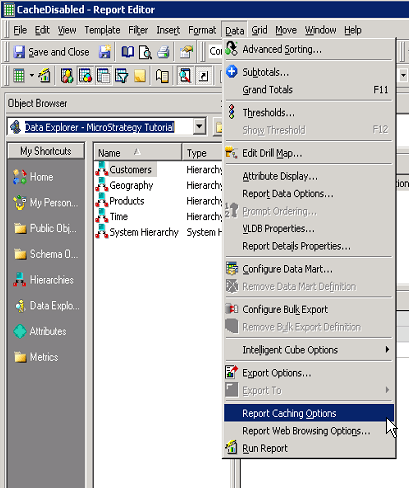
2. Using Strategy Developer 10.x, open the report in design mode and go to menu, Data > Report Caching Options.
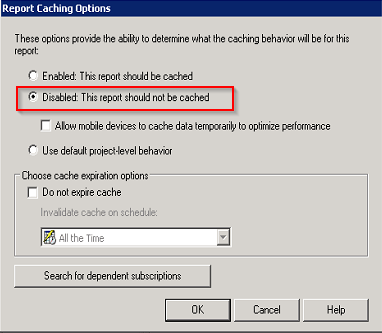
3. Select "Disabled: This report should not be cached."
4. Save and close the report.
5. Go to Strategy Web 10.x and create a new Dashboard.
6. Add the report as the dataset for the Dashboard by selecting "Add Existing Dataset."
7. Notice that the dataset is added and "In Memory" appears below the name of the dataset.
CAUSE
This is working as designed. Even for the dataset report which cache is enabled, the report is actually executed as a whole and data exist inside the memory of Intelligence Server. The report instance cannot be confirmed via Cache or Cube Monitor. However, by enabling SQL Trace, it is clear that the report is actually getting executed when it is added to the Dashboard.
[Database Classes][SQL Trace] Executing SQL. Connection ID: 3.
SQL: select    a12.[YEAR_ID] AS YEAR_ID,
    a11.[QUARTER_ID] AS QUARTER_ID,
    max(a12.[QUARTER_DESC]) AS QUARTER_DESC0,
    sum(a11.[TOT_DOLLAR_SALES]) AS Revenue
from    [QTR_CATEGORY_SLS]    a11,
    [LU_QUARTER]    a12
where    a11.[QUARTER_ID] = a12.[QUARTER_ID]
group by    a12.[YEAR_ID],
    a11.[QUARTER_ID]

"Live" connection is also available for all Strategy Web 10.x with Data Import or by "Add External Data" option. For more information about Live Connect with Data Import, see:
KB236043: New feature in Strategy Web 10: Connect Live to datasource (Direct Data Access) in Data Import
For more information about "Browse All Objects," see:
KB307514 : In Strategy Secure Enterprise 10.x, what is the difference between the "Create New Report" option and the "Browse All Objects" option when creating a VI Dashboard
Article Reference Number:
KB39650
