Starting Strategy Enterprise Manager 9.0, IS_CONFIG_PARAM and IS_CONFIG_PARAM_FACT table are introduced to record the Intelligence Server and Project configuration parameters during the Enterprise Manager Data Load.
In Strategy Enterprise Manager 9.4.x - 10.x, the Metrics under \Public Objects\Metrics\Performance Monitoring Analysis\Configuration Parameters\ are defined to show some of the Intelligence Server and Project Configuration Parameters as shown below:

There are additional reports present out-of-the-box in the Strategy Enterprise Manager project in the folder: Enterprise Manager\Public Objects\Reports\Performance Analysis\Performance Monitoring Analysis.
In order to show all the Intelligence Server and Project Configuration Parameters, run the following script in Strategy DB Query Tool to query related information.
For Intelligence Server Configuration Parameters, run the following script:
select IS_SERVER_NAME, IS_CONFIG_PARAM_NAME, IS_CONFIG_PARAM_VALUE from IS_CONFIG_PARAM a1 join IS_CONFIG_PARAM_FACT a2 on (a1.IS_CONFIG_PARAM_ID=a2.IS_CONFIG_PARAM_ID) join IS_SERVER a3 on (a2.IS_SERVER_ID=a3.IS_SERVER_ID) where a2.IS_PROJ_ID=0;
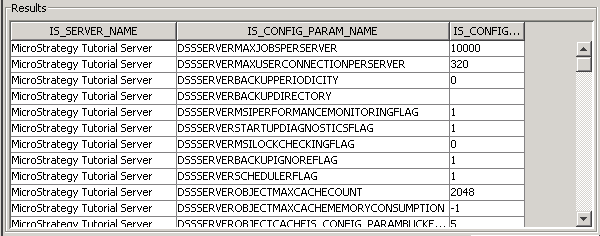
For Project Configuration Parameters, run the following script:
select IS_PROJ_NAME, IS_CONFIG_PARAM_NAME, IS_CONFIG_PARAM_VALUE from IS_CONFIG_PARAM a1 join IS_CONFIG_PARAM_FACT a2 on (a1.IS_CONFIG_PARAM_ID=a2.IS_CONFIG_PARAM_ID) join IS_PROJ a3 on (a2.IS_PROJ_ID=a3.IS_PROJ_ID);
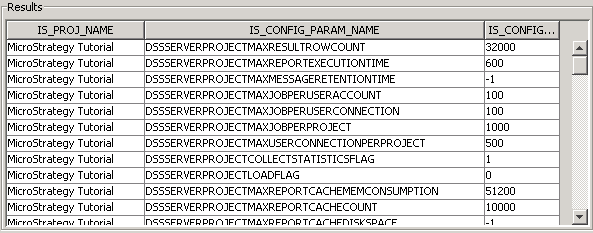
In addition, Command Manager could also be used to list all Project Configuration Settings as explained in the articles referenced below:
KB13380: How to create a list of Project Configuration Settings using MicroStrategy Command Manager 9.x
KB10354: How to save MicroStrategy Intelligence Server configuration settings and 3-tier Project Configuration settings to a file in MicroStrategy 10.x?
