EducationSoftwareStrategy.com
StrategyCommunity

Knowledge Base

Product

Community

Knowledge Base

TopicsBrowse ArticlesDeveloper Zone

Product

Download SoftwareProduct DocumentationSecurity Hub

Education

Tutorial VideosSolution GalleryEducation courses

Community

GuidelinesGrandmastersEvents
x_social-icon_white.svglinkedin_social-icon_white.svg
Strategy logoCommunity

© Strategy Inc. All Rights Reserved.

LegalTerms of UsePrivacy Policy
  1. Home
  2. Topics

KB43570: How to pass selector values from a selector on a grid(attribute used selector) in MicroStrategy Web


Community Admin

• Strategy


In KB38841(KB38841: How to pass selector answer "All" from targeted hyperlink to a prompt child report in Strategy Web), steps for passing 'all' selector values of multiple selectors to answer prompts in a targeted report services document/report are introduced. However if the selector is on a grid, it is not possible to find the key for the selector by viewing the HTML source like mentioned in that article.
This article introduces a method to find the key for grid selectors.
PREREQUISITES
Install a network analyzer that can view HTTP request headers. For an example of a network analyzer tool, refer to KB20064: How to install and use Fiddler for MicroStrategy Web troubleshooting for steps to install Fiddler.
STEPS TO FIND THE KEY
  • Run the source document in Presentation mode.
  • Make a selection from the grid selector. This action should cause an HTTP request to be sent from your browser to the Strategy Web server.
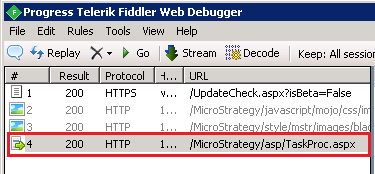
  • In your network analyzer tool, find the request of clicking the selector performed in step 2. In Fiddler, an example request is shown below:
ka04W00000148jUQAQ_0EM44000000REKj.png
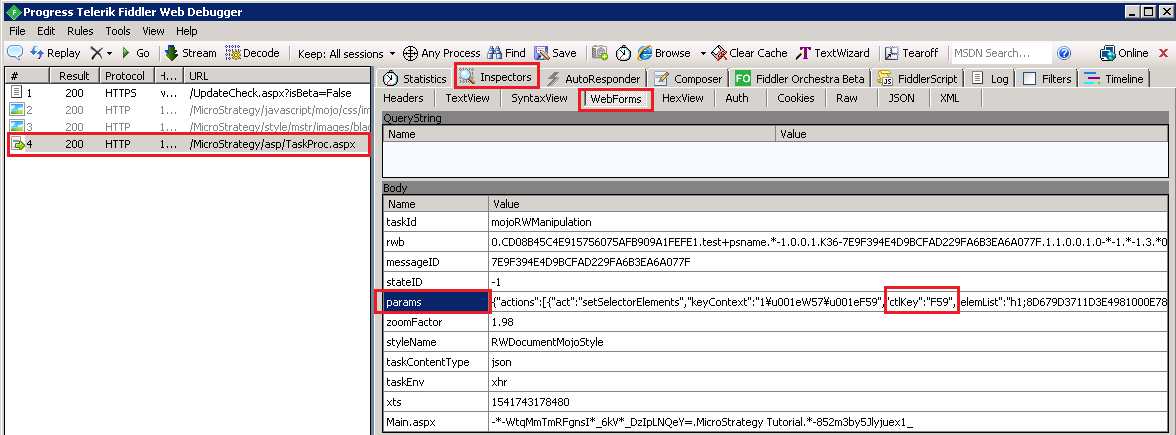
  • Inspect the request headers. In the body of the request, find the keyword ctlKey. The key immediately following this keyword is the selector control key. In Fiddler, users can use the Inspectors > WebForms > params feature to view the body of the request. An example showing a control key value of F59 is shown below:
ka04W00000148jUQAQ_0EM44000000REKe.png
  • Follow the URL syntax in KB38841 to create the hyperlink for passing selections.


KB43570


Comment

0 comments

Details

Knowledge Article

Published:

June 6, 2017

Last Updated:

November 9, 2018