SYMPTOM:
Users may have an attribute form formatted as HTML Tag type in the form definition, like shown below:
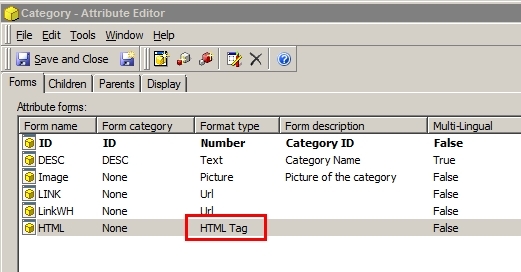
By setting the Format type to HTML Tag, elements from the data warehouse that actually contain HTML tags in their content will render properly when viewing through Strategy Web 9.x, like in the example below:
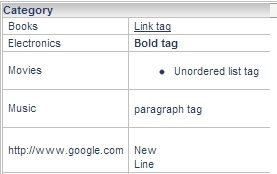
In this example, the right column is the attribute form set to HTML Tag type. The elements in this form contain the common HTML tags <a>, <b>, <ul>, <p>, and <br>, respectively. Other HTML tags are possible.
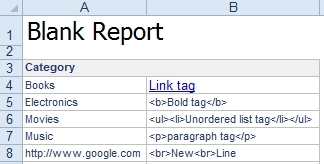
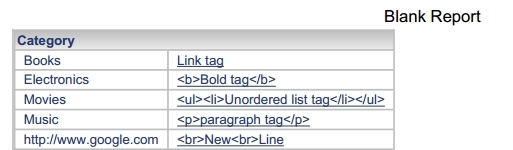
However, when this report is exported to either Excel or PDF, the tags do not render correctly and instead show up as clear text, like shown below:
Excel:
PDF:
CAUSE:
In order for HTML syntax to be properly interpreted, the rendering engine must have the proper capability to perform the interpretation. For example, when the report is viewed through Strategy Web 9.x, the internet browser is capable of such interpretation of HTML syntax, so the HTML tags render correctly. However, Excel and PDF both do not support HTML tag interpretation, so the tags show up instead as clear text. In the above example, it can be seen that Excel and PDF actually have a limited support of the <a> tag, but not any other tag used in the example.
This is similar to the behavior for HTML containers on Report Services Documents like described in KB30198: New feature in MicroStrategy 9.X: HTML Container - Displaying HTML content in a document.
Currently, for PDF only hyperlink tags are supported, and for Excel, only hyperlink and image tags are supported in versions prior to 10.3.
Starting from Strategy 10.3, export html tags to PDF is available. Refer to KB286713: New feature in MicroStrategy 10.3 Secure Enterprise Platform: HTML tag rendering in PDF exports for steps to configure.
ACTION:
Strategy will continue to investigate and post updates as soon as they are available.
