SYMPTOM
When a report or Document containing an element prompt executed, it takes long time to load all the elements when there are large number of attribute elements, and sometimes it even leads to a timed out error.
The timed out error has been outlined in the KB article as below.
KB10155: When answering a prompt with a large number of elements, a timeout error occurs in MicroStrategy Web
CAUSE
When a user runs a report or document containing an element prompt, the Intelligence Server runs two SQL statements (as below) against the data warehouse to retrieve the elements from the data warehouse. The first one is to retrieve the count of all the elements, and the second one is to retrieve the results as shown in the examples below for the Strategy Tutorial "Item" attribute. This has been outlined in the KB article as below.
KB30391: How does the MicroStrategy Intelligence Server 9.x determine the number of prompt elements to fetch and whether or not element caching will be used for the result set.
select count(distinct a21.ITEM_ID)  WJXBFS1  from LU_ITEM a21
select a11.ITEM_ID  ITEM_ID,   a11.ITEM_NAME  ITEM_NAME  from LU_ITEM a11  order by  2 asc , 1 asc
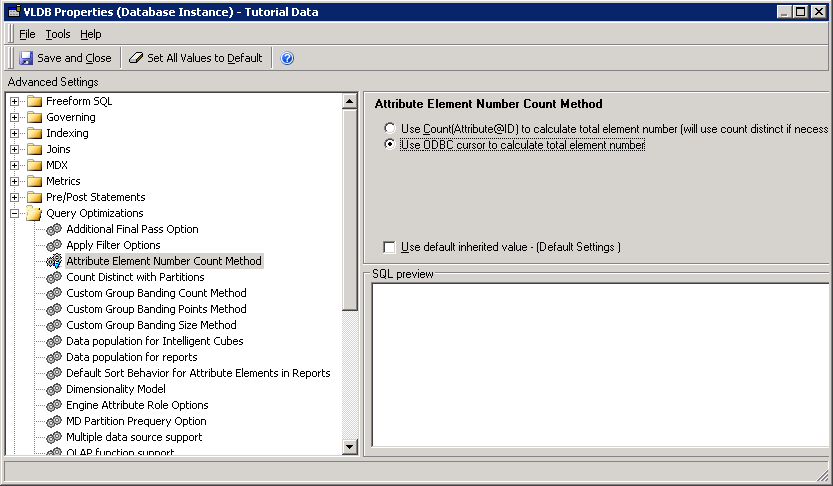
•Use Count(Attribute@ID) to calculate total element number (uses count distinct if necessary) (default): In this case, the database determines the total number of rows.
•Use ODBC cursor to calculate the total element number: This setting causes Intelligence Server to determine the total number of rows by looping through the table after the initial SELECT pass.
The difference between the two approaches is whether the database or Intelligence Server determines the total number of records. Strategy recommends using the “Use ODBC cursor...” option (having Intelligence Server determine the total number of records) if users have a heavily taxed data warehouse or if the SELECT COUNT DISTINCT query itself introduces contention in the database.
