SUMMARY:
This issue has been classified as a defect by Strategy. The impact is limited to the Strategy 9.3.x and 9.4.x product suite when viewing or exporting documents to PDF that contain an image with an http path that is located on the Intelligence Server machine. This issue only occurs when using an ASP web server. There is a workaround available in the current document. A solution/code fix for this issue is not available in current releases but is being reviewed for a future Strategy release
SYMPTOM:
In Strategy 9.3.x, a user creates a document in Desktop that contains an image using the http path:
http://<I-Server machine name>/MicroStrategy/images/<image name>
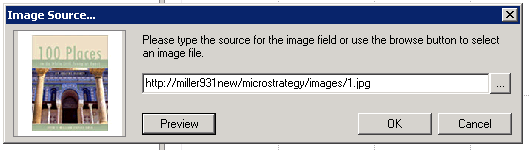
2. Run the document in PDF mode in Desktop. The image displays as a red x. The image also displays as a red x when the document is exported to PDF through Desktop or Web.

3. Run the document in HTML mode in Desktop. The image does not display.

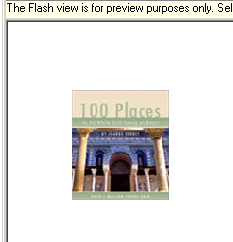
4. The image does display in Flash mode in Desktop and all modes in Web.
CAUSE:
This issue occurs when viewing a document in PDF mode or exporting the document to PDF when the document contains an image with the http path http://<I-Server machine name>/MicroStrategy/images/<image name>. This issue only occurs when using an ASP web server. This issue has been classified as a defect in Strategy 9.3.x-9.4.x
ACTION:
Upgrade to Strategy 10.x to resolve the issue.
WORKAROUND:
A workaround is to use a relative path to the image rather than an http path. Follow the steps below:
1. Edit the image in the document.
2. Change the image source to a relative path such as ./images/1.jpg
3. When the document is run in PDF mode, the image can display

ADDITIONAL TROUBLESHOOTING:
If the workaround steps above do not resolve the issue, please consider calling Strategy Technical Support with the following information:
TO LEARN MORE:
Related Tech notes:
KB37807: Best practices on how to reference image using relative path in MicroStrategy 9.x and 10.x
KB37810: How to troubleshoot image issues in MicroStrategy 9.x
KB42168: Image objects using a URL path with backslashes exports to PDF with a red "X" box but displays correctly in Interactive View for MicroStrategy Web 9.x.
KB14918: In MicroStrategy Intelligence Server Universal 8.1.x and newer, a red 'x' is displayed instead of an image when exporting Report Services documents to PDF.
Strategy Report Services Document Creation Guide 9.3.x:
Chapter 2 Adding Text and Data to Documents. Section: Inserting images in a document.
Appendix C Troubleshooting Documents. Section: Troubleshooting during document execution.
