EducationSoftwareStrategy.com
StrategyCommunity

Knowledge Base

Product

Community

Knowledge Base

TopicsBrowse ArticlesDeveloper Zone

Product

Download SoftwareProduct DocumentationSecurity Hub

Education

Tutorial VideosSolution GalleryEducation courses

Community

GuidelinesGrandmastersEvents
x_social-icon_white.svglinkedin_social-icon_white.svg
Strategy logoCommunity

© Strategy Inc. All Rights Reserved.

LegalTerms of UsePrivacy Policy
  1. Home
  2. Topics

KB483220: No metric values displayed after creating a Group with MDX datasource.


Community Admin

• Strategy


In MicroStrategy 11.0, when Derived Attribute or Element Groups push down is applied on an MDX (Multi-Dimensional Extension) source cube, the data cannot be presented.

Starting with the release of Strategy ONE (March 2024), dossiers are also known as dashboards.
 

Symptoms


The dossier is using a MDX datasource
The dossier has Derived Attribute or Derived Element created
The dossier has missing data (missing rows, blank cells)

Glossary

MDX Source Cube
Derived Attribute
Element Groups
Derived Attribute Push Down
What is CSI?
Query Detail 

Steps to Reproduce


The following example uses Strategy Tutorial cubes, attributes, and metrics.
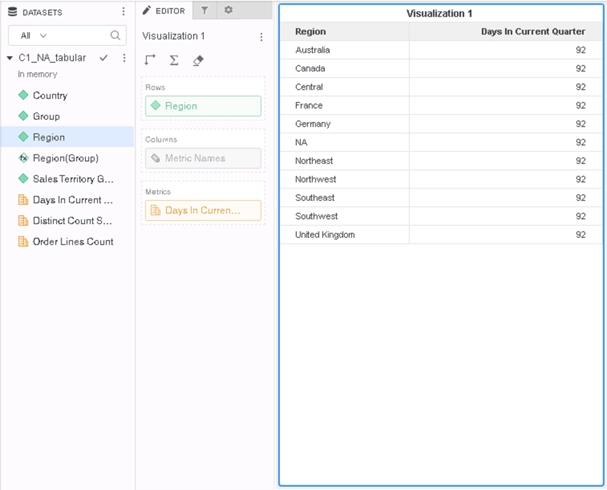
  • Create a new dossier and add a MDX cube, for example cube C1_NA_tabular
  • Add attribute “Region” and metric  “Days In Current Quarter” to a Grid Visualization
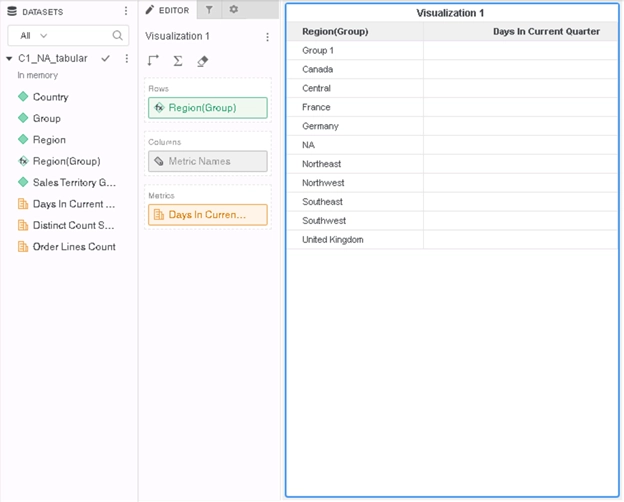
  • Right click on cell “Australia” and chose Group, name it “Group 1”. By doing this an Element Groups Derived Attribute “Region(Group)” is created, and replacing the "Region" attribute in the Grid.
  • Notice the missing data on the Grid
ka0PW0000001JXsYAM_0EM2R000000lSH5.jpeg
  • If the user replaces “Region(Group)” with "Region", the missing data is shown.
ka0PW0000001JXsYAM_0EM2R000000lSH0.jpeg

Cause


This is a known defect in Strategy 11.0. 
Since MDX source cube has different logic for metric level compared to normal OLAP/MTDI cubes, when pushing down Derived Attribute or Element Groups to the MDX source cube, the metric level can be inconsistent, which causes failure in execution and missing data.
Before the fix, the Query Detail shows:
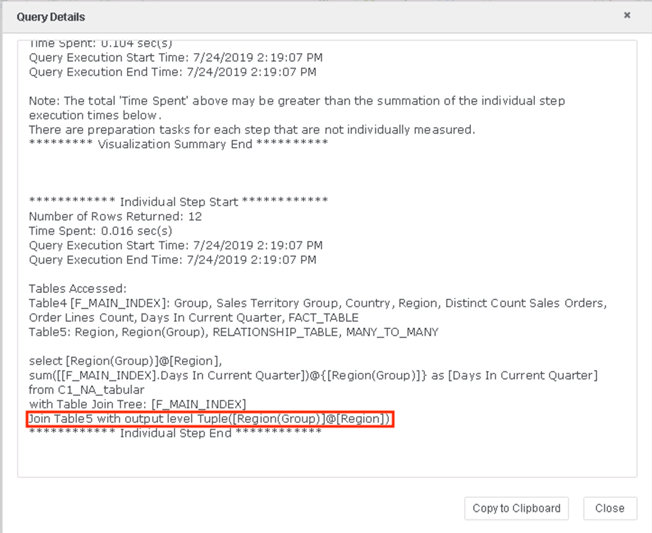
ka0PW0000001JXsYAM_0EM2R000000lSHZ.jpeg

Solution


To resolve this defect, please upgrade to Strategy 2019 or above. We recommend the latest version.
In the new fix, the metric level of the MDX cube is the same as an OLAP/MTDI cube, and no data missing when Derived Attribute or Element Groups push down is applied:
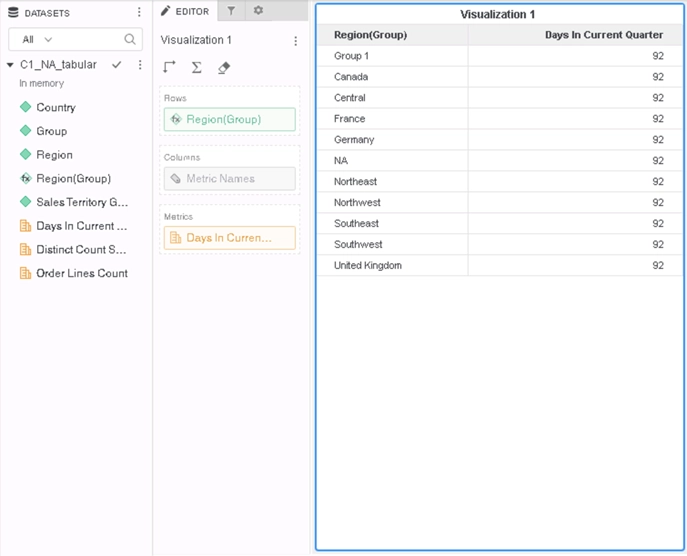
ka0PW0000001JXsYAM_0EM2R000000lSHt.jpeg

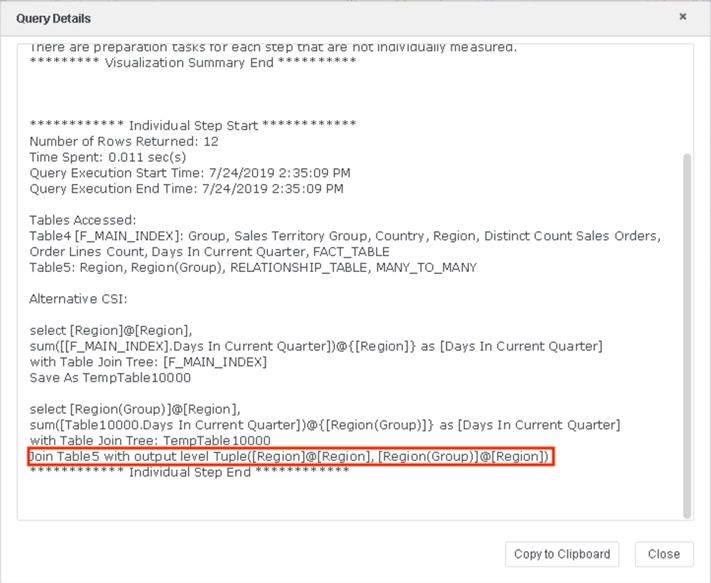
After the fix, the Query Details shows complete level information.
ka0PW0000001JXsYAM_0EM2R000000lSHj.jpeg

Strategy Internal Reference number for this technical note is  KB483220 and DE103710.


Comment

0 comments

Details

Knowledge Article

Published:

May 1, 2019

Last Updated:

March 21, 2024