EducationSoftwareStrategy.com
StrategyCommunity

Knowledge Base

Product

Community

Knowledge Base

TopicsBrowse ArticlesDeveloper Zone

Product

Download SoftwareProduct DocumentationSecurity Hub

Education

Tutorial VideosSolution GalleryEducation courses

Community

GuidelinesGrandmastersEvents
x_social-icon_white.svglinkedin_social-icon_white.svg
Strategy logoCommunity

© Strategy Inc. All Rights Reserved.

LegalTerms of UsePrivacy Policy
  1. Home
  2. Topics

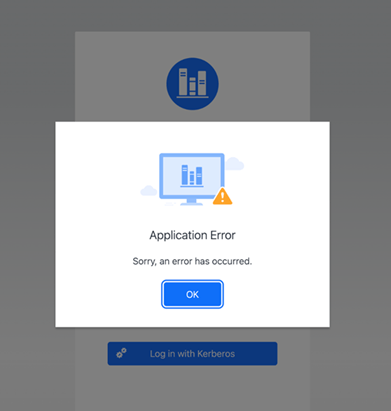
KB486775: An application error occurs in when logging into Library Web while using Kerberos authentication with Tomcat 10


Ning Wang

Quality Engineer, Senior • MicroStrategy


This article details how to resolve an application error when logging into Library Web while using Kerberos authentication with Tomcat 10.

Description

Strategy Library fully supports Kerberos authentication using Tomcat on Windows and Linux.
In Strategy ONE (June 2024), Tomcat is upgraded to version 10+. With previous configuration settings, an application error may occur when trying to log into Library via Kerberos authentication with the previous configuration.
ka0PW0000002UQDYA2_0EMPW000006b8w1.jpeg

Prerequisites

Before attempting to resolve this situation, make sure the following prerequisites are met:

  1. Ensure the Strategy Intelligence server is configured correctly to use integrated authentication as shown in KB19110 (Intelligence Server on Linux) or KB19580 (Intelligence Server on Windows). See Enable Integrated Authentication for all the information necessary to implement integrated authentication in the context of Strategy.
  2. Create a user principal for the Strategy Web server service following article KB33289.
  3. Create krb5.conf, JVM startup arguments, and generate a krb5.keytab as shown in Enable Integrated Authentication.
  4. Ensure that Library Authentication Mode is Integrated(128).

Solution

  1. Open jaas.conf in a text editor. The previous version for Sun/Oracle/Open JDK that works prior to Strategy ONE (June 2024) with Tomcat 9 and JDK17 is shown below. The principal name in jaas.conf must match the principal name created above for the Web Application server user.
    
    com.sun.security.jgss.krb5.accept {
        com.sun.security.auth.module.Krb5LoginModule required
        principal="HTTP/ASMachineName@DOMAIN_REALM"
        useKeyTab=true
        doNotPrompt=true
        storeKey=true
        debug=true;
    };

  2. Update jaas.conf as shown below. The loginConfigName (The name of the JAAS login configuration to be used to login as the service) has been changed from the default value of "com.sun.security.jgss.krb5.accept" to "com.Strategy.web". Do not change any other settings.
    
    com.Strategy.web {
        com.sun.security.auth.module.Krb5LoginModule required
        principal="HTTP/ASMachineName@DOMAIN_REALM"
        useKeyTab=true
        doNotPrompt=true
        storeKey=true
        debug=true;
    };

  3. Restart Tomcat.

Comment

0 comments

Details

Knowledge Article

Published:

May 17, 2024

Last Updated:

June 21, 2024