Starting with the release of Strategy ONE (March 2024), dossiers are also known as dashboards.
Conclusions
1. New Export Engine in Strategy 2019 can deliver a high-quality PDF files with complete data, diversified widgets and various fonts, compared with the Legacy Engine in 10.4.8.
2. For New Export Engine in Strategy 2019, when the number of concurrent user increases, the throughput (pages per minute) would remain almost unchanged under default setting; For Legacy Engine in 10.4.8, the throughput has a nearly linear increase under default setting.
3. The average machine CPU usage and machine peak memory of New Export Engine in Strategy 2019 is not affected by growing number of concurrent users under default setting.
4. Response time of New Export Engine increases linearly with the number of PDF file page increases.
5. To ensure a high-level consistency between target dossier and exported PDF file, New Export Engine in Strategy 2019 sometimes takes more response time.
Content

New Export Engine (Strategy 2019) has a setting—exporter.renderer.process.max, which is dynamically calculated by the CPU core. Normally, it equals to a quarter of CPU cores. And its default value has a limitation between (and include) 2 and 4. This setting defines the maximum number of renderer process, which is a constant. Under the default setting, the maximum number of instances can be processed is the same constant. So, the throughput (pages per minute) remains almost unchanged with number of users increases. As a result, the average CPU usage and peak memory of New Export Engine remains almost unchanged with the number of concurrent users increases under default setting.
For the Legacy Export Engine, while the concurrent user number increases, a liner throughput would be expected.

Concurrent User number: 4, 8, 12
Due to above point, when the concurrent user number increases, average machine CPU usage and machine peak memory of New Export Engine in Strategy 2019 would remain unchanged, which means approximately 4% -70% less CPU and 20% - 35% less peak memory usage when we tested with 8, 12 concurrent users in-house.


Concurrent User number: 4, 8, 12
With the number of PDF page increases linearly, the corresponding response time of New Export Engine will also have a linear increase.
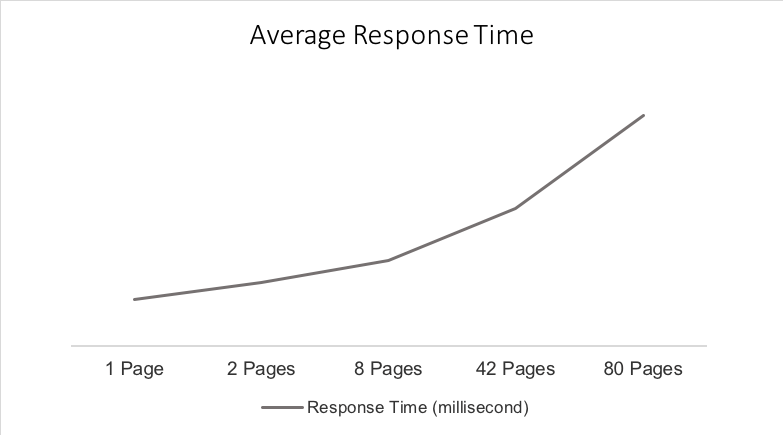

Long response time sometimes is due to calling multiple 3rd party functions(for example Dossier 5 in above graph).
Since Legacy export engine only export part of data, thus the response time is shorter in some cases. Especially when exporting the heavy flat grid with huge amount of data, the response time would be expected to be longer than Legacy Export Engine, since New Export Engine would render all pages but Legacy one would only export part of data. Thus, ‘Export to Excel’ would be recommended for heavy grid.
Below there are related articles for troubleshooting the New Export Engine timeout issues:
