Quick Search is the new search engine that utilizes the full-text search library – Lucene. The Quick Search Indices are generated by Lucene to speed up the search. The content of the indices is based on objects from the metadata.
Learn more:
Currently, Quick Search Indices are created by InitialCrawl, which crawls metadata objects and generates the corresponding index. Usually, this is triggered when a project is first created or loaded on one environment.
Once the indices are created, they will not remain unchanged. Instead, indices will be updated accordingly once the corresponding objects are changed. Quick Search has two ways to make sure indices are updated:
When a project is loaded, Quick Search will first check whether it needs to rebuild the index regardless if it exists in the very project. It will automatically rebuild the index (i.e., destroy the current index if it exists, and start initial crawl task to generate the index) if one of the following conditions are met:
If it does not need to rebuild the index, it will check if there is an existing index for the project. If an index does not exist, the initial crawl task will be started automatically for the project. If an index exists for the project, it will start incremental crawl or resume paused crawl task, based on the index status.
If the index folder is changed via Strategy Developer, Quick Search will automatically create indices for all loaded projects.
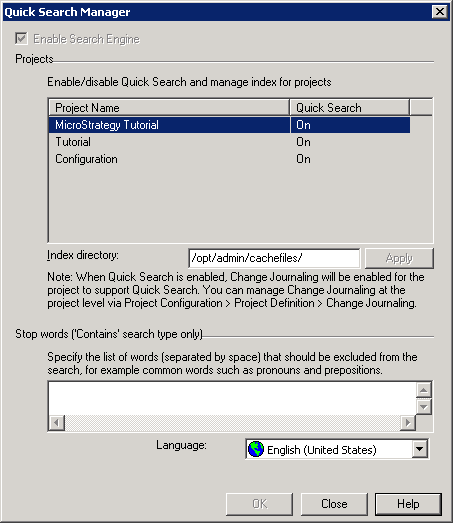
Note: Index will not be updated in 2Tier mode. Initial crawl, incremental crawl, and teal-time update are performed in 3Tier or 4Tier mode.
The index status can be monitored via Developer:
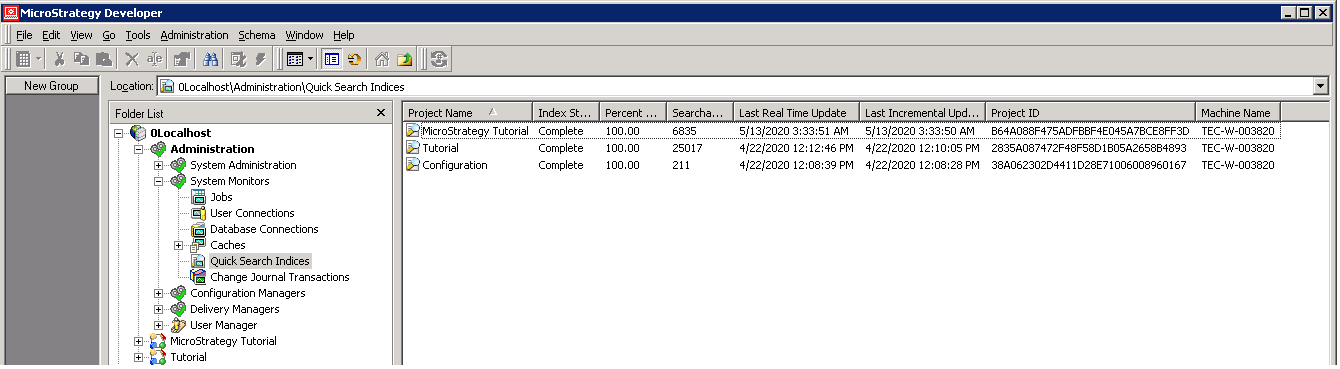
You can see the following when viewing the indices:
If a certain system configuration changes, you may be required to rebuild the Quick Search Index. Quick Search Indices are accessible via your System Monitors. To rebuild a search index:
For additional details, please refer to KB482892.
The following scenarios may require you to rebuild a search index:
