Starting with the release of Strategy ONE (March 2024), dossiers are also known as dashboards.
Dossier uses Live Connect Dataset
Dossier contains non-Aggregatable metrics and the result is calculated incorrectly
Non-Aggregatable Metrics
Live Connect
This example is built upon Strategy Tutorial project.
1. In the Strategy Web, create a new Dossier, click on New Data, Databases
2. Select the following tables: LU_MONTH, CITY_MNTH_SLS.
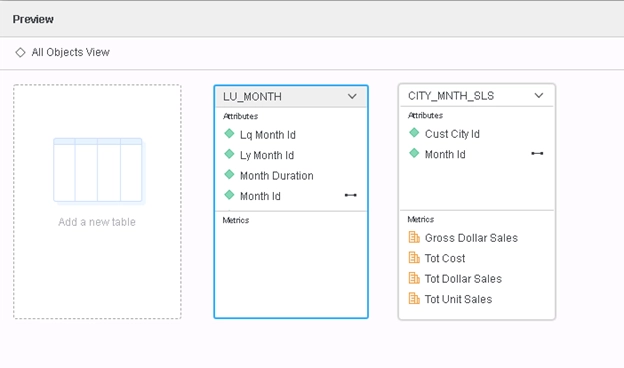
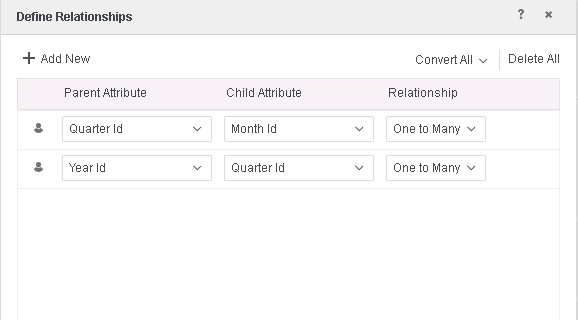
3. Define the following relationships in table LU_MONTH
4. Save the data set and choose Access mode to be "Connect Live"
5. Create a Derived Metric: M01= Sum([Tot Cost]){~+, <|[Quarter Id]+}
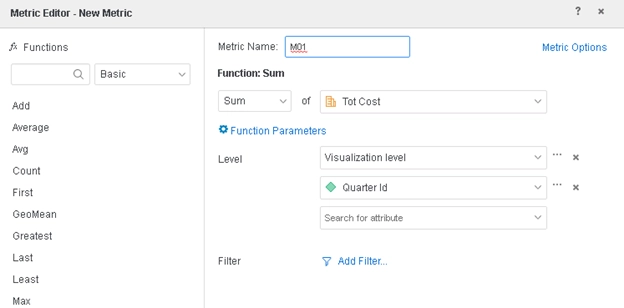
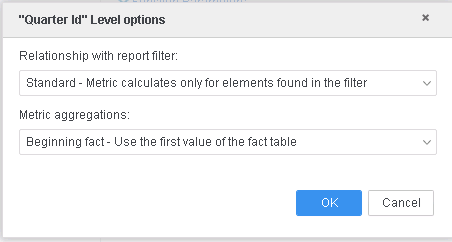
Note that the Metric aggregations is set to "Beginning fact", meaning the return value should be the first value from the fact table, instead of a sum total at the year level.
6. Create a Grid Visualization, add into template: Year Id, M01
7. The data for M01 is shown as below
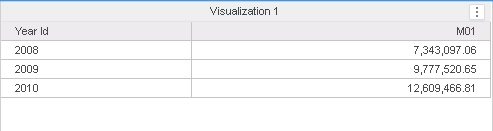
8. Check Query Details and note that the metric is incorrectly aggregated to Year Id level
SQL Statements:
create table TG67062O0NB000 nologging as
select a12.YEAR_ID YEAR_ID,
sum(a11.TOT_COST) WJXBFS1
from CITY_MNTH_SLS a11
join LU_MONTH a12
on (a11.MONTH_ID = a12.MONTH_ID)
group by a12.YEAR_ID
This is a known issue and has been addressed in Strategy 2019 and above.
If you are upgrading to Strategy 2019 or above, to pick up the fix, enable project level setting "Data Engine Version" to 11. This property can only be enabled through Workstation. For more details on enabling the setting, refer to Change Data Engine Version
After the fix is applied, the data are calculated correctly and shown as below:
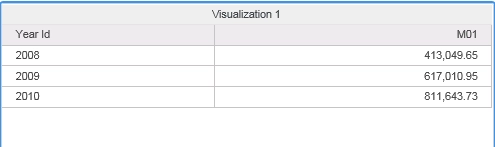
Check the Query Detail, the data is aggregated to Month level, which is the lowest level in the hierarchy.
SQL Statements:
create table THWR3YD42OP000 nologging as
select distinct a11.YEAR_ID YEAR_ID,
a11.MONTH_ID MONTH_ID,
a11.QUARTER_ID QUARTER_ID
from LU_MONTH a11
create table TQ7PM5HDUNB001 nologging as
select pa13.YEAR_ID YEAR_ID,
a11.MONTH_ID MONTH_ID,
sum(a11.TOT_COST) WJXBFS1
from CITY_MNTH_SLS a11
join THWR3YD42OP000 pa13
on (a11.MONTH_ID = pa13.MONTH_ID)
group by pa13.YEAR_ID,
a11.MONTH_ID
Strategy Internal Reference number for this technical note is KB483209 and DE104084.
