EducationSoftwareStrategy.com
StrategyCommunity

Knowledge Base

Product

Community

Knowledge Base

TopicsBrowse ArticlesDeveloper Zone

Product

Download SoftwareProduct DocumentationSecurity Hub

Education

Tutorial VideosSolution GalleryEducation courses

Community

GuidelinesGrandmastersEvents
x_social-icon_white.svglinkedin_social-icon_white.svg
Strategy logoCommunity

© Strategy Inc. All Rights Reserved.

LegalTerms of UsePrivacy Policy
  1. Home
  2. Topics

KB483230: Application of Dataset Relation Filter is not as expected.


Community Admin

• Strategy


In MicroStrategy 11.0 with Data Engine Version set to 11, when auto-join is enabled and there is a full-outer join among attributes, filter with only dataset relation may not be applied.

Starting with the release of Strategy ONE (March 2024), dossiers are also known as dashboards.
 

Symptoms

  • Filter is not applied properly
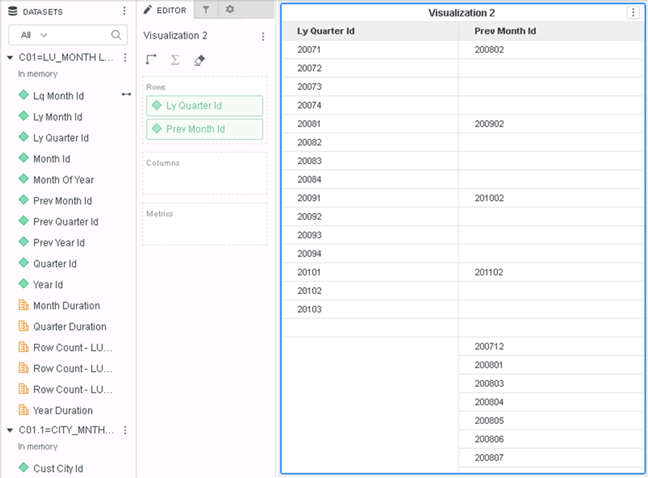
  • Wrong data (undesired rows, blank cells)

Glossary

  • Relationship Filter
  • Min Relation
  • What is CSI?
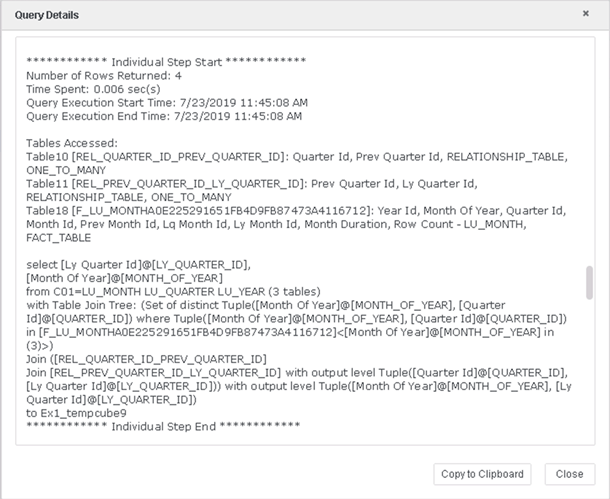
  • Query Detail – A way to check the CSI statements.

Steps to Reproduce


The following example uses Strategy Tutorial Project.
1. Create 2 new datasets in In-Memory mode. 
1) C01:
a. LU_MONTH
b. LU_QUARTER
c. LU_YEAR
2) C01.1:
a. CITY_MNTH_SLS
b. LU_MONTH (Create a One-to-Many relationship on Quarter->Month)
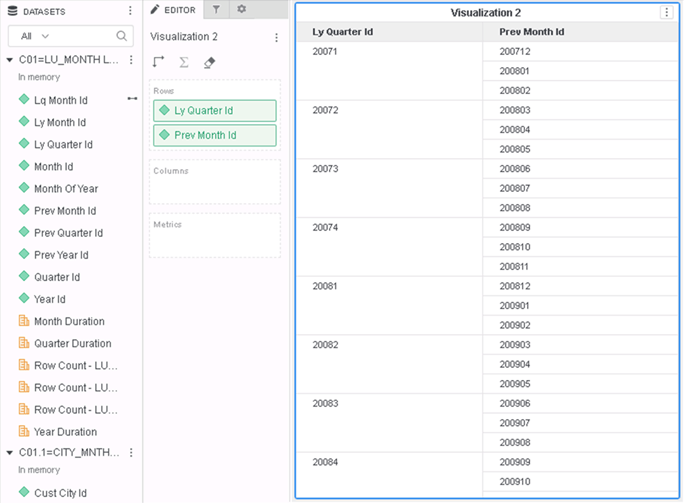
2. Create a new dossier using the above 2 Cubes and add the attributes “LyQuarter Id” and “Prev Month Id” from C01 to the Grid. Data is shown correctly.
ka0PW0000001JY4YAM_0EM2R000000lSjd.jpeg

3. Apply a filter: Month of Year In List(3)
4. However after the filter is applied, the Grid looks as below:
ka0PW0000001JY4YAM_0EM2R000000lSkH.jpeg

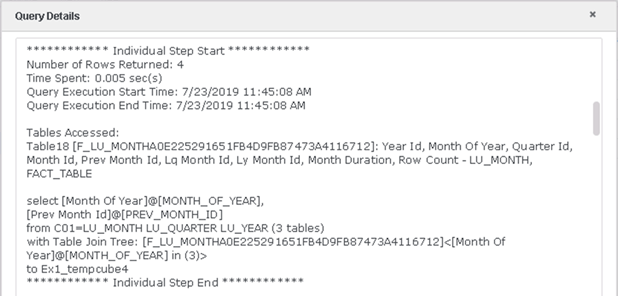
In the Query Detail shows as below:

ka0PW0000001JY4YAM_0EM2R000000lSkq.jpeg

Cause


This is a known defect caused by the fix of a previous change to enhance the Min Relation logic, and wrongly disabled the dataset relation filter.

Solution


To resolve this defect, please upgrade to Strategy 2019 or above.
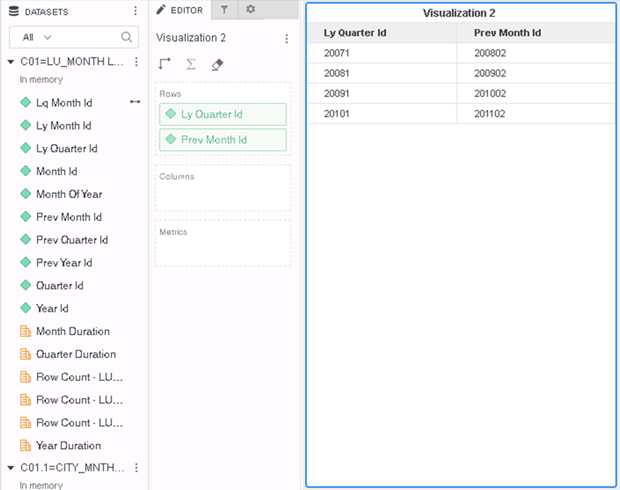
In the new fix, filter is applied correctly and data is filtered correctly:
ka0PW0000001JY4YAM_0EM2R000000lSlF.jpeg

Compare the Query Detail, one more table is selected and used in the CSI Table Join Tree
ka0PW0000001JY4YAM_0EM2R000000lSmr.jpeg

Strategy Internal Reference number for this technical note is KB483230 and DE118009.


Comment

0 comments

Details

Knowledge Article

Published:

May 1, 2019

Last Updated:

March 21, 2024