What is a clustering?
Clustering is a popular strategy in which two or more servers/machines are configured to provide common services in a unified manner such that they behave like a single server. Each machine in the cluster is called a node.
What are the benefits of clustering?
Clustering provides higher availability through failover, better performance through load distribution, and greater scalability through an infrastructure for adding new resources into the system as system demands grow.
Strategy Intelligence Server provides out-of-the-box clustering capabilities. For detailed steps on setting up a Strategy Intelligence Server cluster, refer to the following Strategy Knowledge Base technical note:KB6022: MicroStrategy Intelligence Server Cluster Configuration Guide
When is clustering recommended?
Strategy recommends clustering in any mission-critical application where uninterrupted data access and system performance are of utmost importance. Uninterrupted data access is provided by failover support and performance improvement is provided by load balancing of job requests. Users can cluster either in a Windows or a UNIX/Linux environment.
What is the current clustering architecture of Strategy?
The clustering architecture of Strategy is shown in the diagram below for a 4-tier environment.
NOTE:Clustered MicrosStrategy Intelligence Servers are shown in gray.
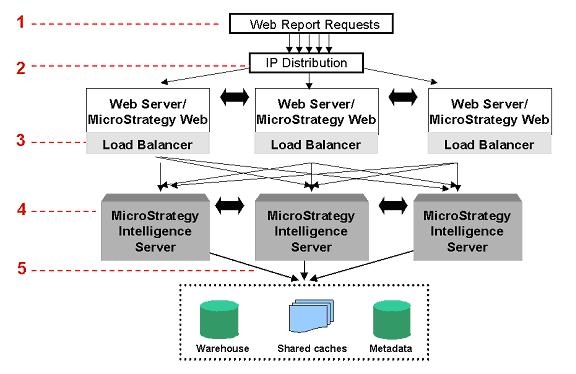
The following table describes a typical job process in a clustered, 4-tier environment. Refer to the numbered steps in the report distribution flow diagram above:
|
|
|
|
|
|
|
|
|
|
|
|
Strategy INTELLIGENCE SERVER CLUSTERING
What information is shared across Strategy Intelligence Server nodes?
In a clustered environment, each node must share information with the other nodes so that the information users see is consistent regardless of the node to which they are connected when running reports. The nodes synchronize:
If objects are created, modified, or deleted, will the change be reflected across all Strategy Intelligence Server cluster nodes?
When a user connected to a node in a cluster modifies a metadata object, the cache for that object on other nodes is no longer valid. The node that processed the change notifies all other nodes in the cluster that the object changed. The other nodes then delete the old object cache from memory. The next request for that object processed by another node in the cluster is executed against the metadata. This process is called metadata synchronization.
Client object caches are also invalidated when a change occurs. When a user requests a changed object, the invalid client cache is not used and the request is processed against the server object cache. If the server object cache has not been refreshed with the changed object, the request is executed against the metadata.
How does Strategy Intelligence Server clustering enable cache sharing?
Each node in a Strategy Intelligence Server cluster maintains indices of the caches available on the different nodes. When a report is submitted, these indices are searched. Once an existing cache is found (in any of the nodes), the cached result is retrieved directly from cache locations in either the local or remote machine.
Is a copy of each report cache retained in each Strategy Intelligence Server node?
No. Each Strategy Intelligence Server retains a lookup table with information about the existence and location of report caches. When a cluster node creates a report cache, information about the location of the new cache is shared with the other cluster nodes. Each cluster node then updates its own lookup table with the location of the new cache.
How can the user tell whether their report hits a cache in a clustered environment?
If the cache is available on the local node, the Cache Monitor will increment the hit count. If the cache is retrieved from another node, speed of response can indicate whether a cache is hit. The SQL view of the report will also indicated whether Cache used = Yes or No. Statistics tables can provide additional data on cache hits as well.
What methods can be used to guarantee availability of the Strategy Intelligence Server report cache?
To prevent the loss of a Strategy Intelligence Server cluster node from affecting report cache availability, the cluster can be configured such that a separate file server is used as a common report cache repository. In order to maintain cache availability, this separate file server can be configured for failover with third-party clustering software.
If a report cache is created by a Strategy Intelligence Server cluster node, will that report cache be seen in the Cache Monitor of another cluster node?
No. Although the new report cache will be available for use by other cluster nodes, the cache will not appear in the Cache Monitor of other cluster nodes. In order to see all report caches within a cluster, the administrator will need to create a separate data source within Strategy Desktop for each cluster node. Then, the report caches within each node can be administered separately, using the same instance of the Strategy Desktop application.
Should all Strategy Intelligence Server cluster nodes be configured identically with respect to hardware and software?
Technically, Strategy Intelligence Servers in a cluster do not have to be configured identically.
However, Load balancing and system configuration are simpler if identical hardware is used for each of the clustered nodes. Once again, identical hardware is not required, but it simplifies the effort required to tune the system.
From a software perspective, all nodes that will be clustered must be running the same version of the same operating system. Additionally, all nodes in a cluster should share a single definition, to simplify administration. This ensures that all nodes have the same governing settings. However, environments set up using different server definitions will not be able to take advantage of asymmetric clustering. With Asymmetric clustering, different projects can be loaded in each node of a Strategy Intelligence Server cluster. Using different server definitions on different nodes in the cluster also compromises some of the benefits found in asymmetric project distribution across nodes, as well as the automatic reformation of the cluster at node startup. For more details on how to set up asymmetric clustering, refer to the MicroStrategy System Administration Guide for the section on 'Distributing projects across nodes in a cluster' in Chapter 5, 'Scaling the System to Many Users.'
The only technical requirements to cluster Strategy Intelligence Servers that MUST be followed are:
NOTE: In Strategy, all projects are considered "registered" on all Intelligence Servers connecting to a particular metadata. This change eliminates the functionality to unregister a project. The new GUI only exposes the "load at start up" functionality, which serves the same purpose to the end user without deleting the project settings.
Is it possible for different nodes of a Strategy Intelligence Server cluster to run against different metadata repositories?
No, all the nodes in the same cluster must run against the same metadata.
Is it possible for different nodes of a Strategy Intelligence Server cluster to run with different configuration settings under the same metadata repository?
Yes this is possible, using caution because users can configure different nodes at different settings. For example, differences in memory allocation for the cache, time out settings, etc can result in uneven performance across cluster nodes.
If a Strategy Intelligence Server node crashes/fails, will report caches be lost?
Node crash/ failure, also known as forceful shutdown, can occur due to a power failure or a software error.
Although report caches will not be lost, access to report caches may be affected, depending on the way in which the report cache is configured.
If a Strategy Intelligence Server node is manually shutdown, will report caches be lost?
In the event of an administrative shutdown, such as when the node is removed from a cluster or the Intelligence Server service is stopped, caches associated with the shut down node are no longer valid for other nodes, even if they are physically available on a separate file server.
For additional information on clustering and failover, refer to the following Strategy Knowledge Base Document:
KB30728 - Strategy Intelligence Server Cluster Failover Guide
If a Strategy Intelligence Server cluster node is rebooted, will the node rejoin the cluster automatically?
In the event of a forceful shutdown (node crash/failure), the node will automatically rejoin the cluster when the Strategy Intelligence Server service is restarted. Administrators do not have to implement any special configuration for this to take place.
In the event of an administrative shutdown, administrators can define the nodes that should automatically rejoin the cluster on restart using the Intelligence Server Configuration Editor. Refer to the following Strategy Knowledge Base document for more information:
KB12428: How to configure the MicroStrategy Intelligence Server to automatically join a cluster upon manual start-up
If a Strategy Intelligence Server node is removed from a cluster manually, will report caches be lost?
If an administrator removes a cluster node from a cluster, then all report caches that had been created by that cluster node will be inaccessible by the rest of the cluster, whether or not a separate file server is used as a common report cache. This behavior is by design.
Does Strategy Intelligence Server support clustering via Microsoft Cluster Server or any other third-party clustering software?
Microsoft Cluster Server (MSCS) can be used for failover of Strategy Intelligence Server. However, MSCS and other third-party clustering software will not provide the load-balancing and some of the failover capabilities of Strategy Intelligence Server's native clustering solution.
Is it possible to run multiple instances of Strategy Intelligence Server on the same Microsoft Windows machine?
Strategy does not support running multiple instances of Strategy Intelligence Server on the same Microsoft Windows machine. Unlike previous versions of Strategy, Strategy can support running multiple projects with different prioritization and configuration settings on just one server. So the need to run multiple instances of Strategy Intelligence Server is removed.
What is the maximum number of nodes that can be supported in a Strategy Intelligence Server cluster?
Users can cluster up to four Intelligence Server machines. However, when the number of nodes increases, there is increasing overhead put on the system by the clustering software. So, there will be practical limits related to the hardware configuration of the users' system. For further details on this topic, refer to Strategy Knowledge Base Document titled
KB13200: What is the maximum number of nodes that can be supported in a MicroStrategy Intelligence Server cluster
Strategy WEB CLUSTERING
Does Strategy Web support clustering via Cisco Local Router or any other third-party clustering software?
Strategy Web relies on third-party web-clustering software to provide clustering functionality. Strategy Web is designed to be stateless so that each individual Strategy Web node can function without the knowledge of the existence of other nodes. Therefore, any third-party software used to cluster web servers can be used.
What information is shared by the application across Strategy Web nodes?
Strategy Web is designed to be as stateless as possible. Therefore, no information is shared by the Strategy Web application across cluster nodes. All state information for running jobs is pushed to the client browser.
When a report is submitted by a Strategy Web user, the user will receive a wait page in the client browser. This wait page will poll the Strategy Web Server periodically for the status of the report. This polling is performed as new http requests. This http request will contain all state information, including encrypted login information and Strategy Intelligence Server connection information.
Is Strategy Web "cluster-aware"?
The Strategy Web application is designed so that each Strategy Web cluster node does not need to know that it is a member of a cluster. Strategy Web is designed to be stateless, so that each client http request can be processed individually without having to persist information within the Strategy Web application. Therefore, third-party Web-server clustering software can be used to cluster together multiple web servers running Strategy Web.
Can I control which node I connect to in Strategy Web?
Controlling connections other than by default load balancing requires customizing Strategy Web. The Strategy SDK and Strategy Developer Library (MSDL) contain information on customizing Strategy Web.
Should Strategy Web be specifically configured to access a Strategy Intelligence Server cluster?
No. When the administrator configures Strategy Web to access a particular Strategy Intelligence Server, the Strategy Web application will automatically detect that the Strategy Intelligence Server is a member of a cluster. Once this detection is made, Strategy Web will automatically add all the other members of the same cluster into the pool of available Strategy Intelligence Servers.
Additionally, the entire cluster appears on the Administration page and is labeled as a single cluster.
Articel reference: KB16018
