Starting with the release of Strategy ONE (March 2024), dossiers are also known as dashboards.
This article describes best practices to be taken when connecting an instance of PostgreSQL in Strategy. Understanding your data characters and choosing the matched configuration could enhance the performance and accelerate the process to view the latest data. The following key areas are covered in this article:
PostgreSQL, also known as Postgres, is a free and open source relational database management system (RDBMS) emphasizing extensibility and SQL compliance. It was originally named POSTGRES, referring to its origins as a successor to the Ingres database developed at the University of California, Berkeley.
The support level of on-premise PostgreSQL within Strategy is Diamond. For Diamond gateways, Strategy proactively runs end-to-end regression tests and performance tests to ensure that our gateways are optimized.
Strategy has certified PostgreSQL 13.x for the following components.
Strategy Component | PostgreSQL Version Support |
|---|---|
Warehouse | 13.x |
Metadata | 13.x |
Platform Analytics | 13.x |
Collaboration Server | 13.x |
History List | 13.x |
Besides on-premise PostgreSQL, Strategy is also expanding our support to cloud based PostgreSQL. For example, Amazon Aurora PostgreSQL is already supported within Strategy.
Strategy ships three PostgreSQL drivers on Strategy 2021 Update 2, as shown in the following table.
Driver Type | Driver | Windows | Linux | Driver Version | Note |
|---|---|---|---|---|---|
ODBC | MicroStrategy ODBC Driver for PostgreSQL Wire Protocol | <install path>\ODBC\mypsql64.dll | <install path>/install/lib/MYpsql64.so | 7.10.06.381 | Provided by the MicroStrategy driver vendor |
ODBC | PostgreSQL Unicode (x64) | <install path>\PostgreSQL\1202\bin\psqlodbc35w.dll | <install path>/install/pgsql-12/lib/psqlodbcw.so | 12.02.0000 | Native PostgreSQL ODBC driver |
JDBC | com.microstrategy.jdbc.postgresql.PostgreSQLDriver | <install path>\JDBC\mypostgresql.jar | <install path>/install/JDBC/mypostgresql.jar | 5.1.4.000315 | Provided by MicroStrategy driver vendor |
*Shipped driver refers to Data Direct driver which is installed along with the MircroStrategy Intelligence server
*Native driver refers to PostgreSQL ODBC driver (PostgreSQL Unicode (x64))
It's suggested to use Strategy ODBC Driver for PostgreSQL Wire Protocol and JDBC Driver (com.Strategy.jdbc.postgresql.PostgreSQLDriver) to get a more integrated and thorough support since we have a fully certified shipped driver from all aspects, including connectivity, functionality, security, and performance.
The following chart shows the throughput with different drivers. The PostgreSQL ODBC Driver has the best cube publish performance as it has the highest throughput. The test is for a single cube (4M rows) republish executed on the Strategy 2021 Update 2 release with platform as 32 CPU, 244 GB memory Amazon Linux machine. The ODBC connection uses 3.x ODBC calls by default.
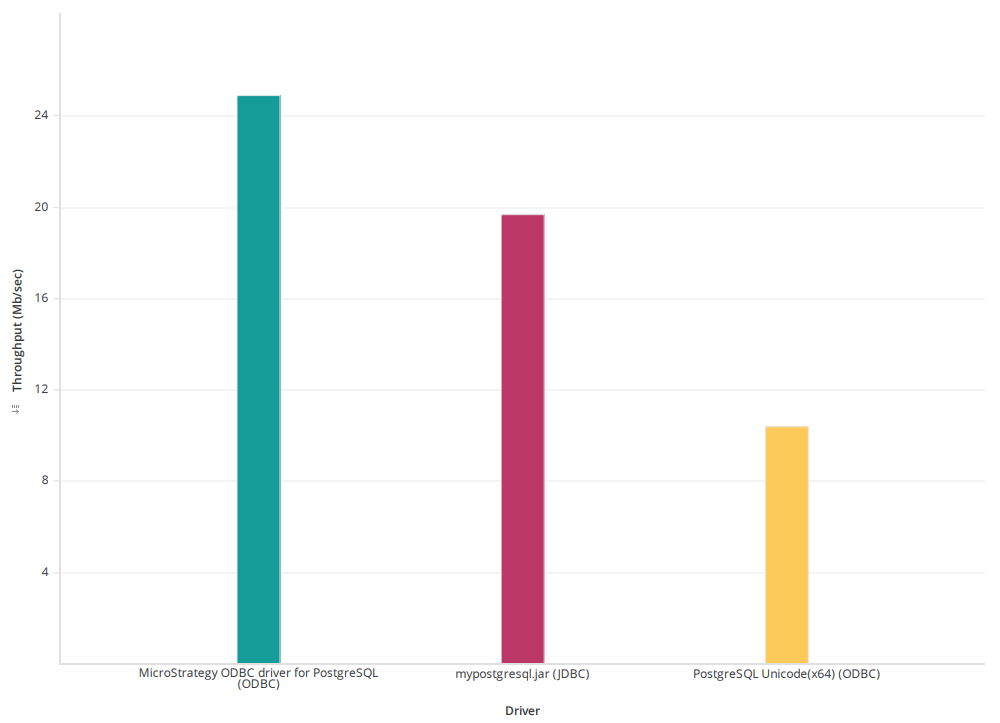
Prior to Strategy 2021 Update 2, PostgreSQL JDBC has a limitation to fetch large size data set (>5 Gb). This limitation has been addressed in the Strategy 2021 Update 2 release.
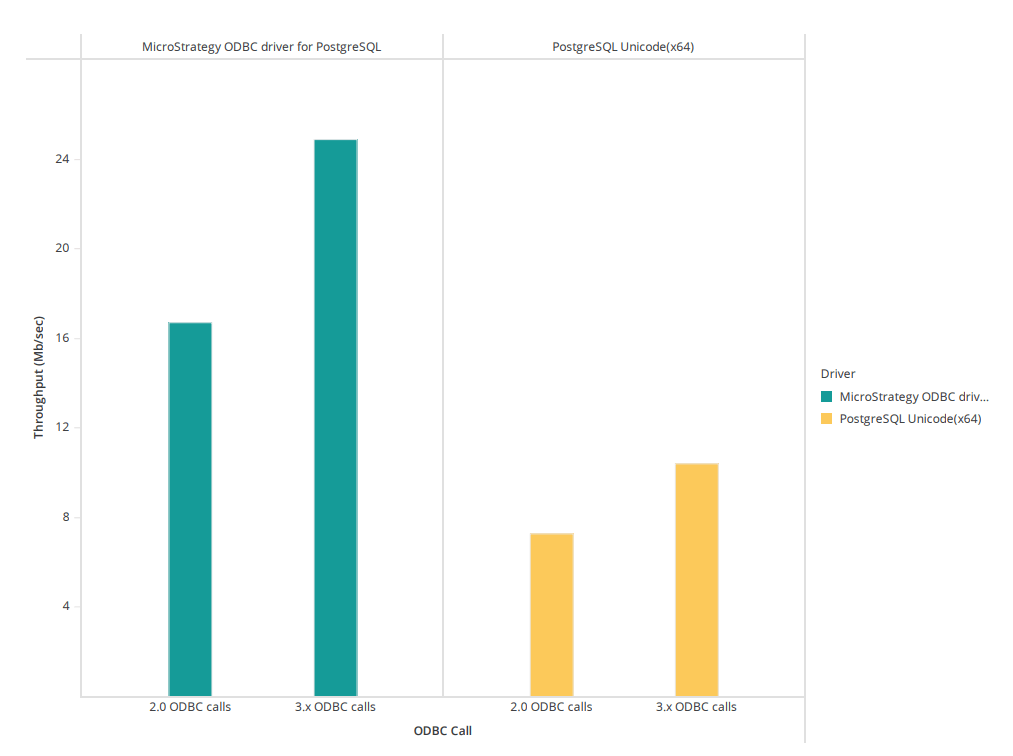
By default, Strategy uses ODBC call 3.x for PostgreSQL since Strategy 2021 Update 1.
For a single cube publish, using 3.x ODBC calls have approximately 30% performance improvement than using 2.0 ODBC calls.
The below test is based on a 4M rows dataset which shows the throughput improvement with ODBC call 3.5 compared to ODBC call 2.0.
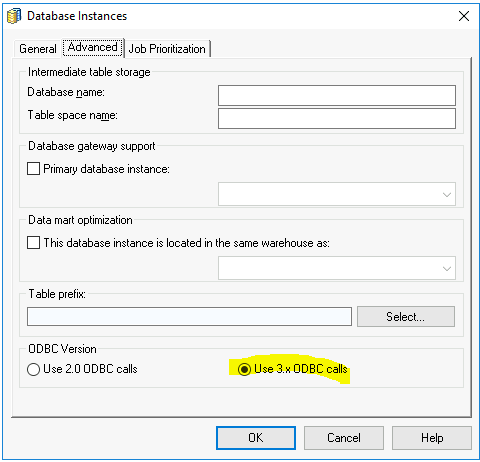
You can change the ODBC version in the Strategy Database Instance level, as described below.
Select the database instances, right-click it, and select the Use 3.x ODBC calls option.
This section describes tuning PostgreSQL for an the Analytical workload based on internal tests in Strategy.
The tuning requires administrative privilege against the PostgreSQL database server.
Parameter & Operation | Initial Value | Changed To | Performance Gain | % Execution Time of Original Value |
|---|---|---|---|---|
shared_buffer | 128 MB | 1280 MB | Metadata garbage collection time reduces from 5724 sec to 47 sec. | 0.82% |
work_mem | 4 MB | 50 MB | Metadata garbage collection time reduces from 47 sec to 17 sec. | 36.2% |
maintenance_work_mem | 64 MB | 1536 MB | 4 times performance gain on the index creation on platform_analytics_wh.access_transactions table. | 25% |
max_parallel_maintenance_workers | 2 | 8 | ||
random_page_cost | 4 | 1 | Execution time of query "select tran_id from access_transactions as a join temp_lu_object as b on a.object_id=b.object_id limit 1000;" in Platform Analytics get reduced from 214185 ms to 2.3 ms. | <0.01% |
enable_nestloop | on | off | Table scan time reduces from 585 sec to 8 sec. | 1.36% |
vacuum | NA | NA | Table size reduces from 110 GB to 1.5 MB after vacuuming the table platform_analytics_wh.access_transactions | <0.01% |
Parameterized queries are SQL queries that can use placeholders for data. Using placeholders allows these queries to be re-used.For details, see KB484512. The following is an example of a parameterized query:
select	distinct "a11"."CUSTOMER_ID"  "CUSTOMER_ID",
	CONCAT("a11"."CUST_LAST_NAME", "a11"."CUST_FIRST_NAME")  "CustCol_12"
from	"lu_customer"	"a11"
where	CONCAT("a11"."CUST_LAST_NAME", "a11"."CUST_FIRST_NAME") like ?
with parameters:
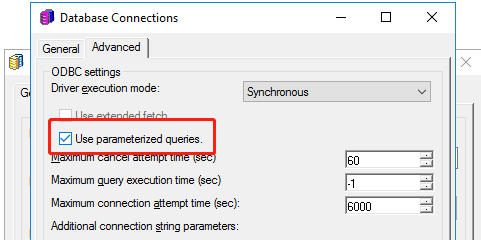
%?%Starting in Strategy 2021, parameterized query is turned on by default. You can enable or disable this feature in the Database Connections dialog, as shown below.
Select the Use parameterized queries checkbox.
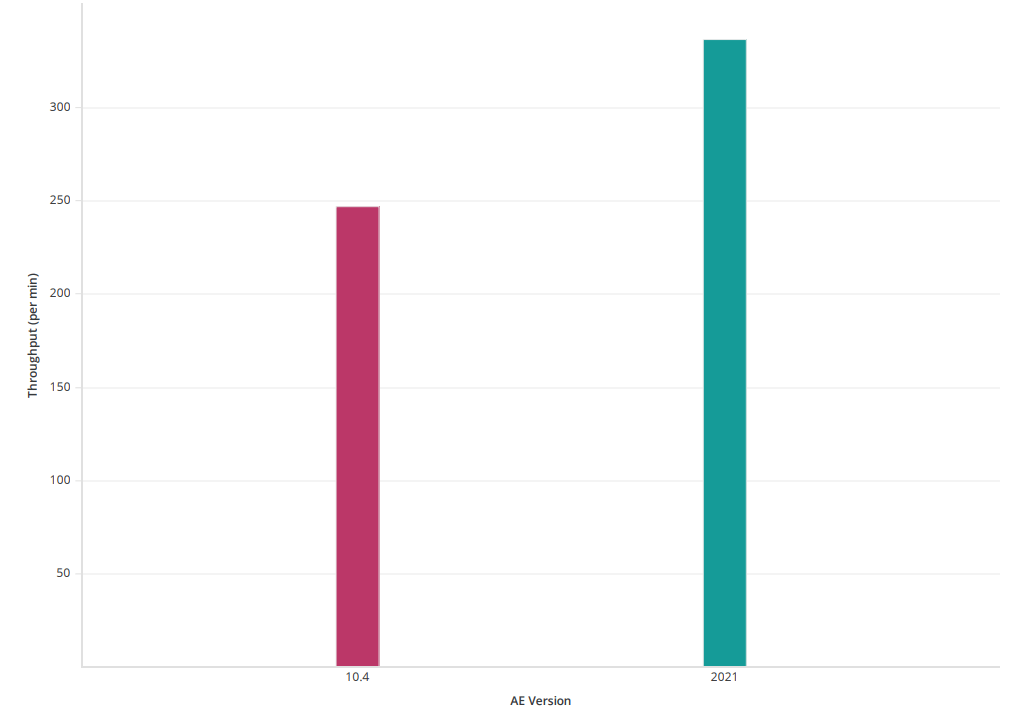
In our internal UB performance test, when using Data Engine version 2021 in Strategy 2021, there is an overall 35% performance gain compared to using Data Engine version 10.4.
Starting in Strategy 2021, the default Data Engine version is 2021. For detailed changes, see Data Engine changes in MicroStrategy 2021 release.
For example, with Data Engine version 2020 and above, Strategy pushes filters down to the database for execution to minimize the intermediate results set size. This pushdown can significantly improve the performance of dossier execution. For more details, see KB483573.
The following chart shows the throughput change with different Data Engine versions. The throughput of Data Engine version 2021 is higher than Data Engine 10.4. The test is executed with 50 concurrent connections.
Starting in Strategy 2020, a new feature is introduced where the correct quotes is applied to all identifiers.
For PostgreSQL, double quotes are used in SQL generation. The following is an example SQL:
select	"a11"."badge_id"  "badge_id_bigint",
	"a11"."Badge_Name"  "Badge_Name"
from	"idm_intel2"."badge"	"a11"
where	(("a11"."badge_id")
 in	(select	"s23"."badge_id"
	from	"idm_intel2"."LU_BD_HISTORY"	"s22"
		join	"idm_intel2"."REL_BADGE_BDHISTORY"	"s23"
		  on 	("s22"."bd_history_id" = "s23"."bd_history_id")
	where	"s22"."directorate_id" in (40)))
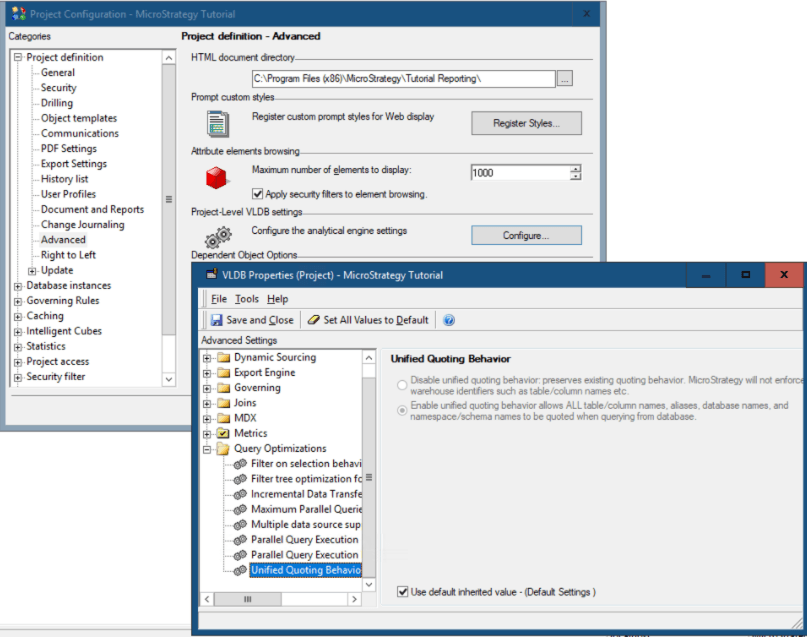
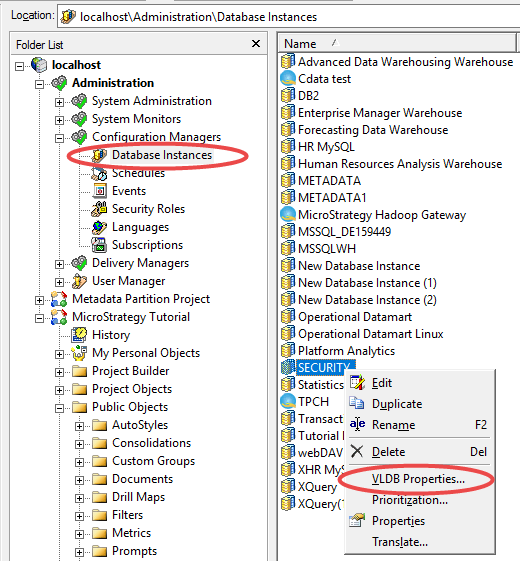
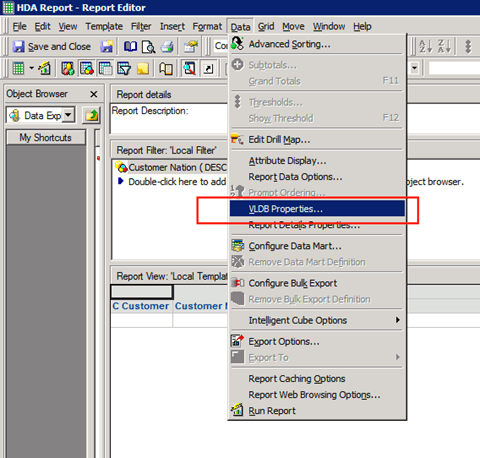
The Strategy platform provides VLDB settings for all supported RDBMS platforms to generate optimized SQL that takes advantage of database-specific functionality.
The following table describes the authentication methods supported by PostgreSQL. For details, please refer to this PostgreSQL documentation.
Authentication Method | Note | MicroStrategy Supported? |
|---|---|---|
Password Authentication:
| Requires that user sends a password. | Yes- |
GSSAPI Kerberos Authentication | Relies on a GSSAPI-compatible security library. Typically, this is used to access an authentication server, such as a Kerberos or Microsoft Active Directory server. | Yes- Supported since MicroStrategy 2020 Update 3 and MicroStrategy 2021. For details, see KB484540 and KB484541. |
Certificate Authentication | Requires an SSL connection and authenticates users by checking the SSL certificate they send. | Yes- Supports only with native ODBC driver. For details, see KB484539. |
LDAP Authentication | Relies on an LDAP authentication server. | Yes |
Other authentication modes | See this PostgreSQL documentation. | On the roadmap. |
Transport Layer Security (TLS) protocol enables a client to validate the certificate of a server, and provides private communication between the client and server by use of encryption. TLS configuration requires both the server and client configuration. Your system/database administrator may have already configured on the server side, or you can refer to the PostgreSQL documentation for more details. For client configuration of Strategy as the PostgreSQL client, refer to KB44454. Strategy uses TLS v1.2 by default.
DRIVER={Strategy ODBC Driver for PostgreSQL Wire Protocol}; HostName={hostname}; PortNumber={port}; Database={database};AuthenticationMethod=1; EncryptionMethod=1; ValidateServerCertificate=0;DRIVER={PostgreSQL Unicode(x64)}; Servername={hostname}; Port={port}; Database={database}; DriverUnicodeType=1;UseDeclareFetch=1;Fetch=1000;SSLmode=require;JDBC;DRIVER={com.Strategy.jdbc.postgresql.PostgreSQLDriver};URL={jdbc:Strategy:postgresql://{hostname}:{port};DATABASENAME={database};EncryptionMethod=SSL;ValidateServerCertificate=false;fetchTWFSasTime=TRUE};
Administrators can, based on priority, specify the number of warehouse connections that are required for efficient job processing. There are three possible priorities for a job: high, medium and low.
Administrators are not required to set medium and high connections, but must set at least one low connection, because low priority is the default job priority.
The optimal number of connections is dependent on several factors, however the main criterion to consider when setting the number of connections is the number of concurrent queries the warehouse database can support.
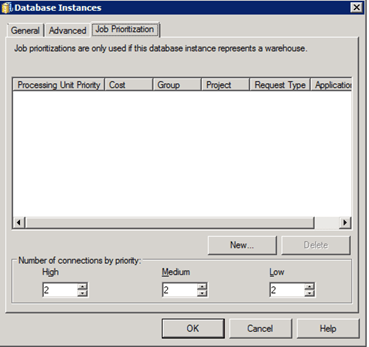
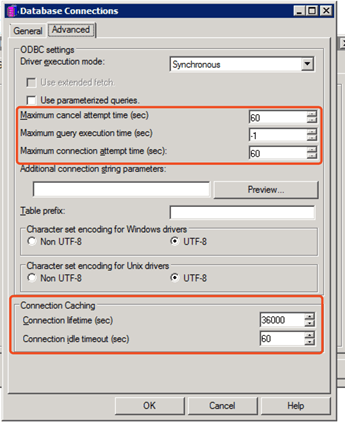
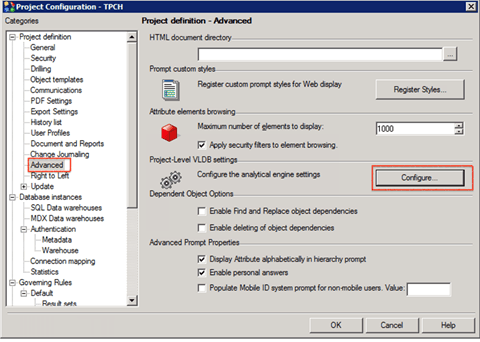
The administrator could also manage database connection threads by some given fields. The settings which used to control database connection are mainly located on Database Instance level, see below screenshots: