SYMPTOM:
When updating the Schema in 3-tier, the user receives the error message below:
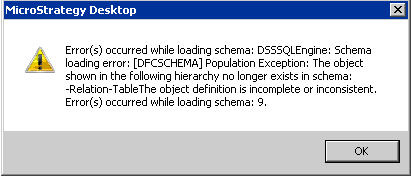
Error(s) occurred while loading Schema DSSSQLEngine: Schema loading error: Population Exceptions: The object shown in the following hierarchy no longer exists in schema: Relation-Table The object definition is incomplete or inconsistent. Error(s) occurred while loading schema: 9.
CAUSE:
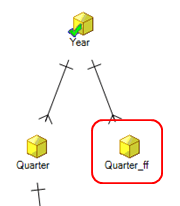
This issue is caused by running ScanMD against a project which has an attribute relationship between a regular attribute and managed freeform SQL attribute using the logical table created by the system during the creation of the freeform SQL report. Running ScanMD with the attribute in this state will lead to the managed freeform SQL attribute becoming part of the System Hierarchy and Schema which is not valid.
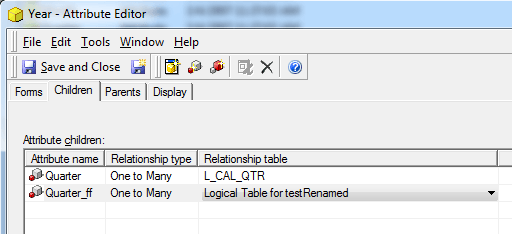
NOTE: It is not valid to create a relationship in this way as outlined in the below KB article:
KB36880: "The object shown in the following hierarchy no longer exists in schema: -Relation-TableThe object definition is incomplete or inconsistent" error message is thrown when updating the schema in three tier in MicroStrategy Developer 9.4.x and 10.x
ACTION:
Remove the invalid relationship between the regular attribute and the freeform SQL attribute. If the relationship cannot be found or removed, contact Strategy Technical Support for assistance in finding and resolving the invalid relationship.
RELATED KB ARTICLES:
KB42342
