SUMMARY
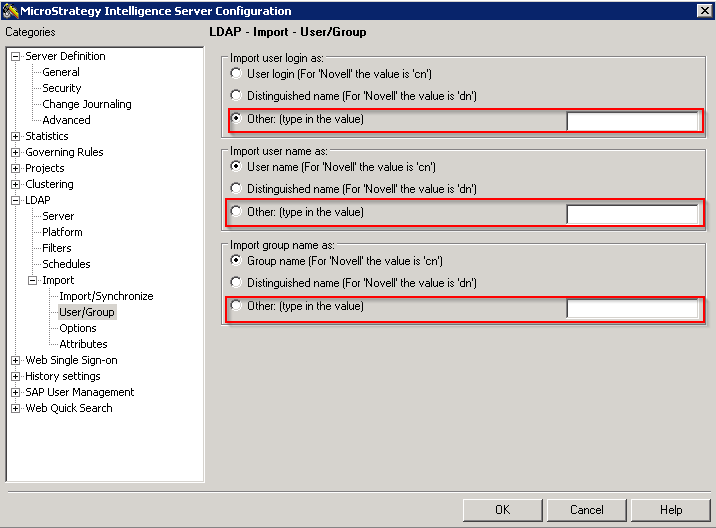
In 'Import user login/username as':
Other: The user has an option to provide a different LDAP attribute than the two listed above to be imported and used as the Strategy user login/username when the Strategy user is created at import. By default, this field is empty. The LDAP administrator should provide with the appropriate LDAP attribute to be used as the user login/username.
In 'Import group name as':
Other: The user has an option to provide an LDAP attribute to be imported and used as the Strategy group name when Strategy users are imported and created along with the users’ groups. By default, this field is empty. The LDAP administrator should provide with the appropriate LDAP attribute to be used as the group name.
EXAMPLE
Assuming that all LDAP users in one LDAP repository have the same LDAP schema, which means that all LDAP users in one LDAP repository have the same list of standard attributes in ADS/LDAP repository.
List of available attributes
Strategy Secure Enterprise Platform pulls out a list of available attributes that depend on the Authentication User used at the LDAP configuration from the Intelligence Server. This list is shown in Strategy Intelligence Server Configuration>LDAP>Import>Attributes on the Select LDAP Attribute drop-down list.
KB408992: How to Remove LDAP Attributes from the LDAP Connectivity Wizard or the Intelligence Server Configuration in Strategy Desktop 9.x.
KB36299: Only the LDAP Attribute "dn" displays and the message "Please make sure the attribute names are unique" appears when configuring LDAP Attribute Import options in Strategy Intelligence Server 9.0.x and later
KB35026: The user or group 'full name' or 'login' fields are populated with the default attribute values rather than the selected ones when the user or group is imported or synchronized when using LDAP with the Strategy Intelligence 9.x.
KB41353: Is it possible to use several LDAP attributes when setting the Import User name Parameters in Strategy?
KB41235: LDAP Attributes missing in the "Select LDAP Attributes" drop-down when configuring the import of LDAP attributes for System Prompt usage in Strategy 10.x and 9.x
KB41895: When importing and synchronizing users from LDAP in Strategy 9.x and 10.x, the imported LDAP users are not correctly renamed when using a custom imported LDAP attribute for 'import username as.'
When does this happen?
Strategy Secure Enterprise Platform will show that list of attributes in the LDAP configuration next time after clicking OK on Strategy Intelligence Server Configuration after making a change in LDAP configuration.
How does the workflow work?
1.-User types a value (requested attribute) for the radio button option "Other" under any of the following three options;
Strategy Intelligence Server Configuration>LDAP>Import>User/Group>Import user login as: and click OK.
Strategy Intelligence Server Configuration>LDAP>Import>User/Group>Import user name as: and click OK.
Strategy Intelligence Server Configuration>LDAP>Import>User/Group>Import group name as: and click OK.
2.-Then Strategy Secure Enterprise Platform checks the requested list of available attributes.
3.- If the requested attribute is not in that list of attributes OR its data type does not match (like not a valid string value), Strategy Secure Enterprise Platform will attempt to use the default attribute (ex. sAMAccountName, cn, etc.)
*The default value depends on the configuration of Strategy Intelligence Server Configuration>LDAP>Platform
4.-If the default attribute does not exist in that list of attributes available for the Authentication user that is in use, Strategy Secure Enterprise Platform will use the guaranteed attribute in the ADS/LDAP repository; the Distinguished Name (DN).
KB438480
