EducationSoftwareStrategy.com
StrategyCommunity

Knowledge Base

Product

Community

Knowledge Base

TopicsBrowse ArticlesDeveloper Zone

Product

Download SoftwareProduct DocumentationSecurity Hub

Education

Tutorial VideosSolution GalleryEducation courses

Community

GuidelinesGrandmastersEvents
x_social-icon_white.svglinkedin_social-icon_white.svg
Strategy logoCommunity

© Strategy Inc. All Rights Reserved.

LegalTerms of UsePrivacy Policy
  1. Home
  2. Topics

KB47975: How to configure JVM startup arguments in WebSphere 8.5.x running on Unix/Linux for Kerberos (Integrated) Authentication in MicroStrategy Web.


Community Admin

• Strategy


How to configure JVM startup arguments in WebSphere 8.5.x running on Unix/Linux for Kerberos (Integrated) Authentication in MicroStrategy Web.

Before completing the steps in this technical note please make sure that:
 

  1. The configuration is supported by Strategy, please see KB38012: Integrated Authentication with Kerberos list of supported configurations on MicroStrategy Web and MicroStrategy Intelligence Server 9.x
  2. Verify that the Intelligence Server is properly configured for
    1. Windows Operating System, see KB19580: How to setup Kerberos (Integrated) authentication for the MicroStrategy Intelligence Server 9.x on Microsoft Windows operating systems.
    2. Unix/Linux Operating System, see KB19110: How to configure MicroStrategy Intelligence Server Universal 9.x for Kerberos (Integrated) authentication on Unix/Linux operating systems.
  3. Strategy Server service was created as per KB33289: Prerequisites for implementing Integrated Authentication with MicroStrategy Components: Configuring Users in the Domain Controller

For more information about Kerberos (Integrated) authentication refer also to Strategy System Administration Guide > Chapter 3. Identifying Users: Authentication > Enabling single sign/on authentication > Enable integrated authentication.
 
To complete the JVM startup on WebSphere - see e.g. step 3. JVM startup arguments in KB33276: How to set up Integrated Authentication in Tomcat running on Linux and having MicroStrategy Web Universal 9.0.1 to 9.2.1  - follow the steps below:
  • Log to the WebSphere Administrative console:
    http://WebSphere_machine:admin_port/ibm/console/logon.jsp
    Notes:The admin port can be different from the port used for the deployments.
  • Provide the appropriate credentials for logging in
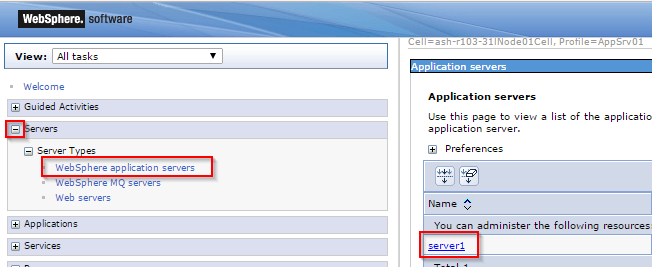
  • Once logged in, expand the Servers link located on the right side of the page
  • Select "WebSphere application servers"
ka04W00000148hlQAA_0EM440000002I0j.png
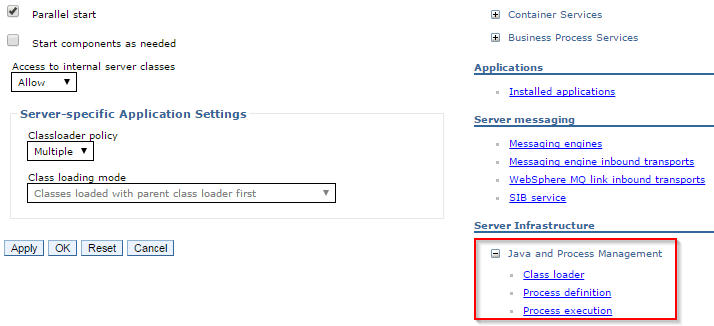
  • On the right side select the Application Server use
  • In the Configuration tab (opened by default) Expand the Java and Process Management located under the Server Infrastructure
ka04W00000148hlQAA_0EM440000002I0o.png
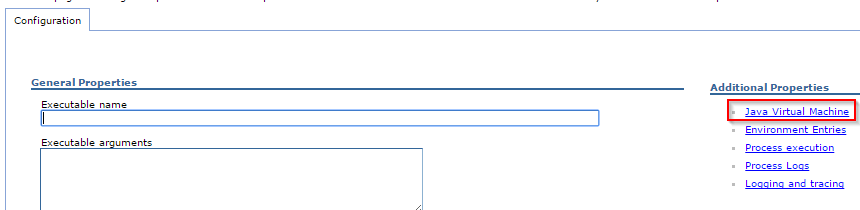
  • Click on Process Definition
  • On the new section displayed, click on Java Virtual Machine
ka04W00000148hlQAA_0EM440000002I0t.png
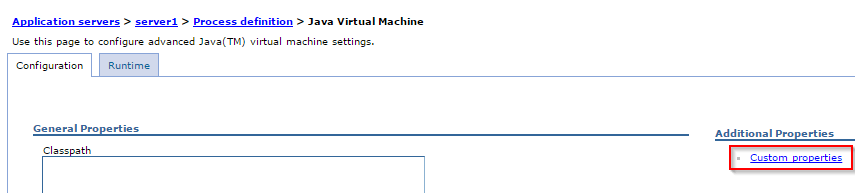
  • On the new window returned, select Custom properties
ka04W00000148hlQAA_0EM440000002I0y.png
  •  
    Note: By default there would be no new properties, but verify that none of the settings that Integrated Authentication are already pre-defined.
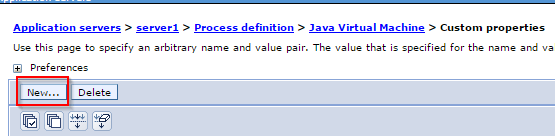
  • Click on New
ka04W00000148hlQAA_0EM440000002I13.png
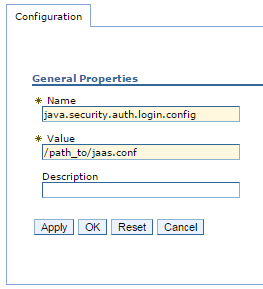
  • Define the JVM parameters as specified in KB33276 step 3. JVM startup arguments. Here shown for -Djava.security.auth.login.config=jaas.conf as following and click OK:
ka04W00000148hlQAA_0EM440000002I18.png
  •  
    Note: Name is specified as java.security.auth.login.config and Value is the location of the jaas.conf
  • Repeat steps 10 and 11 for the following two settings:
    -Djava.security.krb5.conf=krb5.conf (where Name=java.security.krb5.conf and Value=/path_to/krb5.conf in the new Custom Property)
    -Djavax.security.auth.useSubjectCredsOnly=false (where Name=javax.security.auth.useSubjectCredsOnly and Value=false in the new Custom Property
  • Select Save on the messages that are displayed on top
ka04W00000148hlQAA_0EM440000002627.jpeg
  • Restart WebSphere
     

Third Party Software Installation WARNING
The third-party product(s) discussed in this technical note is manufactured by vendors independent of Strategy. Strategy makes no warranty, express, implied or otherwise, regarding this product, including its performance or reliability.
KB47975


Comment

0 comments

Details

Knowledge Article

Published:

April 5, 2017

Last Updated:

December 29, 2018