EducationSoftwareStrategy.com
StrategyCommunity

Knowledge Base

Product

Community

Knowledge Base

TopicsBrowse ArticlesDeveloper Zone

Product

Download SoftwareProduct DocumentationSecurity Hub

Education

Tutorial VideosSolution GalleryEducation courses

Community

GuidelinesGrandmastersEvents
x_social-icon_white.svglinkedin_social-icon_white.svg
Strategy logoCommunity

© Strategy Inc. All Rights Reserved.

LegalTerms of UsePrivacy Policy
  1. Home
  2. Topics

KB38596: Is access to Intelligence Server required to perform Custom Time Window with MicroStrategy Enterprise Manager?


Community Admin

• Strategy


Custom Time Window is one of the Enterprise Manager data load options which allows users to control the data in the warehouse. For more information about this feature, see:
KB10191: What are the “Custom Time Window” and “WH Data Deletion” buttons in the MicroStrategy Enterprise Manager 9.x Console?
 
Since this button allows moving Statistics data to fact tables, it seems that only a connection to the database where Enterprise Manager statistics and warehouse is required. However this is not true. 
 
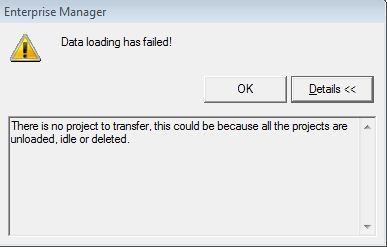
At the beginning of Custom Time Window operation, the process checks the projects loaded on Intelligence Server. If the connection to the Intelligence Server is not available, the following error comes back:
 

ka04W00000148bRQAQ_0EM4400000029wl.jpeg

 
Error message:


Data loading has failed!
There is no project to transfer. this could be because all the projects are unloaded, idle or deleted.

 
For more information about how to troubleshoot this error, see:

  • KB37823: "Data loading has failed! There is no project to transfer; this could be because all the projects are unloaded, idle or deleted" error message appears when performing an Enterprise Manager data load in MicroStrategy 9.x
  • KB36645: "There is no project to transfer" and "Cannot load data from Project <Project Name>. This could be because the Project is unloaded, idle or was deleted" errors occur when attempting to perform a dataload in MicroStrategy Enterprise Manager 9.x
  • KB30809: The MicroStrategy Enterprise Manager 9.x data load fails with the error “There is no project to transfer; this could be because all the projects are unloaded, idle or deleted"


Comment

0 comments

Details

Knowledge Article

Published:

June 16, 2017

Last Updated:

June 16, 2017