EducationSoftwareStrategy.com
StrategyCommunity

Knowledge Base

Product

Community

Knowledge Base

TopicsBrowse ArticlesDeveloper Zone

Product

Download SoftwareProduct DocumentationSecurity Hub

Education

Tutorial VideosSolution GalleryEducation courses

Community

GuidelinesGrandmastersEvents
x_social-icon_white.svglinkedin_social-icon_white.svg
Strategy logoCommunity

© Strategy Inc. All Rights Reserved.

LegalTerms of UsePrivacy Policy
  1. Home
  2. Topics

KB11482: How to deliver an e-mail manually for SMTP troubleshooting purposes?


Community Admin

• Strategy


This document is broken down into three parts. The first part is the procedure used to deliver a message to a recipient similar to the procedure taken by MicroStrategy Narrowcast Server. The user will use telnet to connect to the receiver SMTP (mail server) and send the message to a recipient. The second part is a sample of the communications of the sender SMTP (MicroStrategy Narrowcast Server) and the receiver SMTP. The third part contains additional information regarding SMTP logging, Smart Hosts, Direct Mode, and SMTP troubleshooting.

Introduction
This document assumes that the user understands the basics of the Simple Mail Transfer Protocol (RFC821). 
 
This document is broken down into three parts. The first part is the procedure used to deliver a message to a recipient similar to the procedure taken by Strategy Narrowcast Server. The user will use telnet to connect to the receiver SMTP (mail server) and send the message to a recipient. The second part is a sample of the communications of the sender SMTP (Strategy Narrowcast Server) and the receiver SMTP. The third part contains additional information regarding SMTP logging, Smart Hosts, Direct Mode, and SMTP troubleshooting.
 
For the first part of this document, the procedure assumes a simple scenario. In it, Strategy Narrowcast Server is able to generate email correctly without errors. However, this procedure can also be used to troubleshoot Narrowcast SMTP Transmission whenever there are transmission errors.
 
Note: Since telnet (sender SMTP) will be used to simulate how Narrowcast Server sends email, most of the errors will be related to connectivity and permission/access with receiving SMTP (mail server). It is highly probable that the errors encountered during this procedure are also the errors preventing Narrowcast Server from successfully delivery messages. It is recommended to discuss the errors encountered during this procedure with a mail administrator and/or network specialist to gain more insight on the error and its cause. Once the cause of the error has been identified and fixed, repeat the procedure again. If the procedure finishes successfully, then apply the changes/fixes to the Narrowcast configuration.
 
Part 1: Procedure
The procedure assumes that the Strategy Narrowcast Server service contains a simple subject line, an HTML body with a report, no attachments, no execution control, using the "Generic e-mail client" device provided by the product, no authentication objects, no preference objects, static subscription set, etc. However, more complex scenarios can follow the procedure as long as the proper modifications are made.
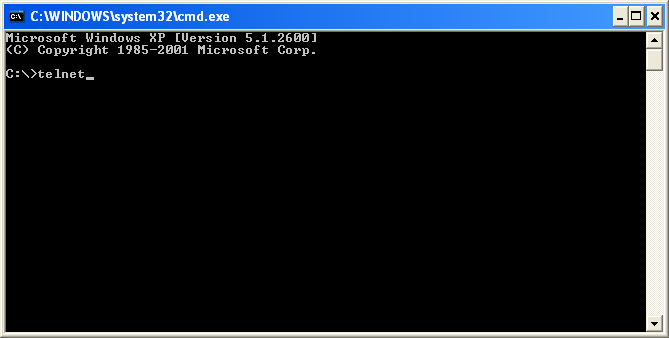
 

  • Connect to the mail server
    Connect to the mail server (receiving SMTP) via telnet on TCP port 25 as shown in the figures below. The mail server "mail.Strategy.com" will be used in this procedure as an example:
     
ka04W00000148WfQAI_0EM440000002Bjr.png
  •  
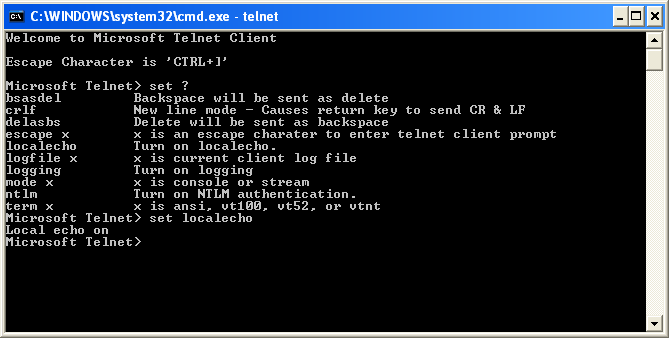
    For convenience, enable the Local Echo facility of the Microsoft Telnet Client. To determine the command to enable Local Echo, use the
    set ?
    command:
     
ka04W00000148WfQAI_0EM440000002BkH.png
  • Obtain the mail server address
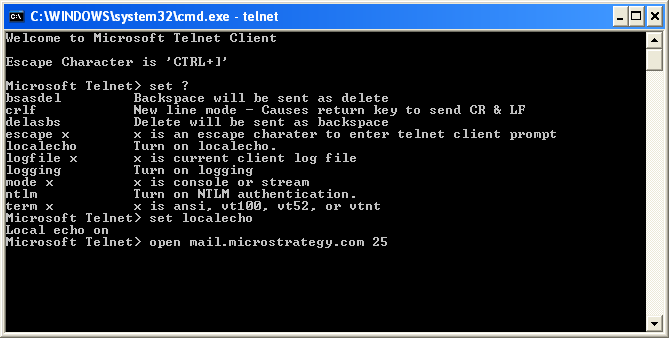
    Strategy Narrowcast Server has two methods of connecting to the receiver SMTP server, one method is by searching for Mail Exchange (MX) records (Direct Mode) and the other is by using an IP address that points to the receiver SMTP server (Smart Host Mode). If the user has configured Strategy Narrowcast Server to use Smart Host then the same IP address for the Smart Host will be the receiver SMTP server address to use in this procedure. If the user is connecting to the receiver SMTP via Direct Mode, then refer to Strategy Knowledge Base document KB31568 to search for mail exchange records for SMTP message and obtain the receiver SMTP address.
     
    Connect to the SMTP server on port 25 with the Telnet 'open' command:
     
ka04W00000148WfQAI_0EM440000002BkJ.png
  • Identify the sender SMTP to the receiver SMTP
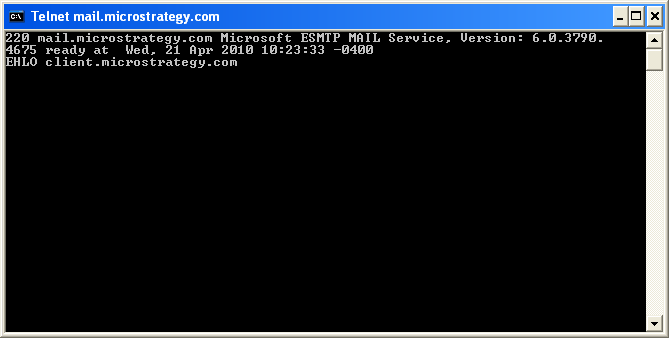
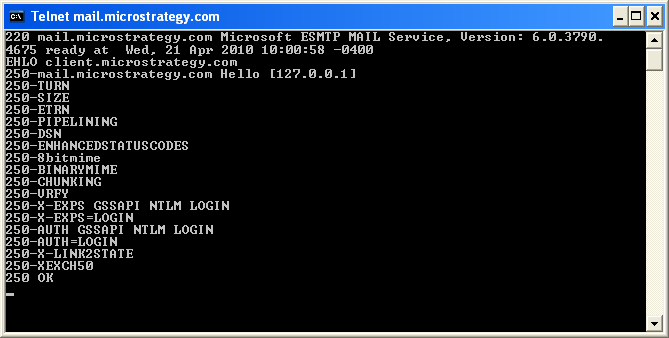
    There are two ways to identify the sender SMTP to the receiver SMTP; one is through the RFC1869 Extended Hello (EHLO) and the other is through the original RFC821 standard Hello (HELO).
     
    The procedure outlined in this document will use the identification EHLO to open a transmission. The syntax for an EHLO is 'EHLO <fully qualified machine name of client>':
     
ka04W00000148WfQAI_0EM440000002Bk8.png
ka04W00000148WfQAI_0EM440000002BkE.png
  •  
    Note: Strategy Narrowcast Server opens an e-mail session using EHLO (ESMTP), if possible. Otherwise, HELO (SMTP) is attempted. If both protocols are rejected, then Strategy Narrowcast Server will attempt to locate another mail server if possible.
     
  • Obtain the MAIL FROM email address
    After identifying the sender SMTP to the receiver SMTP, the sender SMTP must send a MAIL FROM command to indicate the sender of the message. If the receiver SMTP accepts the MAIL command, it will reply with an OK.
     
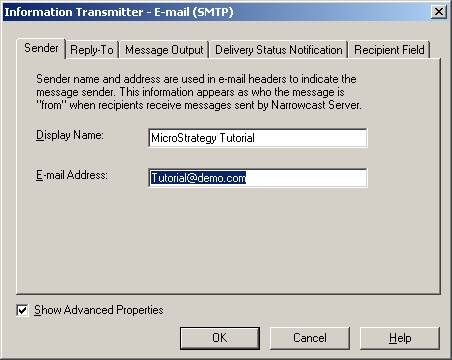
    The MAIL FROM address that Narrowcast will use to indicate the sender of the message can be obtained from the 'Sender' tab inside the Email (SMTP) Information Transmitter, as shown below:
     
ka04W00000148WfQAI_0EM440000002BkG.jpeg
  •  
    The syntax for the MAIL FROM command is:
     

    Sample Code/Error
    MAIL FROM: <email-address>

     
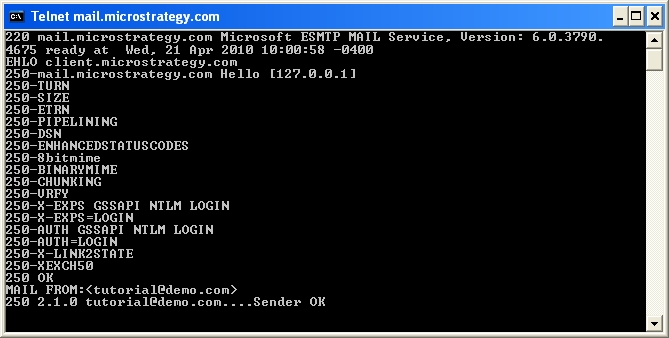
  • Using the email address shown in the display, the command that Strategy Narrowcast Server will use is:
     

    Sample Code/Error
    MAIL FROM: <Tutorial@demo.com>
     
ka04W00000148WfQAI_0EM440000002Bk9.png
  • Obtain the recipient's email address
    After the MAIL FROM command has been accepted, the sender SMTP will then send a RCPT TO command to identify the recipient(s) of the message. If the receiver SMTP does not accept the message for one or more recipients then it will reject that/those recipient(s), but not the entire message delivery process. If the recipient(s) is/are accepted then the receiver SMTP will respond with an OK.
     
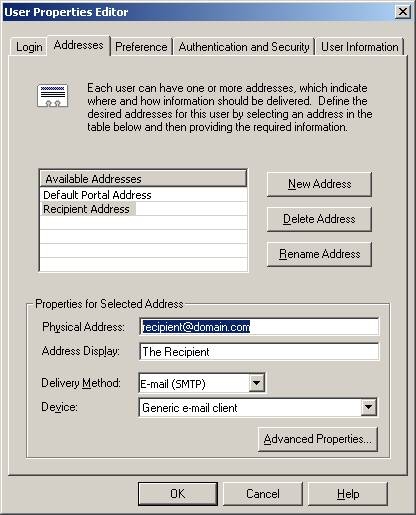
    Strategy Narrowcast Server obtains its recipient(s) from the email addresses that are collected in the Subscription Set. The email address can be obtained by opening the 'User Properties Editor,' as shown below:
     
ka04W00000148WfQAI_0EM440000002Bjq.jpeg
  •  
    The syntax for the RCPT TO command is:
     

    Sample Code/Error
    RCPT TO: <email-address>

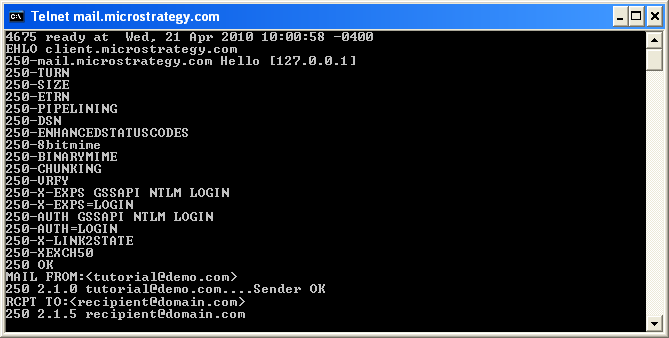
    Using the email address shown in the display, the command that Strategy Narrowcast Server will use is:
     

    Sample Code/Error
    RCPT TO: <recipient@domain.com>

     
ka04W00000148WfQAI_0EM440000002BkB.png
  • Obtain the message data
    After the recipient(s) has/have been accepted, the sender SMTP will then send a DATA command to notify the receiver SMTP that the data of the message is about to be sent. After the message data has been transmitted and the receiver SMTP has processed it, the message will be queued for delivery.
     
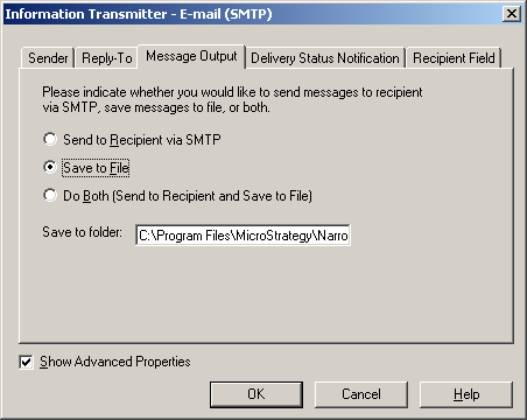
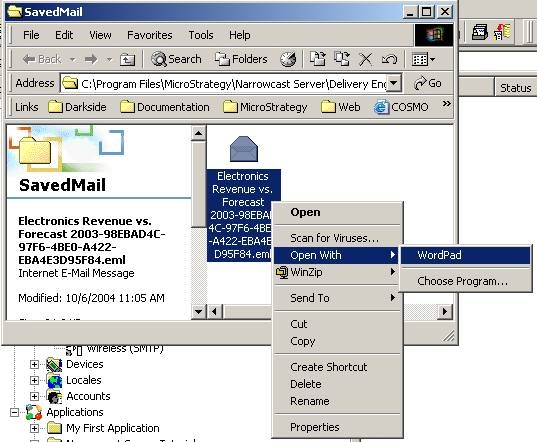
    The message data that Strategy Narrowcast Server sends to the receiver SMTP can be seen in the *.eml file that is generated whenever the E-mail (SMTP) Information Transmitter message output is set to 'Save to File,' as is illustrated in the following screen shots. The data of the *.eml file can be accessed using any text editor.
     
ka04W00000148WfQAI_0EM440000002BkI.jpeg
ka04W00000148WfQAI_0EM440000002HkM.jpeg
  •  
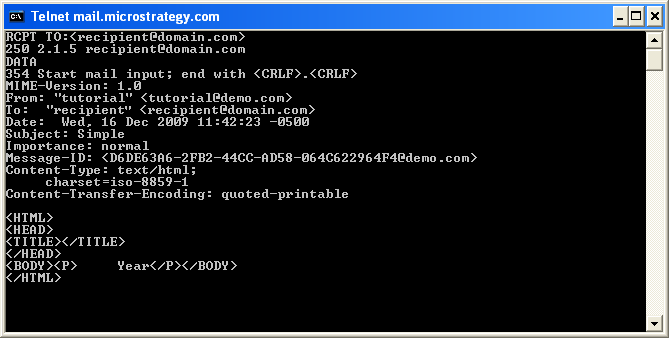
    An example through telnet is shown below:
     
ka04W00000148WfQAI_0EM440000002BkF.png
  •  
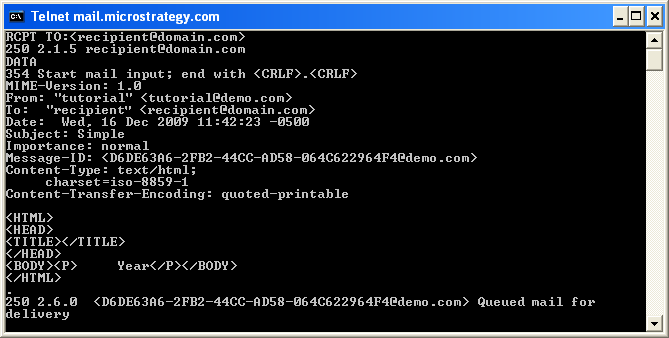
    Once the data has been entered, terminate the input with <Enter>.<Enter>. The message will be queued for delivery, as shown below:
     
ka04W00000148WfQAI_0EM440000002BkA.png
  •  
    Note: When passing the data to the receiver SMTP, it must be terminated with a <CRLF>.<CRLF>. To simulate this manually, press the Enter (or Return) key on the keyboard followed by a period/decimal " . " and then followed again by pressing the Enter (or Return) key on the keyboard.
     
  • Quit
    Once the data has been processed and the message queued for delivery, it is safe to submit a QUIT command to terminate the connection.

 
Part 2: SAMPLE
The sample of the communications of the sender SMTP and the receiver SMTP was generated using the information provided in the procedure of this document hence there is no guarantee that the code in the sample will work in other environments unless the proper modifications are made.
 
An example of communications to and from the mail server are seen in the sample below. The BLUE lines highlight the communications from the receiving SMTP (mail server) to the sending SMTP (Strategy Narrowcast Server). The RED lines highlight the communications from the sending SMTP to the receiving SMTP.
 
Note: Line numbers have been added for convenience.

  1. 220 smtp.domain.com Microsoft ESMTP MAIL Service, Version: 6.0.3790.80 ready at Wed, 10 Nov 2004 12:02:58 -0500
  2. EHLO client.Strategy.com
  3. 250- mail.Strategy.com Hello
  4. 250-TURN
  5. 250-SIZE
  6. 250-ETRN
  7. 250-PIPELINING
  8. 250-DSN
  9. 250-ENHANCEDSTATUSCODES
  10. 250-8bitmime
  11. 250-BINARYMIME
  12. 250-CHUNKING
  13. 250-VRFY
  14. 250-X-EXPS GSSAPI NTLM LOGIN
  15. 250-X-EXPS=LOGIN
  16. 250-AUTH GSSAPI NTLM LOGIN
  17. 250-AUTH=LOGIN
  18. 250-X-LINK2STATE
  19. 250-XEXCH50
  20. 250 OK
  21. MAIL FROM: <Tutorial@demo.com>
  22. 250 2.1.0 Tutorial@demo.com....Sender OK
  23. RCPT TO: <recipient@domain.com>
  24. 250 2.1.5 recipient@domain.com
  25. DATA
  26. 354 Start mail input; end with <CRLF>.<CRLF>
  27. MIME-Version: 1.0
  28. From: "Strategy Tutorial" <Tutorial@domain.com>
  29. Bcc:
  30. Date: Fri, 12 Nov 2004 12:46:52 -0500
  31. Subject: The subject goes here
  32. Importance: normal
  33. Message-ID: <64834B5C-42AC-433B-9A8F-5C5260DFC0EA@corp.Strategy.com>
  34. content-Type: text/html;
  35. charset=iso-8859-1
  36. content-Transfer-Encoding: quoted-printable
  37. The message body goes here.
  38. .
  39. 250 2.6.0 <61A9288E-AD4B-45C4-ABE8-129508C45FB6@domain.com> Queued mail for delivery
  40. QUIT
  41. 221 2.0.0 mailgate2.Strategy.com Service closing transmission channel

 
Part 3:
Additional information regarding SMTP logging, Smart Host, Direct Mode, SMTP troubleshooting, and common error messages during SMTP Transmission:
 

  • SMTP Logging
    • KB9762  - How to generate the Strategy SMTP Protocol log file for Strategy Narrowcast Server 9.x
  • Smart Host
    • KB5238 - How to specify an SMTP Smart Host Server as the delivery option for a device in Strategy Narrowcast Server
    • KB7264 - What is SMTP Smart Host in Strategy Narrowcast Server
  • Direct Mode
    • KB7263 - What is SMTP Direct Mode in Strategy Narrowcast Server
  • Troubleshooting
    • KB7355 - How to search for Mail Exchange records for SMTP message transmission in Strategy Narrowcast Server and Distribution Services
    • KB10391 - How to enable the "Send" button in EML files generated by Strategy Narrowcast Server
  • Common error messages during SMTP Transmission
    • KB8511 - 'The operating system(s) on machine(s): XXX are not properly configured to support e-mail transmission...' message occurs during the Strategy Narrowcast Server System Configuration Wizard.
    • KB5712 - 'Error transmitting to 255F1BA49FF040678F29516E0CFB36C9 - 85018: at host 125.XXX.X.XX' error message appears in the Delivery Engine log file when running a service in Strategy Narrowcast Server Delivery Engine and not using a Smart Host
    • KB9182 - "No valid recipient e-mail addresses" error message appears after subscribing to a report with multiple email addresses using the 'Send Now' or 'Scheduled Email' features in Strategy Web.
    • KB10497 - "Error transmitting to … invalid parameters … No valid recipient e-mail addresses" error message appears in the System Message Viewer when Strategy Narrowcast Server attempts to transmit to a distribution list.

Comment

0 comments

Details

Knowledge Article

Published:

April 3, 2017

Last Updated:

June 14, 2017