For enhanced security, starting from Strategy version 2021, all SQL executions containing text inputs from filters, search conditions, and text prompts will be secured through parameterized queries.
Note: Prior to the 2021 release, only text prompts used within Freeform SQL reports are parameterized.
Without parameterized query, a report SQL may look like this:
select a11.CUSTOMER_ID  CUSTOMER_ID,

max(a12.CUST_LAST_NAME)  CUST_LAST_NAME,

max(a12.CUST_FIRST_NAME)  CUST_FIRST_NAME,

sum(a11.TOT_COST)  WJXBFS1

from customer_sls a11

join lu_customer a12

  on (a11.CUSTOMER_ID = a12.CUSTOMER_ID)

where a12.CUST_LAST_NAME < 'Abas’

group by a11.CUSTOMER_ID
select a11.CUSTOMER_ID  CUSTOMER_ID,

max(a12.CUST_LAST_NAME)  CUST_LAST_NAME,

max(a12.CUST_FIRST_NAME)  CUST_FIRST_NAME,

sum(a11.TOT_COST)  WJXBFS1

from customer_sls a11

join lu_customer a12

  on (a11.CUSTOMER_ID = a12.CUSTOMER_ID)

where a12.CUST_LAST_NAME < ?

group by a11.CUSTOMER_ID

with parameters:

Abas
With the release of 2021, secure text input is enabled by default on all existing database connections, as well as newly created connections when the following requirements are met:
It is recommended to always enable secure text input. However, platform administrators can toggle this functionality if needed:
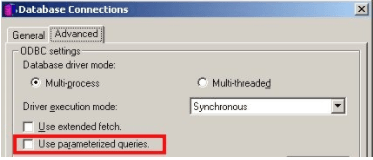
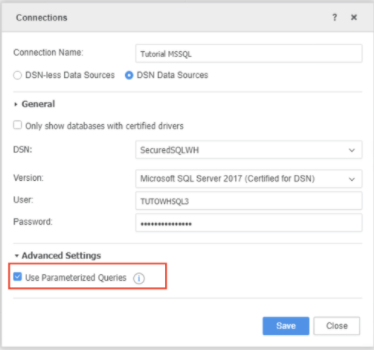
2021 platform release:
2021 Update 1 release (Users need to manually upgrade MD):
2021 Update 5 release:
Note: In the 2021 Update 4 release, users do not need to manually upgrade MD. When the iServer starts, these Gateways will be enabled by default.
By default, if a user views the SQL without executing the report, the SQL view will not show parameterized view. Only after the execution can Query Details accurately show the queries that have been sent to the warehouse, with parameterized mode. However, we understand that in some situations users want to view the query in parameterized mode before they sent the request to run in the warehouse. For this, we provide a VLDB setting at both the Report level and Database Instance level for users to control the mode of the SQL view before execution.
Once the metadata is upgraded to Strategy 2021, the setting is under Data > VLDB Properties... > Select/Insert > Parameterized SQL View.
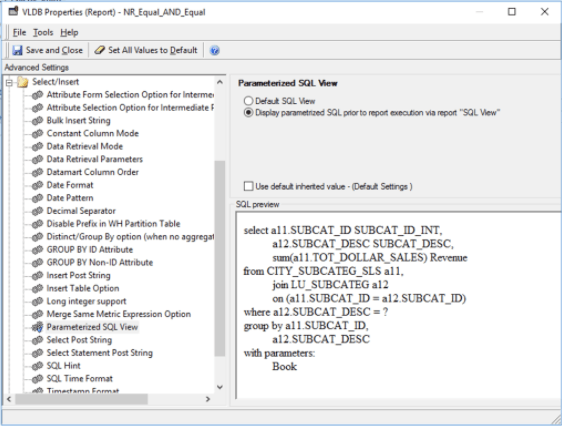
With this setting turned on, when viewing SQL without execution, users will be able to preview the SQL in parameterized mode.
There are multiple reasons that can potentially affect the parameterization. To help users understand the settings enabled in a specific engine, we implemented extra logging for parameterized query related VLDB settings. To enable the setting, please use Strategy Diagnostics and Performance Logging Tool to enable the File Log for Engine > SQL Trace.
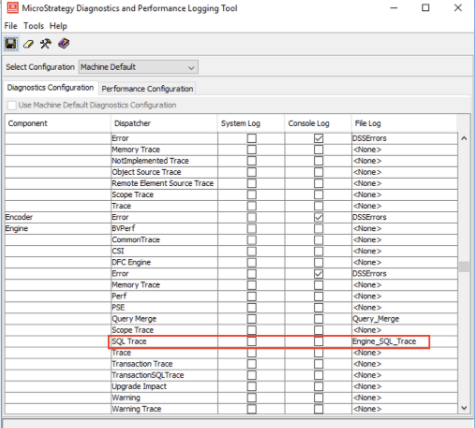
Once the log is enabled and a report is run when the parameterized query is turned on, a sample logging entry will look like:
2020-07-11 16:47:43.252-04:00 [HOST:IP-0AF41735][SERVER:T57_IP-0AF41735_200611153024719_8712_0001_yisofi][PID:7960][THR:7784][Engine][SQL Trace][UID:54F3D26011D2896560009A8E67019608][SID:36E0B0973F8FB5BBD76B1E60C2F0C622][OID:E8C28452417B57519AA859BBCEC88BE3] Parameterized Query for Text Input enabled for DBRole XYZWH, Report [C01-DB Qual-R02]
2020-08-05 16:56:55.976-04:00 [HOST:IP-0AF417E2][SERVER:T148_IP-0AF417E2_200804140111205_2824_0001_picofo][PID:9352][THR:12468][Engine][SQL Trace][UID:177BA03045F8E12426075297825740AD][SID:97B2F831AC0FB114F20190DB6F70EFAD][OID:B04ED38C493BBDF08F5729A54C054971] Report:[CAWR02 DM AFB SFB] Parameterized query is enabled for database connection XYZWH but NOT used. This is because the database used by XYZWH has not been certified with parameterized query by Strategy.
With all major gateways provide support for parametrized query, there are a few known limitations related to specific gateways/drivers when parametrized query is enabled. Please review the following articles if you are encountering similar issues:
