SYMPTOM:
When attempting to connect a Strategy Intelligence Server and a Strategy Web system, the following error message appears:
'The connection failed. Possible causes are a) Server is not running, b) Server is loading project, c) Network problem, or d) Server reached maximum connection limit'.
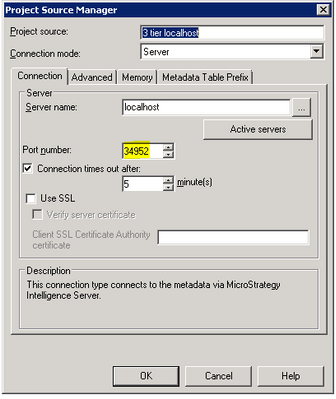
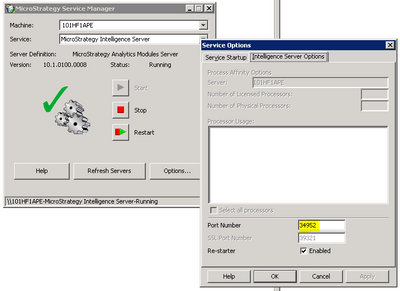
2. Open the Strategy Service Manager, click on the Options button and go to the Intelligence Server Options tab. Edit the Port Number if it doesn't match the one seen in step one:
LEARN MORE ABOUT:
Please review the following technical notes describing similar error messages in Strategy:
KB13082: ‘The connection failed. Possible causes are a) Server is not running, b) Server is loading project, c) Network problem, or d) Server reached maximum connection limit’ error is seen every 5 minutes in the Web Errors log in Strategy Web.
KB31972: "The connection failed. Possible causes are: a) Server is not running, b) Server is loading project, c) Network problem, or d) Server reached maximum connection limit" error appears when trying to connect to a Project Source in Strategy Desktop.
KB34268: 'The connection failed. Possible causes are a) Server is not running, b) Server is loading project, c) Network problem, or d) Server reached maximum connection limit' error occurs when connecting Strategy Web and Intelligence Server on Windows
KB37133: An error appears when connecting from Mobile Server administrator after configuration: "The connection failed. Possible causes are a) Server is not running, b) Server is loading project, c) Network problem or d) Server reached maximum connection limit"
KB38080: "The connection failed. Possible causes are a) Server is not running, b) Server is loading projects, c) Network problem, d)Server reached maximum connection limit." error occurs with Strategy Web
KB42562: "The connection failed. Possible causes are a)Server is not running, b)Server is loading project, c) Network problem, or ..." error message appears when editing attachments in the Narrowcast Server Service Wizard in Strategy
KB45604: Logging in to select a root folder times out when connecting to a Strategy Intelligence Server cluster in Strategy Mobile
KB47443: "Server Definition manipulations error: The connection failed." error appears when using a response file to create metadata tables and configure the Intelligence Server in a single execution of the Configuration Wizard in Strategy
KB47505: "The connection failed..." error message is encountered when connecting from Desktop/Developer to an Intelligence Server running on UNIX/Linux when the IPTables firewall is enabled on the Intelligence Server machine in Strategy
KB47939: Users with a Number and Date Format custom language see an error 'The connection failed. Possible causes are a) Server is not running, b) Server is loading project, c) Network problem, or d) Server reached maximum' when logging into Strategy Web
